
Navigation
Install the app
How to install the app on iOS
Follow along with the video below to see how to install our site as a web app on your home screen.
Note: This feature may not be available in some browsers.
More options
You are using an out of date browser. It may not display this or other websites correctly.
You should upgrade or use an alternative browser.
You should upgrade or use an alternative browser.
FS7: SHOOTING CONCERT - SONY FS7 best settings
- Thread starter benc1982
- Start date

Club venue? / Arena? / Stadium? / Daytime Festival? / Major Performer? / Big lighting as part of show? / Single camera or multicam? / If you're in a tiny club can you add light? (When shooting shows in small/medium venues I often bring a few Diva 200's to space across the front of the stage as footlights - with duvetyne to make them look 'clean' - they end up looking like floor monitor speakers). This helps with the top-lighting curse in places with only down lights, and adds a little light in the faces when the performers look down. Even dimmed down, they can work surprisingly well.
If you can do a proper color correct then Log is not a bad idea -- main thing is that you don't want to burn out the faces in the hot spots from spotlights!
If you can do a proper color correct then Log is not a bad idea -- main thing is that you don't want to burn out the faces in the hot spots from spotlights!
If you're in a small club there is a very good chance the lighting won't be very bright. That can often make Slog a poor choice in which case you should go to a hyper gamma and probably HG7. However the smart money is on going to the club ahead of time and check it out . Shoot a test.
Fast lenses are also your friend. I would typically go with a speed booster and a 2.8 lens - making it 2.0.
Fast lenses are also your friend. I would typically go with a speed booster and a 2.8 lens - making it 2.0.
+1 on getting in there to check it out in advance!!!
If there's a lighting person at the club make sure to go when they're actually there.
Bring the camera (with a fast lens on it)
If they have a dimmer board and some LED lights up in the ceiling you should definitely check things out for possible flickering! (Particularly prevalent with many of the new/cheap LED lamps). If they have a bunch of LEDs you may find that they flicker at different frequencies when dimmed -- meaning that you may need to unplug some of them -- and of course bring a couple of lights to replace them. (and see if you can add a couple of footlights!) Of course LED flicker might also eliminate your ability to use a stills camera for an additional angle.
And never trust what you're told about a club lighting setup without checking it out yourself! (I've walked into places where 'stage lighting' meant two 60w bulbs on a track light above ceiling fans - so when the club gets hot and they turn on the fans its all flickering shadows // and plenty of other places where the light setup is a bunch of spots hitting the wall behind the musicians and nothing on their faces.)
If there's a lighting person at the club make sure to go when they're actually there.
Bring the camera (with a fast lens on it)
If they have a dimmer board and some LED lights up in the ceiling you should definitely check things out for possible flickering! (Particularly prevalent with many of the new/cheap LED lamps). If they have a bunch of LEDs you may find that they flicker at different frequencies when dimmed -- meaning that you may need to unplug some of them -- and of course bring a couple of lights to replace them. (and see if you can add a couple of footlights!) Of course LED flicker might also eliminate your ability to use a stills camera for an additional angle.
And never trust what you're told about a club lighting setup without checking it out yourself! (I've walked into places where 'stage lighting' meant two 60w bulbs on a track light above ceiling fans - so when the club gets hot and they turn on the fans its all flickering shadows // and plenty of other places where the light setup is a bunch of spots hitting the wall behind the musicians and nothing on their faces.)
If it is low light, it seems S-Log is always a bit of a challenge. I would humbly suggest:
1) Fastest lens possible, perhaps to f1.4 if you have it and open wide.
2) With S-Log, if you can get 1-2 stops over through available lights and wide open, then go for it. But I'd keep the native ISO at 2,000. No Applied CINE EI.
3) Work with the available lighting as much as possible. In other words, plan to shoot near and around any available light sources.
4) I'd consider having NR on high.
5) And last, don't be afraid to run Neat Video in post or NR in Da Vinci Resolve if final result has noise.
I've actually moved away from S-Log 3 and now shoot almost exclusively with S-Log 2.
If you are really concerned about noise, then the HG 7 or HG 3 are viable alternatives, which puts you in Custom mode and you can still end up with some noise in the shadows even with those. And of course, as mentioned, if you can get some test footage first, then that would be ideal to see what you might be up against. I was shooting some low light footage just the other night, and we ended up using blue lights to play for night and get the levels up to an acceptable range and that was with Hypergammas.
1) Fastest lens possible, perhaps to f1.4 if you have it and open wide.
2) With S-Log, if you can get 1-2 stops over through available lights and wide open, then go for it. But I'd keep the native ISO at 2,000. No Applied CINE EI.
3) Work with the available lighting as much as possible. In other words, plan to shoot near and around any available light sources.
4) I'd consider having NR on high.
5) And last, don't be afraid to run Neat Video in post or NR in Da Vinci Resolve if final result has noise.
I've actually moved away from S-Log 3 and now shoot almost exclusively with S-Log 2.
If you are really concerned about noise, then the HG 7 or HG 3 are viable alternatives, which puts you in Custom mode and you can still end up with some noise in the shadows even with those. And of course, as mentioned, if you can get some test footage first, then that would be ideal to see what you might be up against. I was shooting some low light footage just the other night, and we ended up using blue lights to play for night and get the levels up to an acceptable range and that was with Hypergammas.

cyvideo
Veteran
Just to give you an idea of what the FS7's Custom mode can deliver. I have a spate of concerts just prior to Christmas every year and I just shoot them in the FS7's Custom mode with my own Custom matrix scene file that has been carefully set up and adjusted using the DSC Chroma Du Monde charts. The DSC settings along with a well set up manual knee, slope and knee aperture settings etc deliver a pretty reasonable result overall. The settings we use have been developed specifically for stage entertainment type live shows. Haven't had any nasty issues other than when some inexperienced tech lunatic has done something really crazy with the lighting. I always make sure the lighting techs have a live feed to a monitor that WE supply so that they can see the results of their actions. Most lighting techs want their work to look good and the monitor reference helps them deliver that.
I think you will find the highlight handling, dark detail and noise levels pretty acceptable in the following clip. Custom scene files set up correctly on the FS7 can deliver up to 12 stops of dynamic range and the FS7 Custom mode is totally capable of handling anything that is reasonably lit. Three FS7's running the same matching scene file matrix makes for a quick turn around for DVD and BD production and quick is what we need with the concerts as we are usually into DVD/BD duplication within 48-72 hours of the completed multicam switch, edit, graphics and DVD/BD encoding. We don't have the time to use LOG grading and NR like Neat Video which really has to be set up scene by scene to get the optimum out of it. WYSIWYG with minimal post adjustments is the order of the day for us for a fast turn around. The following clip is from a mid shot camera and was shot in HD 50i S16 mode with an MTF B4 to E-Mount adapter using an 18 x Fujinon F1.6 B4 broadcast lens. Shot in 50i as that is what we use for the DVD/BD production.
Chris Young
https://www.youtube.com/watch?v=hj3wOzL1Y-Q
I think you will find the highlight handling, dark detail and noise levels pretty acceptable in the following clip. Custom scene files set up correctly on the FS7 can deliver up to 12 stops of dynamic range and the FS7 Custom mode is totally capable of handling anything that is reasonably lit. Three FS7's running the same matching scene file matrix makes for a quick turn around for DVD and BD production and quick is what we need with the concerts as we are usually into DVD/BD duplication within 48-72 hours of the completed multicam switch, edit, graphics and DVD/BD encoding. We don't have the time to use LOG grading and NR like Neat Video which really has to be set up scene by scene to get the optimum out of it. WYSIWYG with minimal post adjustments is the order of the day for us for a fast turn around. The following clip is from a mid shot camera and was shot in HD 50i S16 mode with an MTF B4 to E-Mount adapter using an 18 x Fujinon F1.6 B4 broadcast lens. Shot in 50i as that is what we use for the DVD/BD production.
Chris Young
https://www.youtube.com/watch?v=hj3wOzL1Y-Q
Last edited:
Just to give you an idea of what the FS7's Custom mode can deliver. I have a spate of concerts just prior to Christmas every year ... Most lighting techs want their work to look good and the monitor reference helps them deliver that.
I think you will find the highlight handling, dark detail and noise levels pretty acceptable in the following clip. Custom scene files set up correctly on the FS7 can deliver up to 12 stops of dynamic range and the FS7 Custom mode is totally capable of handling anything that is reasonably lit. Three FS7's running the same matching scene file matrix makes for a quick turn around for DVD and BD production and quick is what we need with the concerts as we are usually into DVD/BD duplication within 48-72 hours of the completed multicam switch, edit, graphics and DVD/BD encoding. We don't have the time to use LOG grading and NR like Neat Video which really has to be set up scene by scene to get the optimum out of it. WYSIWYG with minimal post adjustments is the order of the day for us for a fast turn around. The following clip is from a mid shot camera and was shot in HD 50i S16 mode with an MTF B4 to E-Mount adapter using an 18 x Fujinon F1.6 B4 broadcast lens. Shot in 50i as that is what we use for the DVD/BD production.
Chris Young
https://www.youtube.com/watch?v=hj3wOzL1Y-Q
Had a good laugh when I watched the clip -- because my interpretation of the word 'concert' from the OP was so different. Many of my 'concert' shoots over the years have been in small, usually extremely dark music club venues across the American South -- where often I'll walk in to find the 'stage lighting' to be a ceiling track light with two of its three flood lights burned out and the main source of light coming from a neon beer sign behind the performers. In many cases all I can do is replace the burned out bulbs and add a foot light or two, which work well as long as the ceiling is painted black. You'd doubtless laugh yourself if you walked into some of these bars - but for audience/atmosphere shots I always bring along an A7s with some f/1.4 glass, and often need to crank its ISO above 10,000. Though I'd call your shoot either a 'dance performance' or a 'recital' , I don't doubt that it can also be called a concert. Meanwhile -- I think your approach works great - though obviously you do have some light to work with (and enough to make up for the light loss from the B4 adapter).
Also -- Your points about working within the turnaround time requirements, and the advantages of creating a proper Custom scene file are really excellent. There's a lot of talk on the forums implying that LOG is the only way to shoot -- but for many situations/workflows (and clients) WYSIWYG makes the most sense -- and as your footage demonstrates, spending the time to create settings optimized for what you'll be shooting is more than worth the effort!
Haha while I do agree that Chris's clips is far from my experience in a small club I do agree virtually everything he suggested. If someone is running the lights ( unlikely) then its always a great idea to have a monitor for them to look at and best if you can have someone talking to them while the shoot is going on. I've done that myself sometimes and handed off the shooting to Operators.
The stage lighting guys should be happy to have your input though they'll also have their own issues to deal with. The worst situation unfortunately is if they are lighting with LED's because they can be extremely saturated - way beyond what a camera can handle.
Re exposure. I always use DB settings instead of ISO because the ISO changes with the gamma. DB is a more reliable reference for noise levels. . That said I feel confident going as high as 12DB with the FS7 in Custom. 18DB is a huge jump in noise though and looks like golf balls thought Neat Video can work wonders.
Lenny
The stage lighting guys should be happy to have your input though they'll also have their own issues to deal with. The worst situation unfortunately is if they are lighting with LED's because they can be extremely saturated - way beyond what a camera can handle.
Re exposure. I always use DB settings instead of ISO because the ISO changes with the gamma. DB is a more reliable reference for noise levels. . That said I feel confident going as high as 12DB with the FS7 in Custom. 18DB is a huge jump in noise though and looks like golf balls thought Neat Video can work wonders.
Lenny
cyvideo
Veteran
I think your approach works great - though obviously you do have some light to work with (and enough to make up for the light loss from the B4 adapter).
Understood. Most of these sorts of shoots down here, Oz, are called concerts so I understand the misinterpretation due to the terminology used. Regards the light loss on the Super 16 MTF adapter it's ony 0.7 of a stop which when used with an F1.6 lens is not too severe. The lens works out at about F2.4. With the FS7 in Custom mode I'm quite happy to go to 2000 ISO but generally most of our entertainment shoots run out at 800 - 1600 ISO.
Chris Young

morgan_moore
Major Contributor
Id say Slog2. Main reason is unlike building a custom profile is that you just shoot rather than indulge in dvxuser threads and also having to spend your life building a profile (that may or may not fit the final location)
Some selected rushes from a festival, not an edit and not to be shared further.. https://vimeo.com/222334139/6c16957422
NIkkors in the 1.8 to 2.8 region with a speed booster (and a mamiya 80 'whacked')
Actually watching- its a lot of mamiya 80 2.8 whacked (hand held in front of the sensor)
Log doesnt suffer too much from horrific LED channel clipping.
Some selected rushes from a festival, not an edit and not to be shared further.. https://vimeo.com/222334139/6c16957422
NIkkors in the 1.8 to 2.8 region with a speed booster (and a mamiya 80 'whacked')
Actually watching- its a lot of mamiya 80 2.8 whacked (hand held in front of the sensor)
Log doesnt suffer too much from horrific LED channel clipping.
Last edited:
cyvideo
Veteran
The worst situation unfortunately is if they are lighting with LED's because they can be extremely saturated - way beyond what a camera can handle.
This is why I took the time to roll my own Custom matrix for entertainment lighting to suppress the over saturation that tends to clip especially the blue channel. A lot of Red LEDs also overdrive the red channel though don't tend to clip anywhere near as badly as the blues. Get those nasty LED colors tamed in the matrix and multi-matrix and half your battle is won. Combine your matrix with a custom setup manual knee, slope and clip settings and have the knee saturation turned on and importantly have the knee saturation level setting adjusted correctly and you can minimize a lot of the over saturated angst that crops up too often in post. With regards to the auto knee in the FS7 it pumps too wildly. You just have to view a WFM while shooting rapidly changing stage lighting to see that it really struggles to keep up with those rapid changes. This contributes greatly to the channel clipping because the auto knee doesn't respond quick enough. In Sony talk this auto knee was originally called the DCC (Dynamic Contrast Control) circuit. Old Betacam shooters will remember this. Like in studio setups you would never run any kind of knee as you would adjust the studio grid so that you never ran a camera's exposure to the limit where signal compression was started. We also used to tweak different gamma settings across the studio cameras as obviously some cameras are shooting down the line of the lighting and some are shooting obliquely across the light field which affected their perceived contrast. Of course in many situations we don't have that luxury of precise camera setup for a specific situation so basically we have to come up with the best all round set up and ditching the auto knee in the case of the FS7 is a good starting point to control extreme highlight clipping issues.
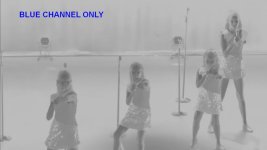
The following stills, full color and blue channel only, are from a typical high sat blue/pink/purple type lighting set up where the blue/pink/purple has been tamed. The matrix is also set up to give more separation between the blue/pink and purple parts of the spectrum. Also as you can see the LEDs pointing directly at the lens have been kept pretty well kept in check with regards to exposure levels, just on 100 IRE, and the highlight roll-off on them is fairly smooth. Look at the blue channel image only and you can see the LEDs facing the camera have a very high blue content. If the blues aren't controlled decently, which is that combo of the matrix and knee and knee sat settings you will end up getting that real hard edged blue clipping that looks really nasty. If you run into those nasty cheap LEDs that square wave and flicker like mad... Well I haven't found anything to fix that easily. That's the worst issue I run into.
Chris Young

Last edited:
CY, Are you willing to share or sell your set-up? It sounds like something you put a lot of work into so I would understand your reluctance but its also a process that would be daunting for all but a very few users. I have my own own matrix setup for ordinary shooting and that took an enormous amount of time in the matrix to create. I shudder at the idea of going back there and frankly wouldn't have a clue as to how to make all the adjustments you have.
Lenny
Lenny
cyvideo
Veteran
Lenny. I will share them. Nobody ever charged me for their experience as I was learning, actually have never stopped learning so I will dig them up and post them. I won't post a scene file as they are different in format between the FS7 and FS7 II. An FS7 scene file won't load into the Mk II. The settings work exactly the same for both models it's just that you will have to enter all the values manually and then save the new settings as a new scene file with a name of your choosing. Some people will like the settings some won't. All care but no responsibility for the results as the old airline quote goes  I now tend to use this scene file for most FS7 shoots regardless of type of shoot as it seems to handle most images indoors and outdoors quite respectably. Especially with regards to hot hard contrast sunny conditions, beaches, snow etc and that's largely down to the knee settings.
What tipped me to the knee issues in the FS7? One of my first commercial shoots on the FS7 required that I a pan across a large white sunlit building to a company logo on section of wall that was brown feature brick. As I moved onto the brick and logo section I could see the exposure characteristics alter in the VF. My assistant also noticed it on the monitor. I was shooting 100% manual? I tried again, same result. I switched to manual knee, exposed for the white building panned and no change in the exposure characteristics. After further investigation I could see it was the auto knee trying to compensate and it was changing the knee values to such a degree that it affected the image. Playing back the images on a WFM you could see a massive shift in knee position and slope. That got me looking at the ability of the FS7's auto knee to smoothly control major illumination changes. I discovered with a lot of stobe lights for example it was hopelessly lost trying to ride the changes. After much testing in various scenarios the settings I ended up with for the manual knee seemed to have greatly tamed this issue. Test them out for yourself when I upload the settings. BTW a few shooters are saying they work well in their F5's which is good to know.
Chris Young
I now tend to use this scene file for most FS7 shoots regardless of type of shoot as it seems to handle most images indoors and outdoors quite respectably. Especially with regards to hot hard contrast sunny conditions, beaches, snow etc and that's largely down to the knee settings. What tipped me to the knee issues in the FS7? One of my first commercial shoots on the FS7 required that I a pan across a large white sunlit building to a company logo on section of wall that was brown feature brick. As I moved onto the brick and logo section I could see the exposure characteristics alter in the VF. My assistant also noticed it on the monitor. I was shooting 100% manual? I tried again, same result. I switched to manual knee, exposed for the white building panned and no change in the exposure characteristics. After further investigation I could see it was the auto knee trying to compensate and it was changing the knee values to such a degree that it affected the image. Playing back the images on a WFM you could see a massive shift in knee position and slope. That got me looking at the ability of the FS7's auto knee to smoothly control major illumination changes. I discovered with a lot of stobe lights for example it was hopelessly lost trying to ride the changes. After much testing in various scenarios the settings I ended up with for the manual knee seemed to have greatly tamed this issue. Test them out for yourself when I upload the settings. BTW a few shooters are saying they work well in their F5's which is good to know.
Chris Young
Last edited:
Thanks Cy, I'm an old school shooter and have no problem shooting Custom with the FS7 and usually get very nice results including skin tones.light OI think its usually the way to. I look forward to seeing what you came up with and I will post mine as well. I also basically have 1 setting for everything though I will alter gamma, black level, black stretch, matrix level (saturation) and even phase to the individual situation. I learned many many many years ago that Manual knee is the only way to to go and also that one has to be careful about being too radical in your knee settings because if it drops too low ( I think even below 90) the compression can begin to affect the hotter parts of flesh tones. I usually leave mine at 92 . I have never tried to come up with settings that deal with saturated LED's though so I'm eager to see yours.
The same settings should work on an F5, FS7I, FS7II and something close should work on the EX1 & EX3 also. For reasons I don't understand I only need to shift the phase between the EX1/3 and FS7 for a match. F3 should be the same as EX1/3.
The same settings should work on an F5, FS7I, FS7II and something close should work on the EX1 & EX3 also. For reasons I don't understand I only need to shift the phase between the EX1/3 and FS7 for a match. F3 should be the same as EX1/3.
cyvideo
Veteran
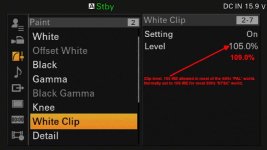
Agree with most of what you say there. Old school shooter here. I find with the FS7 I can start the knee at 85 in most cases as I tend to use 60 IRE for skin Zebra start point with a gate of 3. In most cases my skin tones rarely go above 70 on Caucasians and a little more on darker skinned subjects so 85 IRE is well above my brightest skin tones areas and I've never suffered skin tone compression issues on the FS7. Obviously if over exposed then yes you would see skin tone compression. I find the most important thing is to control the knee and the color saturation going into the knee compression. RGB channels don't compress in a linear fashion vis a vis one another. With the manual knee settings in the knee menu working in conjunction with the knee aperture settings and the knee aperture level settings in the detail menu is where I find I have most control of over saturated colors in extreme highlights. Because of the different compression characteristics in each of the RGB channels it's a bit of a juggling act so it's always a compromise of sorts. It's a matter of trying to get the best compromise With all the above set for optimum performance and combined with a more gentle knee I find I have the most control on LED nasties, or other extreme colored highlights. Like those super bright yellow high viz safety vests under strong sunlight. The peak sun on the shoulders of those sorts of vests and other extreme floro colors can really push the upper limits of color compression in the knee circuit. You will see I do have a phase offset in the FS7 matrix. Again this can be adjusted for skin tone taste. Below are the settings. Everything else at default if not in the images. You may or may not get any joy with these settings. Suck it and see is the old expression.
Chris Young
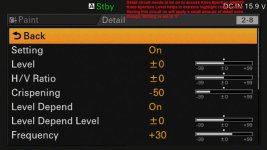
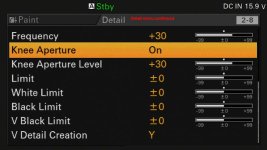
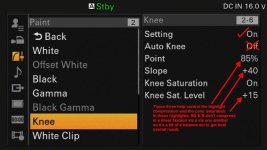
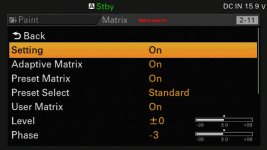
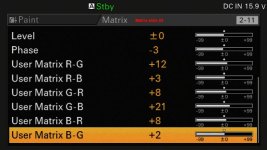
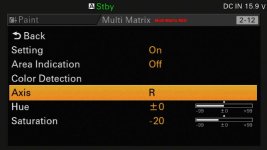
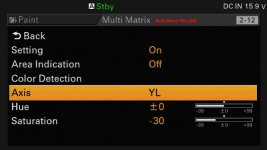
With all the above set for optimum performance and combined with a more gentle knee I find I have the most control on LED nasties, or other extreme colored highlights. Like those super bright yellow high viz safety vests under strong sunlight. The peak sun on the shoulders of those sorts of vests and other extreme floro colors can really push the upper limits of color compression in the knee circuit. You will see I do have a phase offset in the FS7 matrix. Again this can be adjusted for skin tone taste. Below are the settings. Everything else at default if not in the images. You may or may not get any joy with these settings. Suck it and see is the old expression. Chris Young
Thanks Cy, You are much more advanced in your understanding of knee and detail than I am. I'm curious about a few of those but lets start with the detail settings - why the crisping, frequency and aperture levels. Most people I know including me leave their detail circuit off on the FS7, but sometimes in mixed camera situations I have noticed its a bit softer than other cameras including A7s with their detail levels down. I usually attribute that to over sharpening in the others but I've never really been sure about it. Occasionally I sharpen in post.
cyvideo
Veteran
LL. Without going to massive lengths to explain each facet of the settings just let me say I know what they all do. Exactly how they do the things they do and how one setting can influence another is part of the black art of electronic design that is beyond me and many others. In another life I worked as a TD on numerous, like forty to fifty OB's a year for many years. I was also a SMPTE tech member for many years. I also used to teach network newbies how all this black magic worked. One thing I learned over the years was that one setting on one model camera could produce quite a different result when applied to another model. All I know is the by taking the time required to keep on trying different settings and by keeping an accurate record of measurements of what you had and had not tried along with a modicum of intelligence and plenty of patience you will get to a point of a 'tuned result.' Whether it's the result you desired is a different matter! The above is the process that I've used on many cameras over the years to squeeze the best I can out of them. Sony, Ikegami, Panasonic, GV all have their individual Idiosyncrasies when it comes to camera setup so they all need to be understood from a physical settings point of view to get the best out of them.
With all of them and like in most of life, a bit Yen now, once you understand the problem the problem ceases to exist. Understand the workings of most modern camera's circuits greatly assists in solving certain issues. The settings I use on the FS7 are arrived at from past user experience as a cameraman combined with the accrued knowledge gained as a TD. Rather than just trying to explain each individual setting and trying to explain why it is so all I can say is that the settings I use are the optimum I can squeeze out of the FS7 camera. You ask "...but lets start with the detail settings - why the crisping, frequency and aperture levels. Most people I know including me leave their detail circuit off on the FS7, but sometimes in mixed camera situations I have noticed its a bit softer than other cameras including A7s with their detail levels down." You mention softness. That's part of the reason for some of the settings that are needed when the FS7 is mixed with let's say a couple of PDW 800s. None of these settings are set in stone. Personal preference on how you want the images to appear fall into the realm of subjective observation. That is your call. Back to the more objective, to access some of the settings Crispening for one means that the detail circuit has to be on. Why do I need Chrispening? Rather than go into a long explanation of why I will guide you to some Sony "Creative Shooting Techniques" PDFs. Pretty old now, some fifteen years old but they were very useful in their day to introduce newbies to the understanding of how a lot of the camera circuits worked. Worth downloading even in this day and age. When you read these remember that the results can vary greatly from model to model and can also vary in output results depending on how certain codecs handled the compression of the signals that have been affected by certain camera settings. By reading through these PDFs you can get a pretty good grasp of what different circuits do and why and how they affect the image. I used to use these PDFs with new trainees and it seemed to help most of the come to grips with the why and wherefore of settings pretty quickly. The titles are:
Sony 00 Creative Shooting Techniques Concept
Sony 01 Tips for Reproducing Sheen and Textures of Objects Realistically
Sony 02 Tips for Reproducing Vivid Colors Under a Bright Environment
Sony 03 Tips for Improving Picture Sharpness without Coarsening the Image
Sony 04 Tips for Enriching Color Saturation in Dark Areas of an Image
Sony 05 Tips for Avoiding “Overexposure” of an Image’s Highlights
Sony 06 Tips for Reproducing Solid Picture Edges of an Image’s Highlights
Sony 07 Tips for Shooting Without Coarsening Dark Areas of an Image
Sony 08Tips for Creating Film-like Images With Rich Colors
Sony 09 Tips for Shooting Pictures with Rich and Deep Black reproduction (Y BLACK GAMMA Function)
Sony 10 Enhancing Colors in Low-Light Areas (Low Key Saturation function)
I think you will find PDFs #2 through #7 are the ones most pertinent to what we are discussing here.
They can be downloaded from here:
https://www.sony-asia.com/microsite/professional/xdcam/resources_shootingtips.html
Below them is a bunch of PDFs on the EX series. A bit long in the tooth now but may be of interest to you. Once read you will find that on some cameras (+) settings may give you a better result than (-) settings and sometimes a setting might seem counter-intuitive but observe your results and let your judgement be the final arbiter. If the results look better then they generally are. That's an empirical fact by observation. Obviously it's nice to have access to a WFM and V-Scope so that you can confirm that what you are seeing is within legal broadcast levels. That's if you are aiming for your images to be displayed on a TV screen via OTA transmission or displayed on a DVD or BD. All of these mediums expect a signal that complies with BT709 or later and that complies with the 1v P-P rule expectation. Outside of these limits your signal will be 'legalized.' Over 100 IRE will be clipped as will any signal levels below blanking, e.g. black level, 0 IRE. That results in clipped whites and crushed blacks. (Thought? Maybe the 60Hz world peak is higher than 100 IRE. I seem to recall 109 for NTSC but what the current HD levels are I'm not sure. You would need to confirm the levels.) PC levels? 16-235 8-bit or 64-940 10-bit unless going full swing 0-255 and 0-1023 (Codes 0-3 and 1,020-1,023 are used for the timing reference. Codes 4 through 63 provide video data below the black level while codes 941 through 1,019 provide video data above the nominal peak.) Drifting off the topic here so I'll stop
Chris Young
With all of them and like in most of life, a bit Yen now, once you understand the problem the problem ceases to exist. Understand the workings of most modern camera's circuits greatly assists in solving certain issues. The settings I use on the FS7 are arrived at from past user experience as a cameraman combined with the accrued knowledge gained as a TD. Rather than just trying to explain each individual setting and trying to explain why it is so all I can say is that the settings I use are the optimum I can squeeze out of the FS7 camera. You ask "...but lets start with the detail settings - why the crisping, frequency and aperture levels. Most people I know including me leave their detail circuit off on the FS7, but sometimes in mixed camera situations I have noticed its a bit softer than other cameras including A7s with their detail levels down." You mention softness. That's part of the reason for some of the settings that are needed when the FS7 is mixed with let's say a couple of PDW 800s. None of these settings are set in stone. Personal preference on how you want the images to appear fall into the realm of subjective observation. That is your call. Back to the more objective, to access some of the settings Crispening for one means that the detail circuit has to be on. Why do I need Chrispening? Rather than go into a long explanation of why I will guide you to some Sony "Creative Shooting Techniques" PDFs. Pretty old now, some fifteen years old but they were very useful in their day to introduce newbies to the understanding of how a lot of the camera circuits worked. Worth downloading even in this day and age. When you read these remember that the results can vary greatly from model to model and can also vary in output results depending on how certain codecs handled the compression of the signals that have been affected by certain camera settings. By reading through these PDFs you can get a pretty good grasp of what different circuits do and why and how they affect the image. I used to use these PDFs with new trainees and it seemed to help most of the come to grips with the why and wherefore of settings pretty quickly. The titles are:
Sony 00 Creative Shooting Techniques Concept
Sony 01 Tips for Reproducing Sheen and Textures of Objects Realistically
Sony 02 Tips for Reproducing Vivid Colors Under a Bright Environment
Sony 03 Tips for Improving Picture Sharpness without Coarsening the Image
Sony 04 Tips for Enriching Color Saturation in Dark Areas of an Image
Sony 05 Tips for Avoiding “Overexposure” of an Image’s Highlights
Sony 06 Tips for Reproducing Solid Picture Edges of an Image’s Highlights
Sony 07 Tips for Shooting Without Coarsening Dark Areas of an Image
Sony 08Tips for Creating Film-like Images With Rich Colors
Sony 09 Tips for Shooting Pictures with Rich and Deep Black reproduction (Y BLACK GAMMA Function)
Sony 10 Enhancing Colors in Low-Light Areas (Low Key Saturation function)
I think you will find PDFs #2 through #7 are the ones most pertinent to what we are discussing here.
They can be downloaded from here:
https://www.sony-asia.com/microsite/professional/xdcam/resources_shootingtips.html
Below them is a bunch of PDFs on the EX series. A bit long in the tooth now but may be of interest to you. Once read you will find that on some cameras (+) settings may give you a better result than (-) settings and sometimes a setting might seem counter-intuitive but observe your results and let your judgement be the final arbiter. If the results look better then they generally are. That's an empirical fact by observation. Obviously it's nice to have access to a WFM and V-Scope so that you can confirm that what you are seeing is within legal broadcast levels. That's if you are aiming for your images to be displayed on a TV screen via OTA transmission or displayed on a DVD or BD. All of these mediums expect a signal that complies with BT709 or later and that complies with the 1v P-P rule expectation. Outside of these limits your signal will be 'legalized.' Over 100 IRE will be clipped as will any signal levels below blanking, e.g. black level, 0 IRE. That results in clipped whites and crushed blacks. (Thought? Maybe the 60Hz world peak is higher than 100 IRE. I seem to recall 109 for NTSC but what the current HD levels are I'm not sure. You would need to confirm the levels.) PC levels? 16-235 8-bit or 64-940 10-bit unless going full swing 0-255 and 0-1023 (Codes 0-3 and 1,020-1,023 are used for the timing reference. Codes 4 through 63 provide video data below the black level while codes 941 through 1,019 provide video data above the nominal peak.) Drifting off the topic here so I'll stop
Chris Young