C300: Shooting C-Log with LUT assist?

Omar N

Active member
With Sony cameras, you can shoot in S-Log 3 and apply an LC709-TypeA LUT on the viewfinder so that when shooting, you do not actually see the S-Log 3 image, but instead you see the image with a LC709-TypeA LUT applied. This is especially fantastic because I simply apply the same LUT to the image in the NLE, and since the LC709-TypeA LUT is exactly the look I am going for, it makes the whole process very smooth and consistent from acquisition to editing.

The research I am doing into the Canon C300 and C-Log leads me to believe that there is no similar workflow. I understand there is a view assist feature that shows a very contrasty image, but this will never be the desired final look. So when you pull the C300 media into the NLE, you either have to stare at C-Log footage in front of the client while you edit, or you have to go through and apply various LUTS to different clips, and just hope that they end up looking good.

I really miss how with Sony cameras, you can work with one LUT the entire time while shooting and editing. My question is, is there a way to achieve a similar workflow with Canon C-Log? Namely, can I upload a LUT file on camera that I like and use that LUT to view the image while shooting, and then apply the same LUT to the media in the NLE? This way, when applying the LUT in the NLE, I will already know it will look good since I used it to light and stage the scene.

Thanks in advance!
 
Could you create a Picture Profile that matches your LUT?

It will bake in the look through the whole workflow which is what you essentially are doing.

Question is if you can easily convert a desired LUT to a PP.

BTW if you are using a LUT to get a Sony to emulate an Alexa then you can read this about trying to get a C300 to emulate an Alexa (images seem to be missing - bummer, there's probably a PP for it somewhere)...

http://www.provideocoalition.com/color-matching-a-canon-c300-to-an-arri-alexa/
 
BTW if you are using a LUT to get a Sony to emulate an Alexa then you can read this about trying to get a C300 to emulate an Alexa (images seem to be missing - bummer, there's probably a PP for it somewhere)...

Canon Log 2, Cinema Gamut, and Production Matrix matches ARRI pretty well.
 
You should be able to use LUTCalc to get a decent custom 3D LUT for just about any setting combination:

https://cameramanben.github.io/LUTCalc/LUTCalc/index.html

You can download the source code and build a desktop app if you're an Apple Developer (or not- just install XCode and learn enough to compile and run).
https://cameramanben.github.io/LUTCalc/

Why would anyone go to that bother when you can buy LUTCalc for the price of a beer on the Mac Appstore or the Chrome Appstore?
 
Hey guys, thanks for the help!

So if I understand this correctly, the only way to do this is to apply a custom Picture Profile to the camera and back in the look from the start, correct? It just seems strange to me that anybody could apply a LUT in post production and just hope for the off chance that it looks good without actually seeing that LUT in the viewfinder on set to verify. Perhaps I just need to understand it better.
 
Why would anyone go to that bother when you can buy LUTCalc for the price of a beer on the Mac Appstore or the Chrome Appstore?

The free web version works fine too. The OSX version builds an app with an embedded browser (for use without Internet access). Buying/donating is honorable if one finds it useful.
 
Hey guys, thanks for the help!

So if I understand this correctly, the only way to do this is to apply a custom Picture Profile to the camera and back in the look from the start, correct? It just seems strange to me that anybody could apply a LUT in post production and just hope for the off chance that it looks good without actually seeing that LUT in the viewfinder on set to verify. Perhaps I just need to understand it better.

As far as I can tell, it's only possible to use a LUT in camera with Canon Log 2 (only Canon's LUTs). I posted links to Canon's official LUTs in a prior thread. I use the ARRI LUTs in Premiere Pro CC. LUTCalc also worked pretty well in a quick test.
 
Thanks jcs!

Canon Log 2 is only available in the C300 Mark 2, correct? Not the original C300?
 
Omar, the View Assist feature may not look exactly like your final picture, but it will help you expose correctly. Once you're reviewing the footage, you can simply drop one of the official Canon LUTs for c-log. If you've gotten your exposure in the ballpark, the LUTs will look nice while you're editing. It might not look EXACTLY like it will after a color grade, but it never will.

http://blog.abelcine.com/2013/12/04/canon-luts-for-the-c100-c300-and-c500/
 
Thanks jcs!

Canon Log 2 is only available in the C300 Mark 2, correct? Not the original C300?
Correct...and the issue you bring up is fixed in the C300 MK II (multiple LUTs, applying it to LOG footage monitor outs) because of this exact input from C300 users...The only thing you could use in a Odyssey or like monitor/recorder that lets you apply LUTs to a camera LOG output.

Jim Martin
EVSonline.com

Jim Martin
 
Yeah, they're probably crying into their beer for not buying an FS7.

Lol when Sony's color science for skintones improves and they bring PDAF (or similar) to their pro camera line, then Sony will become appealing vs. Canon. If we want to spend a bunch of time in post working on color (or need 240fps etc.), we'll bring out the FS700. We considered the FS7, but the color isn't there yet and no high quality AF (4K focus is critical, especially for live/run & gun shots). We considered the Amira but no AF and huge power requirements. C300 II currently sits in a sweet spot.
 
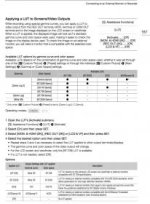
View attachment 111726
Page 167 C300MKII Manual

Canon Log can indeed use a 709 LUT, but only if using 709 Color Space. I was using P3 last I tested applying a LUT, and it wasn't possible.
Wide DR can use a 709 LUT only if using 2020 Color Space. Canon Log 2 can use all of the color spaces and use a 709 LUT (see the manual for other LUTs).
Custom LUTs aren't currently an option (could likely be added via FW).
 
Correct...and the issue you bring up is fixed in the C300 MK II (multiple LUTs, applying it to LOG footage monitor outs) because of this exact input from C300 users...The only thing you could use in a Odyssey or like monitor/recorder that lets you apply LUTs to a camera LOG output.

Jim Martin
EVSonline.com

Jim Martin

You sure about that? The c300ii seems to only have one pretty bad 709 "LUT" and no support for custom LUTs...

I really hope I'm wrong but I certainly remember my strong disappointment when I scrolled to the "LUT" menu item and saw only one option and nothing else. It's pretty misleading to even call it a LUT if it's built in and you can't import or customize. It's like if they called the gamma display assist on the a7sii LUT support.
 
Last edited:
Back
Top