Shooting Ballet Workflow. Help Needed.

Hi SurJones!

I have a similar event coming up soon, how has the testing gone? I'm planning on shooting 16:9 DVCPRO50 @ 24PA. Capturing via FCP to a 100GB USB powered HD. I've shot the Nutcracker twice with a DVX100A @ 24fps and client loved the cinema-like quality. Planning on compressing/authoring a progressive DVD.

Best regards,
 
I found an issue, Please advice.

Everytime I hit ESC to end my current shooting, and hit capture now again, the audio in Clip settings goes from 4 channels back to 2. Any way to get to stay at 4 channels?

Edit: As a matter of fact, If you are in the Log and Capture Window, and then click on the Browser(am sure any other window, but the only one I need open for a live shoot) and then click back on teh log and capture window, it resets back to 2.
 
I tried capturing directly a laptop using FCP always got only 2 channels of audio. Have you been able to capture 4 channels of audio?
 
Hi SurJones!

As mentioned previously, try to use a 60i/60p framerate for this kind of work if you can swing it at all. The dancers WILL NOT appreciate "cinematic look" that ruins the fluidity of their motion.

Also, sound wise, if you can find a way to do it, try to get some sound of the motions on the stage - footsteps, etc. Mix JUST A BIT of it in with the direct sound feed.

I'd go with a WB preset, since there will likely be lots of lighting changes.

Finally, don't even think of using cine-like gamma! If the lighting is at all interesting (in theatrical terms!), you're sure to get some horribly noisy HVX video. Use B. Press or HD NORM, drop the master pedestal. Try and catch a rehearsal to see where you want to set AE compensation to prevent blowouts on important subject matter - theatrical lighting is really tricky for AE, and the constant changes make it tricky for manual exposure. I find an AE shift of -2 or -3 tends to work...
 
STILL have this issue. Shoot is in a couple hours. I took 95% of the advice here, Specially from Ulla, and Mib.


SurJones said:
I found an issue, Please advice.

Everytime I hit ESC to end my current shooting, and hit capture now again, the audio in Clip settings goes from 4 channels back to 2. Any way to get to stay at 4 channels?

Edit: As a matter of fact, If you are in the Log and Capture Window, and then click on the Browser(am sure any other window, but the only one I need open for a live shoot) and then click back on teh log and capture window, it resets back to 2.


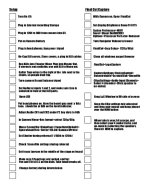
I created a small Procedures list. If anything needs to shoot to FCP., I think they will find it somewhat useful. I just did it is somewhat shorthand for my knowledge, but I think most can use it.
 

Attachments

  • procedures.jpg
    procedures.jpg
    157.3 KB · Views: 0
The shoot dressrehersal is in 3 hours, I set up for tests at 1pm MST. thank in advance for your speedy help.
 
I guess it may be too late... but I'm looking over your checklist (which is a nice thing for you to share with everyone!):

1) The board operator may not be able to/know how to send you a 1KHz tone. In my experience, also, board operators set their levels in strange ways having to do with various factors of the house amplification system rather than optimal signal levels for recording. So, the best way to set levels is by catching a rehearsal (if the music is live).

2) If you have the 1Khz tone, be conservative - don't set camera levels for it to be 0dB; set if for -6 or so. Of course, the board may never have output anywhere near the level of the tone... see above about the rehearsal being optimum!

Sorry, I can't address the 4-channel capture issue! Following your checklist should get you through today, and we canj try and figure out if there's a solution later!

Good luck!
-Barry
 
Ullanta, and all: I have posted a couple frames in the Footy/Frame section.

The guy did not know how to throw a 1krz, and his audio was ALL over the plae. I ran 4 channels of audio. 2 in the board (stereo out)(Although I will have to fix audio, becuase the CD's they brought in had issues. Apparently from what the audio guy said. ;)

The list I created helped EVERYTHING to run smooth. No issues at all. Longest STRAIGHT capture time was 35mins and no issues there. As was stated before, watch the dress rehearsal to TRY to memorize the choreography. No real framing mistakes, no one was missed dnacing, and MOST important, All feet and hands were in the frame + some :)

Thanks for every one helps. Especially those to went above and beyond.

Audio Issue: Has to do with Untilted Projects(those that are not saved) Once you save a project with it's audio set at a # ( I set at 8, dont know, just was looking to see) saved it and when I closed the program and it worked. When I closed the program, camera, it worked, and closed the program, camera, and comp, still worked. So when Final Cut was brought back up, all was saved.
ONE THING: It was never my focus BUT the audio levels on those 4 channels stop bouncing when you hit Capture Now. Jut doesnt seem right. Started new project (saved them) still did not work. Ran a lot of other tests. Dont know..... Anyone???Normal???
 
FCP doesn't show any live analysis (levels, waveforms, etc.) while capturing. I thought I read somewhere that a new version did or would change this... but not so far!

As for the levels being all over the place: I'm not addressing your board op and whatever issues he may have had, but in classical music, dynamic range tends to be far greater than in "pop" music. You often have, e.g., a five-minute classical section that tops out at -30dB (doesn't even show up on the HVX meters!) followed by a section that pounds away at 0dB. Whereas for pop, rock, etc. you can often listen to part of one song and get an idea of the sound levels (not saying I'd recommend it, but in a pinch...), you can listen to 3/4 of a classical concert and still never hear anything half as loud as the peak levels.

Now if the house is playing a CD rather than live music, you may be able to find a meter on the CD player that swill tell you where the levels are in whatever section you have a chance to listen to, and you can use that to guide you a bit... or jump around the CD listening for loudest parts.

If you have live musicians, you can ask them to play the loudest parts - they may come close, but they won't (their interpretation of loudest is different) - and will spend a lot of time playing the quiet stuff around what they think are loudest parts. What I do when I can is ask the musicians to spend 1 minute making the loudest noise they possibly can with their instruments. Hey, sometimes it comes out pretty cool, especially if it's an orchestra! Then, assume that they'll play a little louder during the performance so be conservative. Remember, levels too low degrade gracefully; levels too high do not!

Anyway, sounds like it went well! Congratulations, these are tough events!

-Barry
 
Back
Top