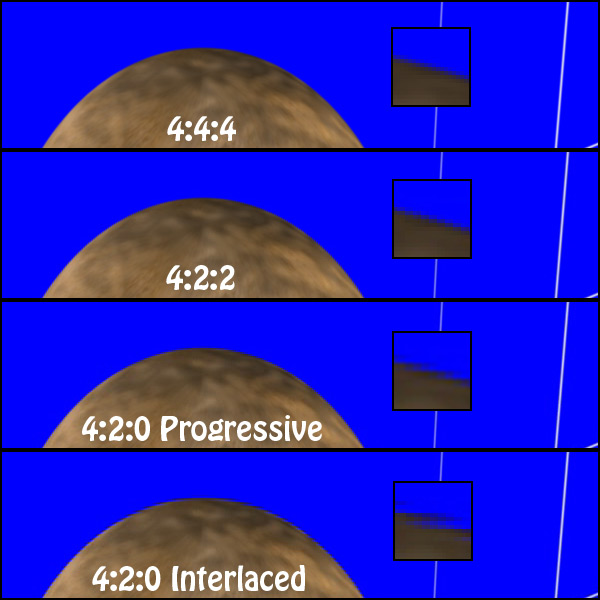
shoot 4:2:2 or 4:4:4

Barry are you sure that was progressive footage? The chroma lines look alternated like they are with interlaced based 4:2:0 sampling. The red lines skip every other line. True progressive encoding would not have these gaps and use a nice 2x2 pixel block for chroma.

It's 23.98p, that's what FCS transcodes it into anyway. I think that barry's system has somehow added some extra compression artefacts to the footage and that is why his sample looks so bad. I've looked through every frame of the clip since my last post and none of them look like what barry posted on here when they are viewed at 200%. It must be a problem with the NLE he is using.
 
It's 23.98p, that's what FCS transcodes it into anyway. I think that barry's system has somehow added some extra compression artefacts to the footage and that is why his sample looks so bad. I've looked through every frame of the clip since my last post and none of them look like what barry posted on here when they are viewed at 200%. It must be a problem with the NLE he is using.

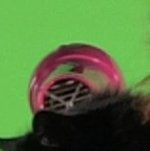
I agree. The NLE must be treating the chroma of any AVCHD material as field based 4:2:0 chroma. A good decoder or nle should know the difference and when to use each decoding method.
 
Firstly, Barry said that he resized in his editor, not in photoshop
No, the frame was exported from the editor (PPCS4) at native 1920x1080, then brought into photoshop and *not* resized. I did a zoom to 200%, keeping it pixel-for-pixel, then did a screen grab.

although he doesn't use FCP so maybe his editor does it a different way.
That right there is the issue. I'm looking at pixel-level AVCHD. You're not. You're looking at a converted ProRes file, and the first thing that particular editor does is a chroma smooth process. They've been smoothing the chroma since at least DV days.

So, I think we have two major differences here -- I'm not using any kind of resize, and I'm not doing any chroma smoothing. I'm showing the actual pixels from the actual AVCHD file.
 
Barry that may be true but the image you showed clearly shows field based style of chroma sampling for 4:2:0 video. Even without chroma upsampling native frame based progressive 4:2:0 will always look 100X better then field based interlaced chroma. I'm not sure if CS4 is decoding the video properly but in no way should native progressive 4:2:0 look like that. Other NLE's even with native AVCHD should show true progressive chroma.

Barry does 720p AVCHD material show chroma that looks like that in CS4 as well?
 
No, the frame was exported from the editor (PPCS4) at native 1920x1080, then brought into photoshop and *not* resized. I did a zoom to 200%, keeping it pixel-for-pixel, then did a screen grab.


That right there is the issue. I'm looking at pixel-level AVCHD. You're not. You're looking at a converted ProRes file, and the first thing that particular editor does is a chroma smooth process. They've been smoothing the chroma since at least DV days.

So, I think we have two major differences here -- I'm not using any kind of resize, and I'm not doing any chroma smoothing. I'm showing the actual pixels from the actual AVCHD file.

OK, so your method is better according to you, despite showing a fuzzier image?

Anyway, I've followed basically the same process this time. I opened the original clip in VLC (not Pro Res etc, the original AVCHD). Then I screen grabbed part of the image at 100%. I opened this in Pixelmator and zoomed (not resized) to 200%. I then screen grabbed again and the resulting image is attached. This is effectively the same process as you did, no transcoding or resizing. The resulting image is very similar to the other I produced, possibly slightly better due to not doing through ProRes LT and again it is quite comparable to your HPX170 image!

I'm now thinking that maybe CS4 does a very poor job of processing AVCHD compared to either VLC or FCS's Log & Transfer transcoder and this must be the reason for your HMC150 image being so poor. If this is the case it's pretty shocking really for such expensive software to screw your footage up that bad!

Maybe somebody with another NLE, not CS4 or FCS, could download Barry's clip and see what result they get?
 

Attachments

  • Pixelmator.jpg
    Pixelmator.jpg
    24.2 KB · Views: 0
A 200% zoom in photoshop is the same thing as point resizing or nearest neighbor 2x. They use the same algorithm

I downloaded the footage, and I agree the AVCHD footage is much noisier (considering it's about 1/5 the bitrate), and already has macroblocking. The point resize algorithm accentuates these blocks

I have PPCS4 and Thomas is correct, there is a problem with the chroma sampling of that footage in PPCS4. I did it Barry's way, exporting a .bmp from PPCS4, then using a point resize vs. using a different decoder in avisynth using libavcodec. VLC uses libavcodec to decode as well, as do many other open source & free decoders

13zwg1v.png


I uploaded to full 1920x1080 unaltered frame here (frame #5) using both methods. I converted to .png (still lossless) for size purposes and you can download and examine

http://www.mediafire.com/?zznnfwjtfmq
 
Last edited:
I can also confirm that Sony Vegas 9c which works with native AVCHD decodes the 4:2:0 properly as progressive and looks the same as the VLC grab above.

Here is a graphics example I created years ago to show the true difference between chroma sampling when you take the camera out of the equation.

810d1159424266-potential-rumored-chromakey-issues-hdv-chroma-examples.jpg
 
OK, so your method is better according to you, despite showing a fuzzier image?
Depends on what you mean by "better". I'm going for "accurate", not "best looking". I'm trying to eliminate any processing whatsoever, so it's looking at the native pixels. No chroma smoothing, no processing, no resizing.
 
Just tried it in Sony Vegas. It's official -- Premiere Sucks for 4:2:0 progressive chroma. I will be filing a bug report.

From Vegas, it looks just like Stuart's. And I'm 80% sure Vegas doesn't do any chroma smoothing by default.
 
I can confirm it affects AE too, what many people use to do their keying.

I suspect people who use Adobe products to encode to intermediates (eg. DNxHD) will have the same issue since it's a decoder issue; it's probably better to use something else
 
Just tried it in Sony Vegas. It's official -- Premiere Sucks for 4:2:0 progressive chroma. I will be filing a bug report.

From Vegas, it looks just like Stuart's. And I'm 80% sure Vegas doesn't do any chroma smoothing by default.

Wow, that's a pretty big bug not to be noticed all this time!
 
An amazing thread. Thanks for the all the detective work Stuart!

Indeed, thanks to everyone on the work here, and especially PDR who made me aware of this chroma problem in CS4 before I was about to start a big project. Perhaps we should put a sticky up warning people not to bring AVCHD into PPro if they plan to use AME to export to something else, especially if their looking to do green screen work like I was. At least until they get a patch out. Cheers

- Shawn
 
if i converted my AVCHD footage to DNxHD would the bug, whatever it was you guys were saying, still be there or does it just apply to AVCHD files?
 
as long as you converted the footage using something besides adobe media encoder, and before you brought it into any adobe programs, i think that would eliminate any of the chroma interlaced problems their talking about.

Its only once you bring it into an adobe program that it decodes the AVCHD file incorrectly and then passes it on to every other part of your work flow. At least that is my understanding
 
Hi All,

Just want to say thank you to everyone that contribute here. There is so much information and I'm trying to process all of it!

I've recently acquired a HMC150 and been digging through this great forum and just wanted to bump this thread and see if anyone knows if this bug still exists in CS5?

I've ordered CS5 and should be coming sometime this week but wanted to ask if any of the pros here know if this is still a problem with Premiere.

Thanks in advance!
 
Here's a relatively serious point of interest, especially to AVCCAM users, and I'd love to hear Barry Green's take on it.

I had a conversation with Adobe today in which they confirmed the video I'm going to link to below...

LINK: http://vimeo.com/13764135

They're saying that Premiere Pro CS5 upsamples all footage imported to 4:4:4 -- and that all color correction done with 32 bit plug ins are done in 4:4:4 -- including AVCCAM footage.
 
Back
Top