Shogun works great with A7s

olof

DVXuser Sponsor
Just got the Shogun last night from Access A V in NH...

Did the first few tests this AM. 4K (UHD) works perfectly. I will be comparing to an Odyssey 7Q+ and the FS7 in the next few days.

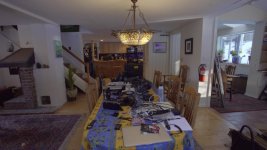
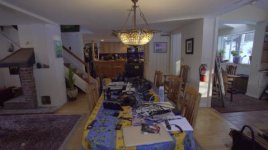
Here is a screen grab of my first UHD shot. This is a very contrasty scene, snow and bright sun outside. Shot is a 46GB png from FCPX. It will take a while to view full size. Metabones V4 Canon L 17-40 F4 at 17mm F10

More to come soon:
4K-A7s-Shogun.jpg

Here is a link to orig png. I can't put it up here, too big.
http://www.westsideav.com/4KA7sShogun.png
 

Attachments
  • 4K A7s Shogun.jpg
    4K A7s Shogun.jpg
    19.8 KB · Views: 0
Last edited:
The above was shot PP7 Slog2 Sat +9 cinema gamma detail -7, everything else factory setting. ProRes HQ in the Shogun. Just RAW image 1/60 30P, no CC.
 
Hi olof, thanks very much for posting this. In the "false color" section of the shogun menu, do you know if it's possible to assign a color to specific IRE range?
I believe you can with the Odyssey 7Q but I'm not sure. Let's say for example that you want to assign the color yellow to IRE 60-70 for skin tones. From a few youtube videos I've seen, I know the shogun has a false color setting, but it would be nice to know if you can assign colors to IRE ranges. Do you like the waveform display? Can it cover the entire screen? Can you change the color of the wave to green or is light blue the only option? Thank you in advance.
 
olof,
I've got some questions along the lines of Nicholoas'. I'm currently evaluating a small HD Pro7 monitor which has a lot of the same features ( minus recording of course) but I've found some of the monitoring tools sound better than they are.

For example if I set zebras at 60 and 100 ( which is what I like ) , the 60 IRE zebras are frankly obnoxious - you can't see the picture behind them - kind of zebras against a white background) so it is very difficult to keep them on while shooting - pointless then . Likewise they have 2 different preset false color choices , but I don't find either of them at all useful - they seem to be highlighting the wrong IRE. My old TV logic by comparison had false color that was completely user set-able.

Another thing to check is the color peaking. Is it user controllable and more important , can you set it so that it doesn't give you a lot of false positive information. A lot of monitor peaking circuits are next to worthless in the real world. i.e. I work with a 7" Marshall that has red peaking and a waveform monitor and neither is worth 10 cents.

So how do those tools seem to work on the Shogun . Also how do you like the basic picture quality? Does it come with any LUT's already? How many can you load in at a time?

Thanks

lenny
 
Lenny and Nicholas,

Here is a really good video that shows all the features in good depth:

<a data-cke-saved-href="https://vimeo.com/114978513" href="https://vimeo.com/114978513">

I did not shoot this video it was done by Stefan Czech and he does a great job of demoing how false color and the other aids work. I think false color and the scopes are excellent in the Shogun, and the peaking features really work as does the 1x and 2x magnification. But watch Stefans video, I was going to make one but Stefan did such a thorough job, I feel I don't have to. Thank you Stefan, Great Job...

Take the time to watch the whole video.

I am just beginning to explore the Shogun. So far I am very impressed. The quality of the image is great full 1920 1080. It comes with a Spyder to calibrate the screen and it is recommended you do this once a month or so.

The screen grab above is noisy, but bear in mind that this is a very contrasty image. I will definitely lower my sat from +9, this will lower color nose in the shadows. To have detail in the dark parts of the kitchen and still retain direct sunlight detail in the winter snow landscape outside is remarkable. It is so contrasty to start with that it does not even look like a Log image. I will be doing a lot of testing to see how to get the best 4K images from the A7s and the Shogun and O7Q+ in the next week, it will be interesting. And yes the ISO was native 3200 wgtwo. Normally with a Slog image I have to move the blacks down to have the image not appear milky.

I will certainly post my findings and clips/stills here. I am also figuring out the best way to mount the recorders on the A7s.


Correction!

I did get a Spyder with my Shogun because I ordered back in July or August, so only early preorders includes the Spider, Sorry for any confusion.
 
Last edited:
@olof
"It comes with a Spyder to calibrate the screen and it is recommended you do this once a month or so." Are you saying your Shogun came with a Spyder???!!! The US version I have did NOT come with a Spyder ...
 
@olof
"It comes with a Spyder to calibrate the screen and it is recommended you do this once a month or so." Are you saying your Shogun came with a Spyder???!!! The US version I have did NOT come with a Spyder ...

Mine did it was in the box that shipped from Access A V (drop shipped from distributor). The video from Atomos also states that the Spyder is shipped with the Shogun, this Video:

Contact your dealer if you did not get it.

Correction!

I did get a Spyder with my Shogun because I ordered back in July or August, so only early preorders includes the Spider, Sorry for any confusion.
 
Last edited:
There is NO WHERE in that video where it shows the Spyder in the box???!!! My box is exact same as in the video you linked. Am I missing something???
 
Your screen grab doesn't grab me (sorry). I was hoping for a sharper, more detailed image from a 4K grab. Is it possible that there's some camera shake happening? And the noise does seem pronounced, I'd like to see a side-by-side with an in-camera 2K image.
 
@olof
I just spoke with 3 other people who have received their Shoguns and NONE of them came with a Spyder calibration device ......
 
@olof
I just spoke with 3 other people who have received their Shoguns and NONE of them came with a Spyder calibration device ......

Maybe I got mine because when I pre ordered months ago they ran a special, sorry I thought it was mentioned in the video as well. Maybe I heard "included" when he said use Spyder.

Below is part of the email Kevin sent me back in August when I ordered the Shogun, it looks like Atoms honored early orders with the Spyder.

"We received an email from Atomos last week that they would be shipping in September/October with free Spyder."

Sorry for any confusion, I guess only early pre orders shipped with the Spyder. I will correct my post above.
 
Your screen grab doesn't grab me (sorry). I was hoping for a sharper, more detailed image from a 4K grab. Is it possible that there's some camera shake happening? And the noise does seem pronounced, I'd like to see a side-by-side with an in-camera 2K image.

The screen grab above is noisy, but bear in mind that this is a very contrasty image. I will definitely lower my sat from +9, this will lower color nose in the shadows. To have detail in the dark parts of the kitchen and still retain direct sunlight detail in the winter snow landscape outside is remarkable. It is so contrasty to start with that it does not even look like a Log image. I will be doing a lot of testing to see how to get the best 4K images from the A7s and the Shogun and O7Q+ in the next week, it will be interesting. And yes the ISO was native 3200 wgtwo. Normally with a Slog image I have to move the blacks down to have the image not appear milky and this kills the noise in the shadows. Bear in mind this is not a lit scene, it is camera torture.

I will certainly post my findings and clips/stills here. I am also figuring out the best way to mount the recorders on the A7s.

This was the first quick test with the A7s and Shogun. I will be dialing this and my FS7 in this week. It will be very interesting to see what the 2 cameras do. The A7s with Shogun and also with Odyssey O7Q+ as well as FS7 internal and both recorders 4K from HDMI, and later I will test the RAW to 4K ProRes in the O7Q+ and FS7 with RAW output from the back, I will test the Shogun with RAW as well once I have all the updated parts.
 
So does the A7S do 10-bit HDMI out? I was under the impression it was 8-bit.

Shogun will record only in 10-bit. I assume it will convert the 8-bit into the 10-bit wrapper if a particular camera doesn't do this itself ... but I am not 100% sure.

Thas was a very good test. Could we get a comparison with internal 1080p?
It looks different in ProRes than in XAVC, doesn't it?
 
Your screen grab doesn't grab me (sorry). I was hoping for a sharper, more detailed image from a 4K grab. Is it possible that there's some camera shake happening? And the noise does seem pronounced, I'd like to see a side-by-side with an in-camera 2K image.

Steve - I have looked at Olof's pictures and my own tests with the A7S and the Shogun. There's something going on with his camera or lens that I can't pinpoint, but it seems like it's a little blurry; like you say it's almost looking like camera shake. I tested with a Sony 24-70 (with IS) and it was clearer and sharper on the 100% punch in.

That said, while I think the image looks very very nice, the FS7 is cleaner and has more dynamic range... and a touch more detail. And that's comparing 4K Shogun A7S footage to internal XAVC-I 4K from the FS7. No audience member would notice the difference (subjectively, both cameras look amazingly good), but I do when grading. The 8 bits hurts the A7S a bit.

As for the noise, Olof is showing a non-graded Slog 3 image. Of course it will show some noise in the shadows.. even at native ISO. That said, the HD image shows less noise (coming out of the camera). This is likely because the Shogun is going direct from the sensor and bypassing the in-camera compression and NR. I saw the same kind of thing with a Ninja on a Canon C100.
 
Hi olof, thanks very much for posting this. In the "false color" section of the shogun menu, do you know if it's possible to assign a color to specific IRE range?
I believe you can with the Odyssey 7Q but I'm not sure. Let's say for example that you want to assign the color yellow to IRE 60-70 for skin tones. From a few youtube videos I've seen, I know the shogun has a false color setting, but it would be nice to know if you can assign colors to IRE ranges. Do you like the waveform display? Can it cover the entire screen? Can you change the color of the wave to green or is light blue the only option? Thank you in advance.

- No assigning custom IRE on false color.
- Waveform is nice, albeit a little laggy. It can cover the whole screen. Blue is the only option for color.
 
Back
Top