sharpen FX9 for 28-135?

LennyLevy

Veteran
I'm not happy with the sharpness of my 28-135 F4 lens particularly at 135mm. I've compared it to other 28-135's and its not worse than others (maybe a touch softer at 135 but better at other settings) , I just don't think its a very good lens ( not as sharp as as the 18-110 for example.) So I've decided to try to slightly bump up the sharpness of the camera when using it . I usually hand off my footage to clients so doing it in post is not an option.
I did a few preliminary tests and it looks like either increasing the detail to around +10 or aperture to +10-20 might do the trick , but I haven't run real world tests yet - just a chart at 135mm. Just wondering if anyone here has experimented with boosting the sharpness on their FX9 and which settings they found most effective and least objectionable. I suspect that raising the aperture might be better than detail.

Please no arguments from people who love their 28-135's - I've looked at a bunch. Mine is not an outlier and at least on mine the backfocus works correctly. . My experience is that about 50% of them are set incorrectly direct from Sony and very very few owners even bother to check their backfocus carefully.

I need to keep it as it does things that no other lens in its price range does so I use it frequently and its often requested for multicams and events.

lenny
 
Last edited:
Although old now the basic information contained in the following PDFs are still pretty applicable to our modern crop of Sony cameras.

PDFs #01, 03, 06 & 07.

You may well know all this, but generally I find dropping Detail, increasing Aperture, increasing Knee Aperture (when shooting Custom) and increasing frequency and running a degree of negative Crispening can help most of our cameras deliver "sharper" looking images with greater apparent fine detail but not looking too "electronic". Mark you, the results vary considerably when applied using different lenses on any camera. I store basic Scene Files with different settings for different lenses AND scenes. Indoors, outdoors, stage lighting, stadium lighting etc. Plus a couple of "general" day to day files for the most regularly used lenses.

For example, if I'm using Super 16 Crop with a B4 lens, its settings are quite different to either the 18-110 or the 28-135. And the last two can look quite different in either FF or Crop modes. The totally different MTF's of the different lenses all have a distinctly different response to these settings. Especially when shooting both HD and UHD/4K, as what works for HD can be well over the top for UHD/4K.

For a past example, an old camera 3 chip CCD camera now, but the PDW-F700s gave some of the best sharpest but smooth, not electronic looking images with HD glass using Detail OFF, Aperture ON, Detail level -19 and Aperture level +87. These were Alan Robert's settings back then. He summed up by saying, "Aperture correction looked much more smooth and resulted in sharper pictures with fewer problems." Generally I would agree with his comments even today.

Personally, I hate setting up cameras on charts for image sharpness. I find best to use a human face in harsh studio light or even sunlight and then a shot of a decent nice dense leafy tree. If I can get good, sharp but smooth looking detail on human hair and decent looking images of fine leaves and grass, then I'm reasonably happy. Those subject matters are still in the 4-6MHz band as they have always been, so tuning frequency and aperture to get the best looking results in that bedspread generally still works quite well.

Chris Young

https://www.sony-asia.com/microsite/professional/xdcam/resources_shootingtips.html

Ages back Alister posted a good overview of these settings and how they work.

https://www.sony-asia.com/microsite/professional/xdcam/resources_shootingtips.html
 
Thanks Cy, That's exactly what I was wondering about . I do of course agree that real world shots are the best way to evaluate these settings, though I do find charts an excellent way to compare lens sharpness or detect problems. Do you have any specific settings I could use as a starting place for the 28-135 on the FX9. Frankly , i'm reasonably technical but that stuff is above my pay grade.
 
That's a hard one. Where would I start? Well, no, I don't have any specific recommendations for FX9 settings. I've sold my 28-135 as it wasn't getting a lot of use and the last time I used an FX9 I preferred to shoot in S35 with the 18-110. It's having a more useful six times range and a directly connected zoom without that laggy "rubbery" non-connected zoom feel of the 28-135. On my A7 body, 28-135 kind of killed the aim of a small light rig.

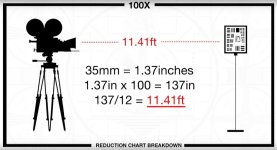
But if I was to set up an FX9 with any lens, or any other camera/lens combo for on a chart, I would start with the Century 8.5" x 11" Precision Optics Resolution Chart as that chart has been designed to work specifically with the 100 x reduction breakdown formula. This is important as the resolution grids on this chart are sized and spaced to accurately work at the 100 x reduction. This is the only true way of optimizing the detail, frequency and crispening of a camera/lens combo. Reduction formula below.

This reduction formula is based on the Shannon Sampling Theorem based on the Nyquist formula which takes into account the impact of the chart image in regard to frequency, aliasing, and color moiré. But that is a totally different discussion. Just saying, just zooming into a chart and adjusting is not going to give you the optimum basis to start making detail adjustment settings.

https://www.optowiki.info/glossary/shannon-sampling-theorem/

Primes are pretty straight forward. With zooms, I tend to try to set them up at full wide, mid-zoom and full zoom. And try to come up with the best overall setting that works at those three points... and hope that it works fairly well across the zoom range from there.

With the 28-135 that means adjustment checking at 28, 68 and 135 mm using the formula below to achieve the 100 x reduction at each of those focal distances. You are saying the obvious softness in your case is at full zoom. I guess this is at full aperture? I would then aim to achieve the best results at 135 mm and work back through the mid and wide ends while making sure any adjustment there aren't impacting my full zoom settings. Zooms usually are weakest at the long end, so often what works best at the long end is what you have to live with throughout the range.

With the FX9, the detail circuit is ON by default. This needs to be on to have access to the other parameters such as level, H/V ratio, crispening and frequency. Something to bear in mind is you will need to do all this twice, and save one setup for HD and another for UHD. As what works well in HD can look quite ugly in UHD. Does your lens look soft in both HD and UHD?

As a rule of thumb starting point I would leave detail at 0 and push frequency to +50, crispening -50 while paying strong attention to the finest A, B, C, D vertical and horizontal line blocks. Sometimes I find by going up on the frequency and dropping the detail "level" starts to improve things. If you see aliasing, often this can be minimized by dropping the H/V ratio. Adjusting for slightly less vertical resolution.

I find the impact of these adjustments seem to have far less impact in UHD than they do in HD. But even in HD the perceived changes in detail retention, edge smoothness etc are very subtle. It really is a sit down with a coffee, a hi-res 4K monitor with its detail and aperture circuits set to "0" and a chart that is designed to work with the 100 x reduction ratio. Work to the formula and adjust, roll a bit and dictate your settings, adjust, roll a bit and dictate your settings again. Then look at it all back and see which settings are working best and keep tracking down that path to try to achieve the best results. Good luck!

Chris Young

Reduction Chart Breakdown.jpg - Click image for larger version  Name:	Reduction Chart Breakdown.jpg Views:	0 Size:	53.4 KB ID:	5698493
 
Last edited:
Thanks Chris, That's very helpful. I doubt I will do all that technical work though I'll make a stab at it , however you have given me a place to start . I do have a century chart that I blew up to 4' and I look at all my lenses on it . Its only a chart and so just a beginning point , but it can quickly tell you how lenses compare , whether you're backfocus is correct or your zoom holds focus through the range, moire etc. I can see for example that in S35 my 18-110 has better resolution than the 28-135 and that bears out in real world tests as well. I pretty rarely use my FX9 in HD , though I do in S35 or 5K. I'm always astonished that no one else i know ever puts their lenses on a chart .
On advice from Alister Chapman I have my trusty old EX-1 ( which at detente was too sharp) set up for - 15 detail and + 20 Frequency, so it was the same idea. I'll probably just experiment with a few settings starting with what you suggested but testing on faces and landscape. I only what want to goose it up a little bit . So far no one has complained but I see misadjusted 28-135's all the times on shoots and no one complains there either, but for me its like chewing on Aluminum foil to know its soft. At least mine has decent backfocus.

I really appreciate the depth of your response. That's what this place is for. If you're ever in the SF Bay area, give me shout I owe you a drink.

Lenny
 
"No probs!" as we say down here. SF, my fave city after Sydney. Honeymooned there. Drove up from LA, LA land. You know SF and Syd are twin cities, don't you? When not working, I spent many a pleasurable hour wandering around SF whilst engaged on a couple of jobs there in the '80s. Corney, maybe, but it was the flower power generation of SF that that captivated many of us outside the US during the '60s. It was Armistead Maupin's Tales of the City that first made we want to really get to know the place and hunt around. Growing up in the '60s in the UK most of us just had to visit SF at some time or another. If I'm ever in the Bay Area again, I'll take you up on a visit to a bar :)

Stay well!

Chris Young
 
haha , I'm an old timer Chris and as a kid I hitch-hiked to SF back in that Summer of Love and hit the crash pads. A amazing and memorable scene.
Probably won't even see anything quite like it again. Certainly not in my young life anyway.
 
Well if anyone cares ( and I'm not sure anyone does) I shot a bunch of tests increasing detail and frequency and lowering crispening with the 28-135 and the results were extremely surprising .
Mainly that enormous increases in detail and frequency really only did a little bit to change sharpness and they didn't seem (at least in my tests) to have any negative effects.

First I compared it to my 18-110 at 110mm both on a face and a chart and as expected the 28-135 at 135mm 6K was noticeably softer than my 18-110 at 110 mm S35. and remember 6K should inherently be sharper.
In testing at first it was hard to see any differences as I went up on my detail settings , but eventually went all the way up to detail +99 and Frequency +99 and that did seem to give me an increase in sharpness that was noticeable, pleasing and surprisingly subtle on a closeup of a face at 135mm . On a chart it was interesting because whereas it did sharpen the lines that were soft but still visible with normal detail , at the point where those lines got really soft at normal, the detail increases had no effect - I guess that makes sense though.

What also surprised me was that when I pulled out to 28mm on an ordinary shot of my room with both a bookcase and the chart ( now much smaller but with lots of detail) I didn't see any artifacting. I expected it to go crazy .

Does this make sense to anyone out there?
Are these detail settings that subtle or is there just very little you can do to an inherently soft lens in camera?
I do know that in Post I can affect the sharpness much more and can easily overdo it to create artifacting .
I gotta admit though , I'm a little reluctant to set this lens at +99 for a real job . I'll have to shoot some more test to make sure its OK.

Lowering crispening didn't seem to do much . In fact in one test it seemed to make the picture softer but I'm not sure I trust that one.

By the way , my 28-135 loses some sharpness at the longest end which is why I started these tests. On the other hand I've compared it to 3 others and none are especially good.
One lens I compared to was sharper at 135 but pretty awful as it got wider while mine was far sharper in the rest of the range . Also mine was parfocal and the others weren't.
 
Last edited:
Back
Top