FS7: Share videos, test footage, etc.

jshbckr

Veteran
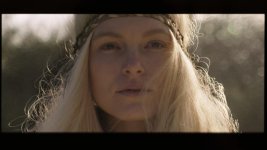
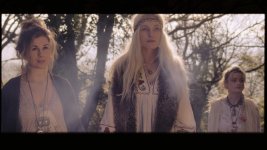
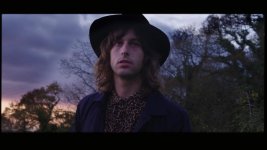
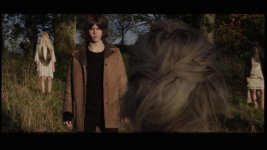
Looked like most topics were created for an individual video, I figured I could make a topic to just post things we're shooting. I've noticed a lot of interest in people wanting to see what kind of footage you can get out of the camera.


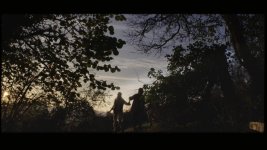
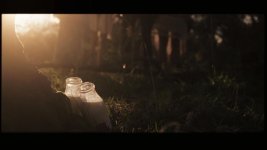
We had an unseasonably warm December day here in Minnesota. Whipped out the FS7 while we had a little fire outside. It was right around the time the sun was going down, so some shots are boosted/warmed up because the color temp was getting more blue.

Everything is UHD 24p XAVC, ISO 2000, shot in CineEI mode, Slog3. Zeiss ZF 50mm f/1.4. I applied three effects in this order: 3-way CC, Sony Slog3 to LC709A LUT, 3-way CC.

I don't fancy myself a colorist, so let me know what you think of the treatment. I could also upload a ProRes of the flat footage... it's about 2.6GB.
 
Very nice looking footage. Pleasing colors and natural skintones - good work.

I would like to play around with the flat prores footage if possible.
You would export it as 10bit HQ version I assume?


Best,
J.
 
Very nice looking footage. Pleasing colors and natural skintones - good work.

I would like to play around with the flat prores footage if possible.
You would export it as 10bit HQ version I assume?


Best,
J.

This is a silly question, but how do I make sure it's 10-bit from a Premiere export? I set it to ProRes 422 HQ.
 
If the source is 10bit (as the XAVC-I is and assuming you shot the footage in XAVC-I) then exporting it to Apple Prores HQ, the .mov file should be automatically 10bit as well.

Easiest way to test this, is to first to export only a few seconds long clip and open up the file with VLC player and going under Tools > Codec Information - Codec tab and check whats is written under "Decoded format".
If it contains 4:2:2 and 10bit you are good to go!


I would like it to be in 10bit because then the file contains the same amout of color data as the original XAVC-I which is necessary as I want to see how much color grading FS7 can handle.
 
Last edited:
Josh - very nice - you applied proper workflow and exposure and got a result that is exceptional for a camera of this price point.

This is what we should all be doing.
 
Amazing how this camera can achieve very organic pleasing looking results when in the right hands.

When I see the kind of footage you guys are posting it really drills home that I've purchased a great camera.
 
I think mentally Ive cracked something.. (try and follow this it will make no sense)

Im an ETTR nut, and have been ETTR for years (in stills) but actually I realise I dont fully ETTR becuase Ive always got a stop or two of wiggle in post with my stills - so Im actually exposing up to about 80 - but my nikon runs a LUT - no one ever mentions LUTs in stills becuase it is baked in to the camera - that I fill up right. ie the onboard histo is fully right... but in stills Im holding the top two for the speculars without thinking about it.
I have tried to ETTR in video becuase we have all seen those graphs.. botom stop 12 levels, next stop 24 levels, stop 12 500 levels or whatever - so it seems wasteful to not expose right.. but and this is the break through.. getting creamy roll off is expensive and takes a lot of levels. Referencing AliChaps expose to 60 for your white card saves a load of levels for your speculars and roll to white.

So expose up your white at 60-70-80 (but not beyone) and you are saving a bunch of levels for roll off aka 'cream'

Mix that with the superb lut to bring in proper saturation and gaumut and you are good. Exciting.

S
 
Last edited:
I think mentally Ive cracked something.. (try and follow this it will make no sense) . . . . So expose up your white at 60-70-80 (but not beyone) and you are saving a bunch of levels for roll off aka 'cream'


You just figured that out? What about all the "great" advice you've been sending me privately about exposure. Now you see that it was every bit as worthless as I said it was.
 
Last edited:
You just figured that out? What about all the "great" advice you've been sending me privately about exposure. Now you see that it was as worthless as I said it was.

To try and be fair and balanced - we need to find a sweet spot - Sony and I think that is not in one place for every scene, different scenes having different areas of priority and different dynamic ranges. The second frame which I like most is still clipped like crazy- but it doesn't matter (to my eye - which I understand is entirely subjective and got the look we intended -also subjective)

Liam Ive given up on EI and LUTs for the moment because no WFM is doing my nut in as is the Lut disappearing when engaging HFR - too many gotchas with the current FW.

The main problem with LUT/no WFM is ive hit the dirt too often and not kept it right enough.. noise - If there were low end zebras Id be all over that.

S
 
Then you're back to where I am. I can't work without the WFM.

I think that depends on the scene.

My first tests were bright and I was all about nailing my highs and LUT/Zebra gave me that on a plate, then I hit shadowland and got a bit burned in the muzz down the bottom.

But ultimately I want to set the thing up for all scenes.

S
 
Back
Top