settings for shooting action sports

hey butterstick, where do u live? I've been to granite peak several of times, do you ever come to sunburst? Here is some 30pN footy I shoot but it looks like shi*. HERE
 
i live in manitowoc. im only 16 years old and i had a canon before this but this is my 3rd weekend with this hvx and i need to get this thinged tuned right
 
the only problem is that i dont think that is the problem because i can see the grain in the preview box. it has something to do with the settings that im using in some way..

is 720 60p known for good quality?
 
720 60p looks fantastic with proper light. How does it look played back on your camera? I don't use cs4 so I don't know if your preview is a proxy or full quality image.
 
is 720 60p known for good quality?


That's kind of like asking 'is hamburger known for good quality'. Depends on how it's done. :D


Export a few seconds for a test: Try MPEG2, and ONLY change the pull down bar underneath the format to "720 29.98 high quality" and leave everything else as the default. I just did that and the encode looks pretty good.


That clip you posted doesn't show 'noise' as the biggest problem. I can't even see if there's noise or not because it's encoded like crap and just looks blurry and blocky.
 
Not unless you've made all your clips play at 50%.


I don't remember if there's a 60fps option. I'm just trying to find you a decent encode. Only then can we talk about whether or not your footage has noise.
 
Just shoot the F*cker in 1080 60i WHERE YOU CAN DO MORE WITH TWIXTOR FOR SLO MO Than 24p or 30p. B. press, no cine v or d. sharpness +4... ESPN look btw.

EDIT: I said look, not what they actually do :)
 
your footage looks like you know how to use the camera so i dont think thats the problem. id have to agree its the compression. i think its CS4 that doesnt compress very well. my friend edits MY footage with cs and looks alot like yours. when i edit and compress using FCP its way more clear. ANYONE know why?
dont shoot in 1080 60i waste to much space for the hassel, but thats my opinion
 
ANYONE know why?


Because premiere doesn't hold your hand like mac software. You actually have to know what you're doing. :happy:


You need to use a decent output setting. Premiere is more than capable of it. I've already posted an example of one these in this thread.
 
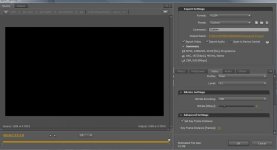
im uploading some test footage onto vimeo and these are the settings i used for rendering the video and it didnt turn out well.. With the moving object it apears all blurry
 

Attachments

  • Untitled 24.jpg
    Untitled 24.jpg
    44.3 KB · Views: 0
Back
Top