
Navigation
Install the app
How to install the app on iOS
Follow along with the video below to see how to install our site as a web app on your home screen.
Note: This feature may not be available in some browsers.
More options
You are using an out of date browser. It may not display this or other websites correctly.
You should upgrade or use an alternative browser.
You should upgrade or use an alternative browser.
C100: Setting Up The Ninja 2 With the C100. Quick Start Guide.
- Thread starter Erik Naso
- Start date

Matt Gottshalk
Resident Preditor
You just wanted to show off your Canon CN-E primes.
Nice video. I just got my Ninja 2 in so this was perfect timing.
Nice video. I just got my Ninja 2 in so this was perfect timing.

Erik Naso
Veteran
I wonder why I couldn't hear any audio? I checked it on another file from Youtube and it was fine but I got nothing (that I could hear anyway) here.
Audio plays fine for me using Firefox on a Mac.
Erik Naso
Veteran
You just wanted to show off your Canon CN-E primes.
Nice video. I just got my Ninja 2 in so this was perfect timing.
I wish those Canon CN-E primes were mine! I have to send them back to Canon next week. Going out today to shoot some footage with the 85mm and 24mm. I'm using the C100 with Ninja 2.
Here is the setup for today.
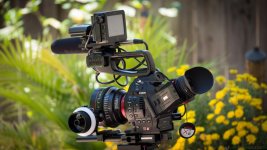
I wish those Canon CN-E primes were mine! I have to send them back to Canon next week. Going out today to shoot some footage with the 85mm and 24mm. I'm using the C100 with Ninja 2.
Here is the setup for today.
View attachment 73526
2 questions regarding this image. What are you using to mount the ninja and wireless mic to the top? and....What HDMI cable is that? It looks like a RocketFish low profile cable from Best Buy. I have owned 2 of these (both brand new) and they both had issues with the Ninja. The Ninja would randomly stop recording for no reason with them. I know it was caused by the cable (or some issue with signal) as the 24P removal would stop working at the same time, as if the Ninja was losing the signal. I'd have to "wave" the camera around to get the Ninja to sync back up with the 24P cadence after this happened. I have since tried several other "beefier" cables and shot for hours with no issues. I am scared to try the RocketFish again even though I love how thin it is. Heck....I even had it stop once using an "apple" HDMI cable which is also low profile.
Thanks for any answers you can offer.
Audio plays fine for me using Firefox on a Mac.
I played it again and got the audio just fine. I don't have a clue. Thanks for the wonderful how to.
Erik Naso
Veteran
2 questions regarding this image. What are you using to mount the ninja and wireless mic to the top? and....What HDMI cable is that? It looks like a RocketFish low profile cable from Best Buy. I have owned 2 of these (both brand new) and they both had issues with the Ninja. The Ninja would randomly stop recording for no reason with them. I know it was caused by the cable (or some issue with signal) as the 24P removal would stop working at the same time, as if the Ninja was losing the signal. I'd have to "wave" the camera around to get the Ninja to sync back up with the 24P cadence after this happened. I have since tried several other "beefier" cables and shot for hours with no issues. I am scared to try the RocketFish again even though I love how thin it is. Heck....I even had it stop once using an "apple" HDMI cable which is also low profile.
Thanks for any answers you can offer.
The mount is a cheapo Ebay double cold shoe $11. free shipping. One of the receiving shoes is tight. I need to fix it. The best part is that the screw is 1/4 20 so I just unscrewed the cold shoe and used the ninja's threaded 1/4 20. Works great. I dont use it as a monitor so it sits nice and solid. The wireless fits perfect. This was pure luck!
Yes I'm using the RockeFish and haven't had any issues. I also use the PNY super slim. I will keep an eye out since you had issues. I just got back from shooting with this setup and haven't looked at the footage yet.
Erik,
Thanks for the reply. To be clear.....any footage that I shot looked great. The issue was that as soon as I received my Ninja 2 and hooked up with the Rocket Fish, I had issues where it would randomly stop recording and it was obvious when I was in the field. The C100 would continue but I would look up at the ninja2 and the red record bars at the top and bottom of the screen weren't there. When I pressed to go back to the main menu, the record option and monitor option were greyed out now. I needed to resync my 24P from the camera again before I could start to record. I would also see "Skippy" the atomos kanga on the screen indication dropped frames.
What I am getting at is you likely would have noticed if this same thing happened while filming. Chances are you are good. I did return the HDMI cable and by another but the problem continued. I am using a heavier cable now with no issues, but I preferred the slim design of the RocketFish. Heck...I even went and bought an Apple HDMI cable as some recommended and the problem returned almost immediately. I am at a loss here. Wonder why only my C100/Ninja2 seems to be having these issues?
Thanks for the reply. To be clear.....any footage that I shot looked great. The issue was that as soon as I received my Ninja 2 and hooked up with the Rocket Fish, I had issues where it would randomly stop recording and it was obvious when I was in the field. The C100 would continue but I would look up at the ninja2 and the red record bars at the top and bottom of the screen weren't there. When I pressed to go back to the main menu, the record option and monitor option were greyed out now. I needed to resync my 24P from the camera again before I could start to record. I would also see "Skippy" the atomos kanga on the screen indication dropped frames.
What I am getting at is you likely would have noticed if this same thing happened while filming. Chances are you are good. I did return the HDMI cable and by another but the problem continued. I am using a heavier cable now with no issues, but I preferred the slim design of the RocketFish. Heck...I even went and bought an Apple HDMI cable as some recommended and the problem returned almost immediately. I am at a loss here. Wonder why only my C100/Ninja2 seems to be having these issues?

Curnsie
Well-known member
I had an issue with a cheapo £2.99 HDMI cable supplied with my C100 / Ninja 2 bundle I purchased in the UK. The recording would be interrupted but continue with a new clip, so it never actually stopped recording - I only noticed because the timecode would go back to the start. I bought a Belkin right angle cable and haven't had any problems since thankfully.
Curnsie
Well-known member
I wish those Canon CN-E primes were mine! I have to send them back to Canon next week. Going out today to shoot some footage with the 85mm and 24mm. I'm using the C100 with Ninja 2.
Here is the setup for today.
View attachment 73526
That cine prime looks awesome on the C100!! :cheesy:
I borrowed a set of Samyang/Rokinon Primes last week and they were impressive image wise. Aesthetically they're not as pleasing as the Canon Primes though lol. Looking forward to your review.
Erik Naso
Veteran

MattDavis
Well-known member
Thanks Eric - I'm so close to switching from Pix220 to Ninja 2...
BTW, have you tested ProRes 422 vs ProRes HQ?
I came across a situation where the C100 image had a bit of 'boil' going on in darker areas, and the 145 Mbit ProRes couldn't quite capture it where the internal AVCHD codec and the ProRes HQ did a better job (for different reasons). There seems to be a growing consensus that, to significantly improve on the internal recordings, ProRes HQ is the way to go?
BTW, have you tested ProRes 422 vs ProRes HQ?
I came across a situation where the C100 image had a bit of 'boil' going on in darker areas, and the 145 Mbit ProRes couldn't quite capture it where the internal AVCHD codec and the ProRes HQ did a better job (for different reasons). There seems to be a growing consensus that, to significantly improve on the internal recordings, ProRes HQ is the way to go?
Erik Naso
Veteran
Matt I haven't tested ProRes HQ. I dont believe your going to get that much more out of it compared to ProRes 422. At higher ISO around 10,000 the noise shows up more in the ProRes HQ codec. I believe the compression of the AVCHD codec hides it.
It would be interesting to see but I just cant get myself to use HQ because the files are pretty big and my limited experience with ProRes 422 has been good so far. In theory the higher bit rate HQ should be better but is it worth it? Only the user can answer that one.
This video shows ProRes HQ compared to AVCHD. Around the end you will see the noise show up in the HQ. Other than that the AVCHHD looks identical.
https://vimeo.com/54325017
It would be interesting to see but I just cant get myself to use HQ because the files are pretty big and my limited experience with ProRes 422 has been good so far. In theory the higher bit rate HQ should be better but is it worth it? Only the user can answer that one.
This video shows ProRes HQ compared to AVCHD. Around the end you will see the noise show up in the HQ. Other than that the AVCHHD looks identical.
https://vimeo.com/54325017
MattDavis
Well-known member
Matt I haven't tested ProRes HQ. I dont believe your going to get that much more out of it compared to ProRes 422.
I was messing around updating the software of my Pix220 (looking for timecode) when I hit on this:
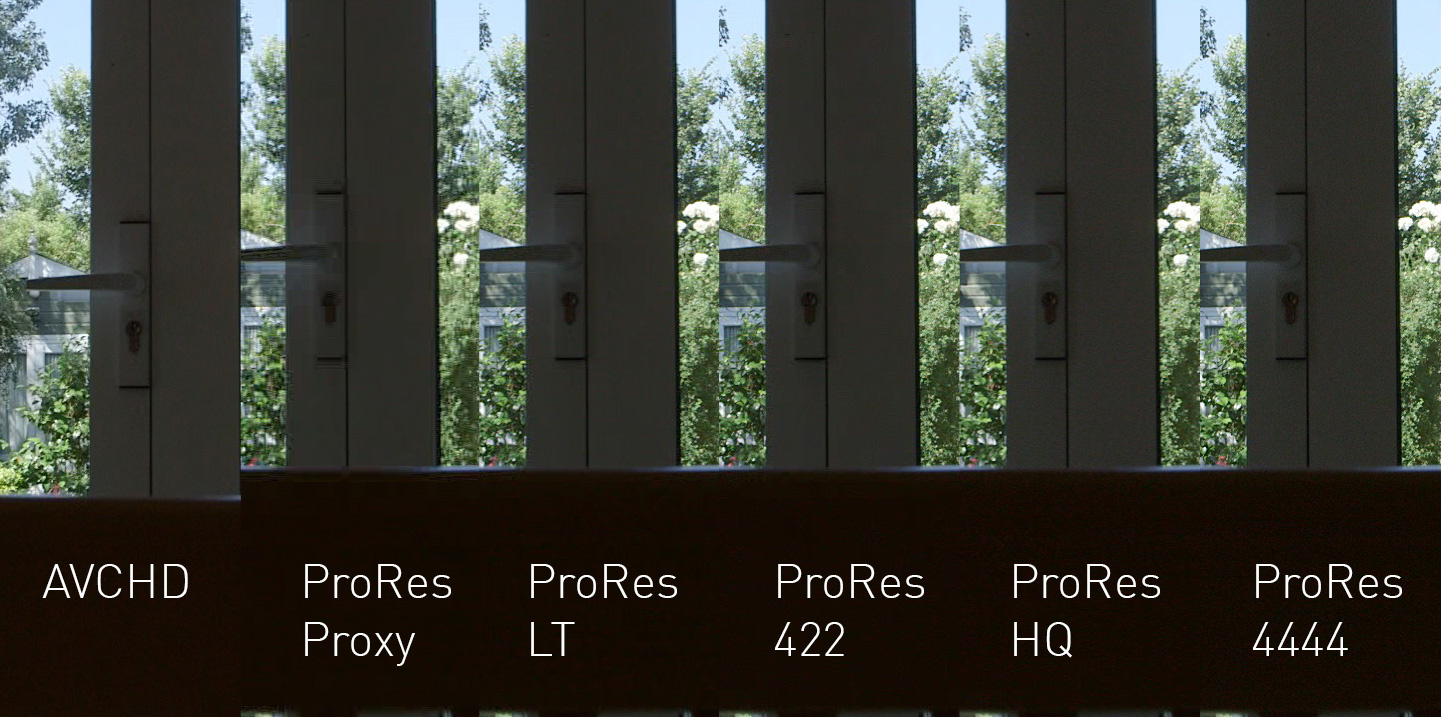
Full thread here:
http://www.dvxuser.com/V6/showthread.php?310861-The-effects-of-Noise-on-recording-to-ProRes
I've since been scooting around to see if anyone else has found similar effects on more challenging footage, and there seems to be a body of work that would suggest that the benefits of recording separately would best be seen by recording in ProRes HQ, especially concerning slightly more challenging material. My own tests have certainly been a little 'easy' on ProRes in the past. LOL.
Last edited: