Sdi out, the best quality ?

riky

Active member
It´s true that with SDI out you can obtain the best image quality getting real 422 with a SDI card, saving the files in ProRess 422 or non compression files?

A portable SDI card to use in outdoors?
It,s better than record in cards and then convert the originals Ex 1 files to ProRess 422?

Thanks
 
It´s true that with SDI out you can obtain the best image quality getting real 422 with a SDI card, saving the files in ProRess 422 or non compression files?

A portable SDI card to use in outdoors?
It,s better than record in cards and then convert the originals Ex 1 files to ProRess 422?

Thanks
Indeed it is. This is one of the first things I tried when my EX3 arrived. I used BlackMagic's Multibridge Extreme. Verified 4:2:2, full 10-bits and the option to also capture PsF (Progressive Segmented Frames), so no reverse pull-down required.

This is what makes the Convergent Design Flash XDR/Nano Flash desirable, although at this time they are only supporting 8-bit formats. They claim that 10-bit support will be future firmware upgrade. The other draw back is that their first go at this relies on Compact Flash cards. My hope is that their next generation will replace Compact Flash cards with a true eSATA-2 output for SSD capture. A much more efficient way to utilize the full capabilities of the camera's SDI output and it opens up the record time window without have to fiddle with a pile of Compact Flash cards. Cheers!
 
thanks, Barry
I have a BM extreme card with SDI in my Mac Pro, but I,m looking for a n SDI card to go outdoors, like matrox MXO 2 with a MacBook Pro. it´s this a good solution?

http://commerce.sage.com/MASQUEVIDEO/upload//items/default/MXO2.pdf

There has been a lot of discussion on the MXO2 over at the DVInfo forums. The Matrox support forums also are a good place to look for answers. Your MacBook Pro will need a fast hard drive and I believe Matrox places some restrictions on SDI capture using the ProRes codec. To be sure check the Matrox site. Cheers!
 
The Dynamic DUO

The Dynamic DUO

Yes that's right Barry, you can't capture pro res 4.2.2 HQ on a macbook pro with MXO2, maybe barely just 4.2.2, but you can with an AJA IOHD. Something funny, i have both the IOHD & the MXO2, it's a long story but i tether them together and have all the features i need.

The MXO2 to me , delivers sub standard SD down conversion, while the AJA is flawless. But the AJA won't play EX1 native, while the MXO2 does. Get the Picture...?

Aja is the best quality i have personally worked with, but it needs pro-res 422 MXO2 is good for playback of 422 with HD-SDI but not for capture .

The Dynamic DUO.
Cheers
 

Attachments

  • ajamxo2.jpg
    ajamxo2.jpg
    209.9 KB · Views: 0
Last edited:
Hey Phil,

How have you found the quality of the MXO2 in terms of it's purported ability to "replace" a broadcast quality HD monitor for color correction? Is the ioHD also useful in this regard? I don't know much about the BlackMagic HDLink Pro but it also boasts accurate color correcting on a consumer HDMI monitor.

I need to get something soonish.

thoughts??


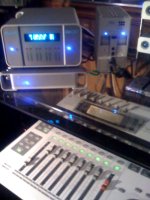
btw - what's that groovy looking mixer in your above photo?


thanks,


dmc
 
As can I read, the The Matrox MXO 2 can capture Proress 422 HQ
Look at this on http://commerce.sage.com/MASQUEVIDEO/upload//items/default/MXO2.pdf
​


•
Captures to a variety of codecs – Apple ProRes 422 HQ, 10-bit uncompressed HD, and many more

​
​
• Supports file-based workflows – XDCAM, XDCAM HD, XDCAM EX,​
P2, P2HD

• Works with Final Cut Pro, Apple Color, Adobe After Effects and allQuickTime applications that support the V-out component

REally work fine whith that setup Macbook pro and proress?
 
Last edited:
Hey Phil,

How have you found the quality of the MXO2 in terms of it's purported ability to "replace" a broadcast quality HD monitor for color correction? Is the ioHD also useful in this regard? I don't know much about the BlackMagic HDLink Pro but it also boasts accurate color correcting on a consumer HDMI monitor.

I need to get something soonish.

thoughts??


btw - what's that groovy looking mixer in your above photo?


thanks,


dmc

Hey DMC, Nice to hear from you, MXO2 will output a HDMI signal to a HDMI input for monitoring, this includes blue gun, color bars and calibration. The output is clean, but "honestly" speaking, i have been a POST technician for a long time, worked at FOX TV and many conversion houses so i have a critical eye for conversions and color smearing.

This said, HDMI is not true HD in my opinion, only HD-SDI can represent what we are "truly "looking at when your master goes to broadcast specs. Now HDMI is better then SDI, unless you are doing mainly down conversions for TV delivery or SD DVD.

AJA IOHD has HDMI in and outs and they work great!

I know it may not be what people want to hear but you can not replace a broadcast monitor with HDMI, for reference on the set, maybe but for broadcast you will never go into any Pro conversion house and the y will be using a HDMI monitor.

Oh the Groovy mixer is a Fostex digital, VM 200.

Cheers
 
As can I read, the The Matrox MXO 2 can capture Proress 422 HQ
Look at this on http://commerce.sage.com/MASQUEVIDEO/upload//items/default/MXO2.pdf
​


•
Captures to a variety of codecs – Apple ProRes 422 HQ, 10-bit uncompressed HD, and many more

​
​
• Supports file-based workflows – XDCAM, XDCAM HD, XDCAM EX,​
P2, P2HD

• Works with Final Cut Pro, Apple Color, Adobe After Effects and allQuickTime applications that support the V-out component

REally work fine whith that setup Macbook pro and proress?

RIKY
Despite any misconceptions with brochures and trust me, i went through hell figuring this out after i bought the MXO2. MXO2 is quite alot less expensive than AJA IOHD , for a reason. It needs a MAC PRO tower to capture PRO RES 4.2.2 HQ with an express card PCIe, which comes included with the MXO2 by the way. Also yes it capture to other codecs as well not HD uncompressed 10 bit, is Mac Pro Tower as well. But you can do 10 bit 8 bit uncompressed SD, DVC PRO HD & SD .
I love it because it supports "native" EX, P2 etc... nad plays right offthe FCP timeline without rendering at all. it also has live 23.98 to 29.977 conversion.
AJA IOHD has to convert native to Pro Res 4.2.2 via live capture or recompress on FCP timeline to output It will barely capture the 422 regular.
AJA IOHD will not play 23.98 HD and do a live down convert SD 29.97 , it has to be dragged into a time line and converted to 29.97 first. iI t may not need rendering depending on your processor power, which again is usually a MAC PRO tower. BUT AJA IOHD will play back and capture Pro Res 4.2.2 HQ on a MAC BOOK pro through firewire 800. MXO2 uses express card, 17" Mac Book pro now only.

I mentioned tis to AJA at CINE GEAR and i hate to say, i stumped him and he quickly moved onto someone else. The KI PRO does the same thing.

They are both great , and they both have their weaknesses and strong points.
Alas the Dynamic Duo
Cheers
 
Last edited:
Hey DMC, Nice to hear from you, MXO2 will output a HDMI signal to a HDMI input for monitoring, this includes blue gun, color bars and calibration. The output is clean, but "honestly" speaking, i have been a POST technician for a long time, worked at FOX TV and many conversion houses so i have a critical eye for conversions and color smearing.

This said, HDMI is not true HD in my opinion, only HD-SDI can represent what we are "truly "looking at when your master goes to broadcast specs. Now HDMI is better then SDI, unless you are doing mainly down conversions for TV delivery or SD DVD.
Cheers


thanks for the info Phil - always helpful!

I guess I'd be mostly interested in the MXO2 for color grading - do you think that it would have a higher degree of accurate color monitoring than simply using something like a DeckLink Intensity card, assuming that they would both be feeding the same a 1080P consumer level monitor?

I'm just not sure which to buy... Clearly a proper broadcast HD monitor is the right way to do it but I can't really justify the expense - not this year anyway.


: )


dmc
 
Hey DMC, first off intensity only works on a pcie tower. So it that is your beast than Yeah, it work for color grading. But if your monitor does not have blue gun or calibration than as far as i know intensity does not have calibration, guys correct me if i am wrong on this but i did not find anything in the brochure on this. http://www.blackmagic-design.com/products/intensity/

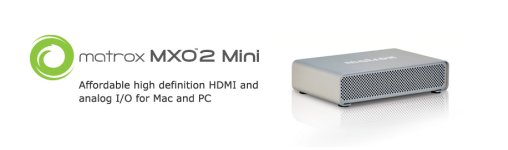
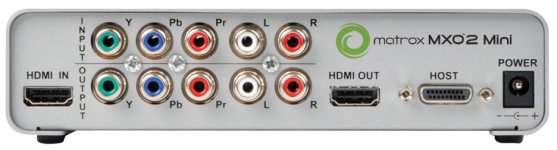
MXO2 may be over kill cost wise but they just released MXO2 mini $449.00 HDMI ins and outs
component (rca jacks) ins and outs as well. But that has the same calibration as the MXO2 full or rack module version. So that's a great choice for your color grading. Comes with choice of express card for macbook pro or pci2e card for tower.

http://www.matrox.com/video/en/products/mxo2_mini/

Sorry i was just PMed for the mxo2 mini specs and it does 5.1 surround

▪ Works with Mac and PC, laptops and desktops
▪ Small, lightweight, external box that's easily connected to your cameras and monitors
▪ Capture and playback high definition video via HDMI and analog component; or NTSC and PAL via analog component, S-Video, and composite
▪ Turns your HDMI screen into a professional-grade video monitor with color calibration tools including blue-only
▪ High-quality 10-bit hardware scaling engine for realtime upscaling, downscaling, and cross conversion on capture and playback (See Specifications section for scaling features supported on Mac and PC)
▪ Stereo RCA and up to 8 channels of HDMI audio input and output
▪ 5.1 and 7.1 surround sound monitoring on the HDMI output
▪ Easily edit AVCHD footage by capturing into an edit-friendly compressed or uncompressed format
▪ Works with your favorite applications including Final Cut Pro, Adobe Premiere Pro, Adobe Photoshop, and many more
▪ Also available with Matrox MAX for faster than realtime H.264 encoding
▪ Three-year hardware warranty and complimentary telephone support

Matrox MXO2 Mini input/output device
Matrox MXO2 PCIe cable (1 meter)
Matrox MXO2 Mini external power supply
Two S-Video adapters
One of the following:
Matrox MXO2 PCIe x 1 host adapter (for use with Mac Pro and PC desktop)
Matrox MXO2 PCIe host ExpressCard/34 adapter (for use with MacBook Pro and PC laptops)

Cheers
 

Attachments

  • en_top.jpg
    en_top.jpg
    36 KB · Views: 0
  • mxo2_mini.jpg
    mxo2_mini.jpg
    47.2 KB · Views: 0
  • pcie_adp7150.gif
    pcie_adp7150.gif
    7.7 KB · Views: 0
  • exp34_adp7156.gif
    exp34_adp7156.gif
    8.8 KB · Views: 0
Last edited:
Thanks!

Yeah I'll be using it in my tower (Mac Pro).

I'm probably going to get the MXO2 Rack since it also has separate outs for surround that are a little easier for my setup in that I'd rather not have to de embed the audio from the HDMI signal. I think that's the only way it could be done with the mini - the price sure is attractive though.

Decisions, decisions...


btw Phil - I just picked up a really sweet Nikon 35 f2.0 the other day for a song! It's circa 1977 - has a great look on the G35. I love the 70s!


dmc
 
The rack is nice, mucho more money though. I do the separate 5/1 through Pro tools and DIGIDESIGN board and five KRK V4s. But yeah, de-embedding is not an option for me as well

Intensity is $199.95 so for color grading quick and dirty it is the way. But if you are doing the post thing, yeah the rack is good, but you can get IOHDs as low as $2,000.00 sometimes on Ebay, if you can wait long enough, they will drop in price because of the KI Pro. IOHD is superior for a post situation than Mxo2, it is a stand alone up and down converter as well, even with no computer connected.

35mm f2 , yeah i love those lens, I've got one and it's simply beautiful and very sharp especially on a G35. Chime in on this thread http://www.dvxuser.com/V6/showthread.php?t=173661

PM me sometime tell me what's new with the kit.

Cheers
 
My company has got 4 PT systems including an older TDM Mix systems in use for animation posting etc.

I so wish that Digi/Avid would yield to letting folks use 3rd party hardware with their software. The ProTools system is by far the most elegant audio solution and would be an ideal fit if a guy could use it from directly within Final Cut in a surround capacity.

Although I've tried to keep an open mind with regards to Sound Track - it really sucks compared to PT IMHO.


dmc
 
...This said, HDMI is not true HD in my opinion, only HD-SDI can represent what we are "truly "looking at when your master goes to broadcast specs. Now HDMI is better then SDI, unless you are doing mainly down conversions for TV delivery or SD DVD....

Do you think this is a problem of HDMI or the quality of the display though? As far as I was aware, both HDMI & HD-SDI were uncompressed full raster full quality signals, and to convert between the two it is only a look up table conversion.

Is it possible that a professional grade monitor, if it had HDMI as well, would look the same from both inputs? Alternatively, if you took a HDMI feed through a HD-SDI converter onto a Professional grade monitor you it would look the same? (or extreme case of HD-SDI to HDMI back to HD-SDI would just bring the stream back to its origonal form (ie the conversions are lossless?)
 
Guyb, great point, i speak from direct conversion experience in a post house and with the AJA IOHD, MXO2 and 2 HD-SDI monitors and the infamous Dell 24 sharp that we were all convinced was going to save getting a broadcast monitor. The DELL - HDMI looks great , but looks completely different than HD-SDI on the Marshall with P toP or a Panny studio monitor. Absolutely, the monitor matters not just the signal input. But HDMI has a different contrast and color spectrum than HD-SDI regardless of full raster and a lossless quality signal. I think to the eye it may look pretty darn close, and it is a cost effective way to get the best signal for the money. The AJA converts HDMI fantastic, so does the MXO2, but nothing looks best when when it HD-SDI.

I bought my marshall HD-SDI monitor for my camera for $,1000.00 on Ebay and it is unbeatable, i have a Marshall 8,4 HD-SDI our the post bay i bought for $1,200.00 and it is unbelievable.
I have a Dell 24 which i output from MXO2 or AJA IOHD and i think it weak in comparison.
So is it the conversion, Is it the monitor , probably the monitor for sure. Has any one tried a HDMI Marshall or even IKAN yet? GUYB, I think that would answer our question huh?

Cheers
 
...So is it the conversion, Is it the monitor , probably the monitor for sure. Has any one tried a HDMI Marshall or even IKAN yet? GUYB, I think that would answer our question huh?
Cheers

I'm sure it would go a long way. Are there any Pro monitors with both HD-SDI & HDMI? If so, then with a HD-SDI to HDMI adaptor you could compare the same signal through different input paths.
 
Good find Phil!
The HDLink Pro looks like a very interesting alternative - it also offers 6 discreet audio outs! Something that unfortunately the ioHD does not.

Anyone out there using the HDLink Pro? If so do you need to use a BM card or will any HD-SDI card (AJA Kona series) work as well?


The AJA io Express looks pretty cool as well - seems at first glance to be a little closer in terms of features to the MXO2 mini.


dmc
 
Back
Top