C500: SD Card Buffer?

digitalinnovations

Well-known member
I was out this morning grabbing some footage and I received a warning / message on my C500 MKII that some something about the “SD card buffer” so I’m wondering if I need a different faster SD card or what this issue may be.

The setup was recording RAW @ 60fps and proxies to the SD. My SD card is a Lexar SDXC 128gb 1667x (250MB/s) so I wouldn’t think that would be an issue but perhaps it is?

Another thing I noticed was that when I would stop recording it took a while for the buffer to clear on the CFexpress (and obviously the SD card). I didn’t time it but it took long enough that I noticed I was unable to hit record for bit; I’m in a habit of “breaking clips” instead of rolling for numerous takes / moves and the C500 MkII wouldn’t let me do that...has anyone else noticed this? Is it perhaps just with the 60fps?
 
Last edited:
I havent's shot with the C500 MKII but as far as cards, how old is the Lexar? Lexar went out of business a few years ago, the execs from Lexar started ProGrade and a Chinese conglomerate bought the Lexar brand name.
The newer Lexar cards, from what I've seen, are not good, are not consistently reliable. I would throw that in the trash and buy a Sandisk Extreme Pro. I use them in our C200s and our Fuji XT3s and they are bulletproof
and Canons seem to work well with them.

Cards are such a weird thing though, I took a chance and bought half a dozen EgoDisk CFast 2.0 cards when the C200 came out, to shoot RAW. We had never heard of the brand, but a few of us who couldn't afford to spend
$7k or $8K on enough Sandisk "approved" media bought them and they turned out to be absolutely bulletproof with the C200 shooting 12-bit RAW. So sometimes it can save you a bundle to experiment with cards but you
go through hassle and returns for the ones that don't work well.

I predict the same thing will happen with the CFExpress cards for your camera, the "Approved" ones are probably not super cheap but soon EgoDisk, Silicon Power
and all of the other fake "brands" will come out with CFExpress cards, if they haven't already, and probably a few of them will work well at a fraction of the cost of the "approved" cards. I've spoke in-depth with engineers at Canon, Panasonic
and Sony and "approved" cards are kind of a shorthand for "Yeah, use these ones we tested, but we're too busy to test all of the cards on the market. Some of the non-approved cards will work fine". The manufacturers have to
eliminate variables when trying to troubleshoot user issues so they will often only qualify one or two brand/models, that's it, but that doesn't mean no other media will reliably function for you. We, as users, can spread the workload out
and try different cards/brands so one person isn't taking all of the risk and spending all of the money.

Six EgoDisk cards for our C200 cost me $1,500.00. The same amount of the storage using the "approved" SanDisks at the time would have cost me $7k, as much as the camera cost, which I couldn't afford. Turns out I have now shot hundreds
of TB of RAW on the EgoDisks without a hiccup over almost three years. So glad I didn't waste $7k just to shoot "approved" cards. For others, they may find spending a boatload on "approved" cards to be worth it. It eliminates a perception
variable if something goes wrong. Depends on who you shoot for and under what circumstances. But approved media goes bad too.
 
Last edited:
Thank you for the reply! And you’re right...it’s CRAZY how much a person can drop on media. I thought the SanDisk cards for ARRI were expensive but these CFexpress cards (and the use of 6k RAW of course) are worse. Like everything else, they’ll drop in time but stupid me, I always seem to buy a camera that uses whatever is the most expensive. I think P2 cards were the most expensive (per GB) cards I ever invested in...so far.

It sounds like these cards are bunk...I bought them new this week from Amazon. It’s my own fault for buying the cheapest UHS-II cards. I just thought since the proxies are only like 40mbps they’d be way overkill. I have Lexars that Ive run in my FS7 v1 since it launched with no problem but I also didn’t know all that Lexar going downhill.

So it looks like these will be going back and I’ll order some others later today.

Thanks again for the help!
 
Good luck, Amazon just dropped off four more of the 256GB Extreme Pros today coincidentally. They're pretty cheap and have worked well for us.
 
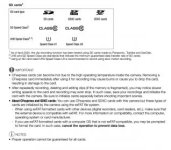
Not sure if this helps, but the user manual mentions that different types of SD cards are formatted and handled different and the SDXC cards strangely don't have any required specs below on this chart:

Screen Shot 2020-08-30 at 7.52.27 PM.jpg

Also, here it says that each different type of SD card is formatted differently within the camera:

Screen Shot 2020-08-30 at 7.53.25 PM.jpg


Assuming you formatted the SD card completely before you started recording and you encountered those problems, you might try an SD or SDHC card instead and see if that solves the problem.
 
That’s great info! Yes, I formatted the “troublemaker” card in-camera prior to recording. Hopefully it is just that card and I have a couple replacements inbound so hopefully that will sort it.

Thank you very much!
 
I have the exact same SD cards, also recently purchased, using the same logic as you (these must be overkill), and guess what... I've encountered the same issue (but in a C300mkiii). More than once.

Looks like a bad series of cards.
 
I have the exact same SD cards, also recently purchased, using the same logic as you (these must be overkill), and guess what... I've encountered the same issue (but in a C300mkiii). More than once.

Looks like a bad series of cards.

Well I’m glad this thread helped someone else too and thank goodness I’m not the only one; not that I want you or anyone else to have troubles but I was kinda wondering if it was my camera which would be much worse. Hopefully you have some new cards on the way like I do. I’ll report back once I have my new cards.

It’s just a little disconcerting to go out with a new camera system and one of the first times out there is an issue...makes you worry about the dependability.
 
Back
Top