SD 702 and 5d

morgan_moore

Major Contributor
Hello

I have the canon 5dmk2 and the Sound Devices 702 audio recorder

I had a concept of trying to pump the sound out of the SD recorder and record it 'in camera' - recording to the CF card on the recorder too

This should mean that maybe I wound not have to synch sound in post or at least the camera has a fairly good sound track to synch too (say doing an interview with lavs where the camera sound could be completely off)

And Im double backed up file wise on my audio

Any comments on which output from the SD to use and what leads???

Thanks

SamMM
 
The only possibility that I can think of are the line out connectors, and then only if you can lower the output level to something like mic level. I do have the SD 722, but I can not remember if the output can be padded down low enough. The Y-cable you need is terminated to a 3.5mm stereo plug from two female XLRs, did you get the cables form those small TA3 connectors to male XLRs with our unit? If not, you need those also. Or a custom made Y-cable from two TA3 females to 3.5mm stereo plug.
 
Im in a similar pickle... and a bit panicky since I need to do the combo monday morning. MixPre-D > 5D mkII.

- Aren't you supposed to be able to simply connect a TA3 > 3.5mm mini jack cable between the two and get a useable signal? I know BH has those.

- Do you still ned to pad now when you can control the gain? Could you maybe just connect an xlr > mini jack cable?
 
If you have a Sound Devices 702, recording in-camera audio - even if it's sourced from the 702 - is going backwards. You have some of the best audio recording you can get sitting right there, and you want to patch it into a 5D? As far as reference/scratch audio in-camera for easier sync later, get a RØDE VideoMic or VideoMic Pro for the camera, and use a dumb slate (clapper board) at the start of each take.

@legrevedotcom, yes... you can get the TA3F>1/8"TRS cable to connect the MixPre-D directly to your 5D from any Sound Devices dealer. The TA3 "st unbalanced mic out" that's located above the XLR inputs is designed specifically for feeding signal to DSLR cameras and needs no further padding of the signal.
 
@Alex, but is that really the only option? Cant you do an xlr (mic lvl out) to minijack? :S I can at the earliest get the TA3 cable tuesday next week and I need a solution for monday morning. I had forgotten how troublesome this combo is...

@Morgan, hope it's ok I do a ride along... seems we have the similar challenge.
 
THanks all for the comments

I got recommended this .. http://www.sescom.com/product.asp?item=LN2MIC-ZOOMH4N

"f you have a Sound Devices 702, recording in-camera audio - even if it's sourced from the 702 - is going backwards. "

Well I will record on the card in the recorder too .. I have had some issues with synch sound sent to editors who are baffled by two files !

Im not looking for ultimate quality (in this scenario) here is an idea of the sound captured on a 5d with a SD premix http://vimeo.com/10194917 which is OK

Now a RVM won't work for scratch if the talent is a way off and using a Lav and a RVM is more claptrap on the rig (I have one BTW)

S
 
Im in a similar pickle... and a bit panicky since I need to do the combo monday morning. MixPre-D > 5D mkII.

- Aren't you supposed to be able to simply connect a TA3 > 3.5mm mini jack cable between the two and get a useable signal? I know BH has those.

- Do you still need to pad now when you can control the gain? Could you maybe just connect an xlr > mini jack cable?
Even if you used the TA3 out, which is nominally -15dB, you would need to pad that down to mic level (-50dB or so) I think SD has a schematic and resistor values if your handy at soldering yo'wn cables. The B&H and Markertek adapter/cables have built in pads/resistors.
 
Last edited:
Last edited:
Even if you used the TA3 out, which is nominally -15dB, you would need to pad that down to mic level (-50dB or so) I think SD has a schematic and resistor values if your handy at soldering yo'wn cables. The B&H and Markertek adapter/cables have built in pads/resistors.

Where are you reading that? From MixPre-D user Guide:

The Stereo Unbalanced Mic Output program is identical to the XLR Output. This out-
put is fixed at a -36 dBu.
 
Now a RVM won't work for scratch if the talent is a way off and using a Lav and a RVM is more claptrap on the rig (I have one BTW)

I must be doing it wrong, because it works perfectly for me for scratch audio. I've done interviews where the talent was a distance from the camera, but the VideoMic captures the slate just fine. As for the scratch audio... well, it's scratch audio, meaning it won't be of usable quality but is enough to hear what's going on for reference.
 
I won't be slating here - RnG

I meant maybe 10 yards from the camera .. maybe with the talent in a busy show environment (for example)

Anyway I'm sure you are right

S
 
I won't be slating here - RnG

I meant maybe 10 yards from the camera .. maybe with the talent in a busy show environment (for example)

If you aren't slating, your options are limited. Though, to run any output from the 702 to the 5D's input... how close is the recorder, generally, to your camera during production? If it's close, are you using wireless for your interviews? If you're using wireless at all, and have a spare system, take the second receiver and retune it to match the transmitter that's in use. Place that receiver on the camera. Now, you're picking up the one transmitter on two receivers: one to recorder, and one to camera.
 
The 702 will be 6 inches behind the camera on a rig

As for not slating? Im talking about simple little interviews hopefully delivering one file of vision and audio - I don't see the need to slate in that situation

Of course (and it is worth considering) is if the lead failed then the camera would have no audio and no visual slate.. a world of sh*t

Although you do get sound on playback with the 5d so pretty quickly you would be aware of such a failure

S
 
If you aren't slating, your options are limited. Though, to run any output from the 702 to the 5D's input... how close is the recorder, generally, to your camera during production? If it's close, are you using wireless for your interviews? If you're using wireless at all, and have a spare system, take the second receiver and retune it to match the transmitter that's in use. Place that receiver on the camera. Now, you're picking up the one transmitter on two receivers: one to recorder, and one to camera.

My typical set-up is one lav, one shotgun on the camera (rig) feeding into the 702 then Pluraleyes - was hoping to skip that step even at the expense of some audio fidelity

S
 
My typical set-up is one lav, one shotgun on the camera (rig) feeding into the 702 then Pluraleyes - was hoping to skip that step even at the expense of some audio fidelity

S

A shotgun on the camera rig, yet you say the VideoMic won't work? I'm not sure why, considering that either way you have a mic that's too far from the dialog to do any good. As a general rule, on-camera is a terrible place for a mic... but the difference between your current setup and the one I suggested with the VideoMic is that the latter gives you clear production audio and a reliable scratch track for slate and sync.

Get a clapper. Even for quick interviews as you describe, it takes just a moment to slate and that's your safety net in post. And if your editor is confused by getting non-sync audio and video files, well... I can't help you there.
 
I have the shotgun (CS2) on the camera feeding into the proper recorder - thats why I don't really like the RVM onboard too - makes for a crazy rig

The CS2 either doing ambient - lets say a chef .. their knife chopping stuff up .. IMO on camera is fine for that.. or as its on a 1m lead - so can be handed off to a reporter

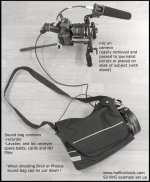
Here is one build the 702 is in the bag in this case - but I have a bigger rig where the recorder is mounted behind the camera - its for solo operating..

SoundoffRig.jpg
 
I emailed Sound Devices about this very topic and here was there response and the route I went:

As for getting audio from the 702 into the 5D, there are two ways you can accomplish this. The first option would be to come out of the tape out, and then use a padded cable to bring it down from consumer tape level (-10db) to mic level (-40db'ish), and then you can just feed the 5D that signal. This method presents a problem because its harder to find exactly what attenuation would be needed for that specific mic input to get the best quality. The more preferable method would be to get a TA3 to 1/8 male cable (XL-3 accessory), and then select your output source in the 702 menu. Once that's selected, attenuate the output via the 702 menu (around option 49: Output1 L,R attenuation) down to -40. From there, connect the cable, and enable tone, so that you can match the -20 tone with the mid point of the 5D meter (probably right around -20 on that scale as well if it goes from -50 to 0). This will ensure that the gain structure between the two devices does not clip camera audio. This would be the method I would use.
 
Back
Top