
Navigation
Install the app
How to install the app on iOS
Follow along with the video below to see how to install our site as a web app on your home screen.
Note: This feature may not be available in some browsers.
More options
You are using an out of date browser. It may not display this or other websites correctly.
You should upgrade or use an alternative browser.
You should upgrade or use an alternative browser.
HPX250: Scene file system on the HPX250
- Thread starter BillinSC
- Start date

Travis Hanley
New member
Awesome
Sorry for such a late reply to your very quick response
ahah so its the model number i changed the from 59.94 Hz to 50 thinkin that it would be an NTSC _ PAL issue
but this makes even more sense
trying to change now
Woo Hoo worked first time you are a legend love ya work
Now do you know where i can find the original in camera scene files as i regrettably changed mine to suit a couple shoots i was doing
and in a bit of a fluster over it all i forgot to save them
One more issue while im here
does anybody know or has anybody have this issue (pic attached)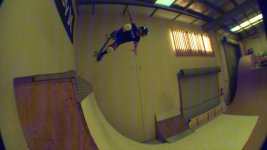
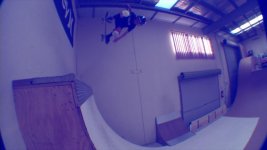
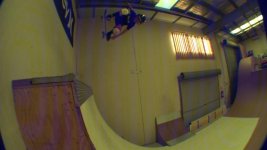

the first three (rough sequence) was a dramatic change from blue bars to a complete wash and i had a fisheye on
second time was 2 days after no fisheye and kind of looks like an acid induced trip
both times i turned off and back on and it solved the problem but im guessing that it will re occur
Any ideas?
im going to enquire about warranty but cant afford to not have a camera
Sorry for such a late reply to your very quick response
ahah so its the model number i changed the from 59.94 Hz to 50 thinkin that it would be an NTSC _ PAL issue
but this makes even more sense
trying to change now
Woo Hoo worked first time you are a legend love ya work
Now do you know where i can find the original in camera scene files as i regrettably changed mine to suit a couple shoots i was doing
and in a bit of a fluster over it all i forgot to save them
One more issue while im here
does anybody know or has anybody have this issue (pic attached)
the first three (rough sequence) was a dramatic change from blue bars to a complete wash and i had a fisheye on
second time was 2 days after no fisheye and kind of looks like an acid induced trip
both times i turned off and back on and it solved the problem but im guessing that it will re occur
Any ideas?
im going to enquire about warranty but cant afford to not have a camera
Travis Hanley
New member
thanks i just seen that
You can initialize the scene files from the camera's menus.
We tried that it didn't work. I think I might have saved over the factory settings.
Did you use INIT (rather than LOAD)?
Yes we did. but nothing changes.
I got the "original" scene files saved in another .txt and attached it, if someone still needs it... just change name & frequency to your regional settings (mine is HPX250EJ, 50Hz).
View attachment SCENE1 original.TXT
View attachment SCENE1 original.TXT
Interestingly enough, Panasonic has put a scene files resource manual together that explains step by step how all of the various options work. They did a nice job. The thing that threw me for a loop was the way they talked about the scene files in the original manual. Once I realized that you could have a 4 sets of six scene settings, it became much easier. Barry's help was great as well.
Panasonic has actually put up a nice collection of other documents as well. This is the link: https://eww.pass.panasonic.co.jp/pro-av/support/content/guide/EN/top.html
-Bill
Panasonic has actually put up a nice collection of other documents as well. This is the link: https://eww.pass.panasonic.co.jp/pro-av/support/content/guide/EN/top.html
-Bill