HPX250: Scene file system on the HPX250

BillinSC

Active member
Hello,

I have read the threads and the operating manual a few times and I still cannot get the concept of using the SDHC cards and external files to work.

Does anybody have any instructions that are simpler or more straight forward than the manual? This camera, or at least the operating manual in conjunction with the camera, has me very frustrated.

Sincerely,
Bill
 
All the card will allow you to do is load files or save files that about it. The files must be created in camera first. If you have Barrys book then you can load files off the CD and onto the card and into the camera to use. Do you have Barrys book?
 
Thanks for replying. No, I received a postcard to mail in. I would imagine it will take awhile to receive it.
 
I appreciate the help. Unfortunately my frustration factor overcame my desire to mess with this camera so I am processing an RMA. Sometimes a man just has to know his limits.

I appreciate your assistance. Good luck with the HPX250.
 
Last edited:
Any camera of this caliber is going to have a whole series of settings that you can change. You really sent the camera back because you couldn't figure out how to load and save scene files to a SD card?
When I got my first P2 camera I did't know squat about it but just went out and hit the red button. You eventually start tweaking the settings but I never thought about sending it back because I was frustrated I couldn't figure something out right away.
 
Must admit I'm a bit surprised - this is one of the best cameras out there at the moment and it's not difficult to operate. You do have to spend time with it as there's a lot you can adjust (I expect to take a few weeks yet before I've explored it all) but straight out of the box it takes pretty fine pictures. Oh well...
 
Well guys, we all have items that we like and do not like. I have many other reasons. I will leave it at that. My decisions are in no way meant to disparage you and your choices. I thank all of you for your assistance.

Sincerely,
Bill
 
Actully I do understand. I just came from SD with manual settings (or auto but manul looked better) still no real adjustments for color as long as white balance was set.
To this camera, and I have to admit I was and am still alittle overwhelmed. Just when I think I understand a setting like say Sync Shutter I try to set it and I am lost, even with books in hand cant make it work. Everytime I use it I learn alittle more, I hope.
To me a camera is just a tool, and you need to feel comforable with what you have. Hope all goes well what what ever you decied Bill.
Regards,
Robert
 
Here's the procedure for saving scene files onto an SD card on an AG-HPX250 camera:

Format the SDHC card in the camera, not on a computer. Go to the Card Function, and choose Scene File->Change. On File Select, choose the position you want to write into, there's 4 possible. Let's presume "1". So leave "file select" at 1, and go to Write->execute".

Now, here's where it gets tricky and what catches a lot of people, so I guess this is where you're getting stuck. You are given the opportunity to change the file name. Whether you change it or not, you HAVE to move the cursor all the way to the right, off the end of the file name. So let's leave it set to "TITLE1". Push the "right" key eight times. At that point, it'll bring up a "write file 1 yes/no" menu. Choose "yes" and it'll save it out. A shortcut for this is, if you know you're not going to change the file name, just go left off the file name, that'll accomplish the same thing.
 
Thanks Barry, that was a perfect explanation! How come it's not written like that in the manual? I'm hoping to get your book from my boys at christmas. I'm so excited about my new HPX250!!
 
Can Write Scene Files but.....

Can Write Scene Files but.....

Here's the procedure for saving scene files onto an SD card on an AG-HPX250 camera:

Format the SDHC card in the camera, not on a computer. Go to the Card Function, and choose Scene File->Change. On File Select, choose the position you want to write into, there's 4 possible. Let's presume "1". So leave "file select" at 1, and go to Write->execute".

Now, here's where it gets tricky and what catches a lot of people, so I guess this is where you're getting stuck. You are given the opportunity to change the file name. Whether you change it or not, you HAVE to move the cursor all the way to the right, off the end of the file name. So let's leave it set to "TITLE1". Push the "right" key eight times. At that point, it'll bring up a "write file 1 yes/no" menu. Choose "yes" and it'll save it out. A shortcut for this is, if you know you're not going to change the file name, just go left off the file name, that'll accomplish the same thing.


Can Write Scene Files but.....Cant read them once i have put the three scene files on the card
I have read the instructions time and time again i have downloaded from the panasonic site a few different times
but still no joy
Any help would be great
 
Are you saying that you write out scene files to the SD card, and then try to read them back in, and you can't? What are the exact steps you're taking?
 
hey guys

I have the same problem as Travis... I have HPX250... I can write, but they don't read... tried multiple times, really carefully followed the steps on panasonic site...

is it maybe problem with the SD Card? I have a random 32MB from Canon (got it some kit, but HPX250 instructions say it should work)...

Thanks for your help!
 
Can Write Scene Files but.....Cant read them once i have put the three scene files on the card
I have read the instructions time and time again i have downloaded from the panasonic site a few different times
but still no joy
Any help would be great
Ah. I just saw your location, NSW, and that you're downloading from the Panasonic site. That's probably the problem. The scene files you're downloading are from the Panasonic USA site and are only designed to be used in the USA version of the HPX250. You have an HPX250EN, not an HPX250P, which is what the scene files are made for. You can probably still get them to work, but you'd have to edit the text of the scene files and change the model number of the camera to match yours.
 
Thank you for a quick reply, never thought of that!
(I am from Slovenia and using AG-HPX250EJ on PAL)

The problem is I am a pretty much a noob when it comes to changing/making scene files on your own, for me presets (like clear/flat) made by professionals are more than enough.
But I am willing to learn and try to make it work, yet I would really appreciate more help.

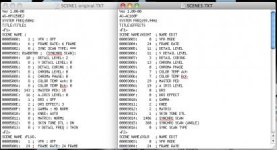
I checked the .txt files with the "original" one (I saved the file that the camera makes in step 2 of the tutorial) and of course there are some differences compared to new scene files text.
I thought it maybe work if I just change the model (to AG-HPX250EJ, as in "original" scenes) and system frequency (to 50Hz, as in "original" scenes), but sadly still no read...

Should I also change the numbers of the modes?
(ex.: in "original" VFR settings are changed in bracket named 00005000, and in new scenes its named 00003003)
There seems to be a slight difference in format of the text also...
Or maybe something else?

I attached a screenshot of .txt files comparison ("original" and effects preset) so you get a better picture what I am talking about...
Screen shot 2013-04-03 at 2.36.26 PM.jpg

Thanks again!
 
Looks like you tried downloading the AC160 scene files. Those aren't going to work on an HPX250. Try downloading the HPX250 scene files, and changing the model name and system frequency, and it should work.
 
Back
Top