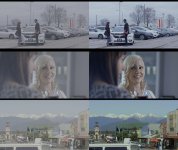
FS7: S-LOG3 ARRi saturation look 709 LUT for Sony FS7/F5/F55 - feedback??

cyvideo

Veteran
Had to come up with an S-LOG3 LUT for a client job and was running into the problem that none of the many LUTs I tried really coped with the FS7/F5/F55 Magenta leanings. Client was happy with previous ARRI 709 grades so set about knocking up a LUT for the Sonys out of of 3D Lut Creator to minimise the Magenta bias. Then tweaked it in Resolve with Art Adams 2013 Lum vs Sat curves tweak to try to emulate the ALEXA's chroma saturation curve.
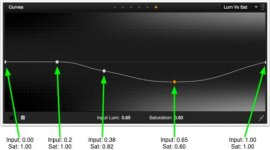
artadamsLum-vs-sat.jpg

Art's article here:

http://www.dvinfo.net/article/post/making-the-sony-f55-look-filmic-with-resolve-9.html

Named the LUT CYAA, the AA to credit Art Adams for the work he did to achieve his "Arrilook" chroma saturation out of the Sonys. Not saying any of these sample grades are anything special but the client was overall pretty happy with the LUT as developed, thoughts please?

LUT Name = CYAA_SL3C_L709A

Comp01 copy.jpg Comp02 copy.jpg

Credits to the many shooters who have posted various stills on the web from a variety of different camera LOG shoots. Stills that I have also used for developing testing this here S-LOG LUT thing.

Shot ALEXA Log-C
https://www.cinematography.net/ACES-Test-low-budget.html
ACES-test.Alexa.jpg

Shot ALEXA
https://digitalfilms.wordpress.com/2011/05/27/arri-alexa-post-part-5/
blg_alexa5_hyvee5-lrg.jpg

Shot F55
http://www.dvinfo.net/article/acquisition/cinealta/craziness-using-an-alexa-lut-on-f55-footage.html
F55 ASL_Models-No-LUT

Shot GH4
https://www.cinema5d.com/wp-content/uploads/2015/10/Colors-of-New-NewZealand-VlogSTILL10_000000.jpeg
Colors-of-New-Zealand-VlogSTILL10_000000.jpg

Shot FS7 Tom Antos
https://www.youtube.com/watch?v=mhy4rZgcJ0w
FS7 SLOG3 Tom Antos.jpg
FS7 SLOG3 Tom Antos 02.jpg

Chris Young
 
Last edited:
This may be a dumb question but do you do the luma vs. saturation curve arri emulation adjustment for the master or for a "specific color" (i.e. magenta)?
 
No in this case I did the magenta correction in the first pass in 3D Lut Creator so that was an adjustment which globally affected the whole LUT. Once I had the overall magenta correction look/color/contrast I was happy with I then brought the LUT into Resolve applied it to the first node then added a second node then applied Art Adams luma/sat curve values to that second node. This node's luma/sat curve processed the chroma saturation increase away from the luminance increase as exposure goes up. If you read Art's article he explains what the basic differences are between how ARRI's color science works vis-a-vis Sony's. This is a sort of emulation of the ARRI's image science that is part of ARRI's proprietary camera hardware and processing technology. Kudos to Art Adams for nutting this out. I'm currently testing this as a monitor LUT and will also 'burn' this LUT in camera to some S-LOG3 footage to see how the results stack up. Once I have tested this out and have finessed the LUT I'll throw it up here for others to suck and see how it works for them. Basically I'm reasonably happy with the first results. Will see how it goes.

Chris Young
 
Chris, keep in mind that Art's entire article only refers to custom mode on the F55 and not CineEI mode where the Sony cameras work much differently.

This is what I seem to see with Alexa’s Rec 709 mode in comparison to the F55 in hypergamma mode. Sony’s F55 saturates colors until they clip and fail, whereas Alexa saturates colors to the point that film would, and no more.

His findings are valid about color saturation increasing as exposure increases in custom mode but I had done some testing recently and tested both custom mode and CineEI mode for saturation level over various exposure ranges, and in CineEI mode the color works a lot like ARRI does. Over a very wide range of luminance values I could not get color saturation to get past 40% which is pretty good. Sony must have thought about this already when designing CineEI mode.

Here's a short video I made showing a vectorscope on a Flanders Scientific monitor hooked up directly to the F55. I'm shooting an x-rite color chart and I increase exposure starting from base exposure all the way past clipping and then back:

https://www.youtube.com/watch?v=lYGT4diBC3M


You can still use Art's luma/sat curve on CineEI / slog footage but you don't really need to. It will mostly have a greater effect on custom mode footage. A common trick amongst colorists you might want to try (and I really like) is to use a luma/sat curve which desaturates color more and more the higher the luminance level gets until finally at the very top of the range color is completely removed. Highlights are generally white, so this can work quite well for an immediate "nice look".

lum-vs-sat.png


For anyone looking to get magenta out of footage they can use the offset wheel in DaVinci, Colourist, or any program with wheels and push it towards green. Another trick I've learned for real stubborn magenta is to use hue vs. saturation and selectively desaturate it just a touch like this:

hue-vs-sat.png
 
Last edited:
Dennis.

Fully understand what you are saying re Art's ARRI rec 709 vs the F55's Custom mode. Thinking laterally though I thought well I'm going for a 709 style LUT so why not see if in practice this treatment can apply when designing a 709 LUT for S-LOG3. Tests so far are keeping me pretty happy and more importantly the client. Re the magenta bias I don't want to have to correct that in post if possible. I just need a non magenta bias looking LUT for an on set 17" monitor that doesn't have LUT capability. With this LUT so far I haven't had to even consider taming the magenta bias because it's just nor there.

Regards your other tips, especially the LUM vs SAT roll off one, and the demo clip many thanks. I will be trying both tips out for sure. I learn more each day. That's why I hang out here :)

Chris Young
 
I think as long as you get the results you like, that's all that matters and it's great to try things and share with the group for discussion.

I just wanted to point out to other potential readers so there is no confusion or misinformation that the idea of Art Adam's theory in emulating the Alexa chroma saturation curve does not apply to the camera as whole (which funny enough is what I thought when I read the same article a few years back).

You sort of generalized how "Art's article explains the basic difference between ARRI and sony color science" as a general catch-all statement but just note this is not exactly correct.

This is also another lum-sat transform that I use a lot on footage depending on the camera that was used:

lum-vs-sat-2.png


Cheers,
 
I'm a firm believer in if it works after extensive trials and without any catches I will use whatever it is, be it software or hardware solutions and innovations. Having trained in a film background where everything from Vaseline, tissue paper, Voile, fishing line and rubber bands were employed in obtaining a 'look' I'm pretty open to trying anything outside the conventional. I'm fairly familiar with most post solutions but in this case I primarily wanted an on set LUT that kept the producer and client happy. That was achieved. It's just that once I got to that point I thought well lets see how this works as a VF and burnt in LUT. Still checking that out.

Thanks again Dennis.

Chris Young
 
I think as long as you get the results you like, that's all that matters and it's great to try things and share with the group for discussion.

I just wanted to point out to other potential readers so there is no confusion or misinformation that the idea of Art Adam's theory in emulating the Alexa chroma saturation curve does not apply to the camera as whole (which funny enough is what I thought when I read the same article a few years back).

You sort of generalized how "Art's article explains the basic difference between ARRI and sony color science" as a general catch-all statement but just note this is not exactly correct.

This is also another lum-sat transform that I use a lot on footage depending on the camera that was used:

lum-vs-sat-2.png


Cheers,

Funny you would show this simple but mighty curve; I've been using it in my HDR grades but in exactly opposite direction, trying to recover as much color in my brightest highlights (like the skies). Works a treat on my 1,000 nit Samsung - but is not needed at all when monitoring on my 1,500 nits Shogun Inferno - the latter little beast is much better in keeping all the color info even in the super-brights! I think this illustrates how many gotchas and difficult grading decisions one encounters when grading for HDR not knowing which device the result will be watched on...

Piotr
 
Back
Top