S-Log2 / LUT / Adobe Premiere

dapoopta

Well-known member
Hope someone can clarify some of this, since I'm new to slog... and slog2 ;-)
I see a lot of talk about LUT (look up tables), but I don't understand where they are implemented. I kinda get what they are, basically a file that tells the camera how to interpret the data to give you a look (am I close???).
I just updated my fs700 and messed around with the slog2, but was discouraged fairly quickly just because of the footage being challenging for me to shoot correct. Using the LCD wasn't a good representation of where I needed to be with exposure.

I'm also looking at getting the odyssey 7q, and was wondering if you could put LUT on there so you can view the footage as it will be after grading but not burn it into the file... any ideas on that?

Thanks for the input!
 
I've been pixel peeping the S-log 2 for the last few days with no recorder. BTW, this is NOT my definitive opinion as I haven't thoroughly tested S-Log yet so I could be wrong (not the first time by any means).

At first I was thinking, WOW! Look at all that dynamic range, and the DR is really impressive for the FS700. The first two days was overcast (more subdued colors) and it seemed to grade decently. Then came a sunny day (way more intense colors) and my S-Log 2 fantasy fell apart (literally). The 8 bit codec was OK at restoring the colors to a normal-ish level, but pushing the saturating really was not something to be done. I notice that in After Effects, the Saturation adjustment causes macro-blocking pretty quickly; much more so than the Cinegammas.

I was kind of hoping that Sony would do what Canon did with the C-Log, make a pseudo log-ish profile for an 8 bit codec. Instead, seems like they went the 4K route and just frankensteined the F5 S-Log that doesn't really work well with the FS700.

I think S-log is great if you just want a less-saturated look, but it seems like regular level colors can barely be restored in high contrast situations without blocking appearing quickly. It would be helpful if we could adjust the S-Log values in camera, but changing the setting don't do anything in S-Log. Just by increasing the saturation in camera would probably help it in post a lot, but none of the adjustments seem to do anything except the Red level adjustment.

Am I missing something here? Have you guys been able to get good results with grading S-Log 2? I'm at a bit of a loss. Almost seems like the clumsy 4k and S-Log 2 are there to give us a taste of the good life, but if you want that good life, Sony wants you to buy the F5 :(
 
Last edited:
Gene,

I'd first of all eliminate any chances that your workflow isn't taking the full 8 bit image, in AE are you interpreting it as full range?

Can you post images for us to see? Can you look carefully with the eyedropper and check out the RGB values you're seeing, are they going up level by level?

Assuming that you are, well, that could just be 8 bit log for you sadly. AFAIK SLog was there to help monitor RAW recording being the only way (with REC800) to stand a chance of exposing with the internal LCD, i don't think it was a gift for those not doing RAW recording.

The Canon LOG curves aren't really proper log as you say, they're tweaked to work better in 8 bit.

You seem to suggest that you can push the saturation up in the camera before slog? I assumed that slog was it - no more tweaking?

cheers
Paul
 
For LUTS in PPro, if you're using the CC version you can use the SpeedGrade integration to add a .look on the timeline containing a LUT. I don't believe there's any direct way in PPro itself to add a LUT- Could be wrong though. I don't have any slog footage (or time) to try but it ought to work fine.

Now it's released the CC version is really very good - still petitioning for better SG integration though...

cheers
Paul
 
Hey Paul,

I will post some pics when I'm at my computer at home.

Yes, I have After Effects set to a 32 bit float workspace, the max setting. For the S-Log setting, you can change the values but it does not do anything unlike the Cinegammas, so it's essentially fixed. The weird thing is the one value you can adjust is add or take away Red. I have to mess with it more.

I messed with it a bit more, and yeah, the saturation (which you really need) really breaks the codec. Contrast /levels doesn't seem to damage it much, unlike Saturation.

I would say if you wanted to do a muted / desaturated look, it's fine, but if you wanted to do a look where the colors really pop, that would be a problem. If you guys are not sure about the look and want to figure out the look in post, that's dangerous with 8-Bit S-Log.

Like I said, it's such a tease. The highlights and shadow details are amazing, but you just can't push it that much in post. Obviously, if it were 10bit it would be different.
 
Hey Paul,

I will post some pics when I'm at my computer at home.

Yes, I have After Effects set to a 32 bit float workspace, the max setting. For the S-Log setting, you can change the values but it does not do anything unlike the Cinegammas, so it's essentially fixed. The weird thing is the one value you can adjust is add or take away Red. I have to mess with it more.

The only thing i'd check would be how you've got 'interpret footage' set (right click on the footage in the project). It's possible that it's being truncated to 16-235 unless you explicitly set it otherwise. 32 bit float is just your working space - you need to ensure the full range of the footage comes in.

If you're seeing macroblocking then you could be seeing compression artefacts. AVCHD isn't designed with a log curve in mind and it compresses according to what our eyes 'can see' so therefore it might be heavy handed with the compression in the range you're adjusting. This is a case where an 8 bit recorder could really be of help.

Otherwise you're seeing quantisation of the tonal range - not enough numbers between one value and the next and the whole thing being quantised into the same block. There's nothing you can do about that as that's the 8 bit barrier.

cheers
Paul
 
Thanks for suggestions Paul. Everything is set right. I guess the moral of the story is shell out cash for the CD recorder or just keep living in an 8-Bit S-Log world :(

I will say that I normally don't push the saturation much because I like a desaturated look and for the tests I pushed them considerably more than I would in real life. But for Cinegamma 4 at the same saturation, there was less artifacting for sure.

For obvious reasons, you can push Cinegamma 4 considerably more before it breaks.
 
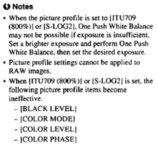
I just received my FS700 back from Sony's LA Service with the v3 upgrade. I shot a few sunny scenes, then went into PP7 and changed a few settings. IE, changed the color mode to pro/8 and the knee to MANUAL 87.5%/2(altho', it would appear these PP settings are disabled for Slog2). Resulting images are still flat, however...

Bringing the footage into Resolve, there is a Sony Slog2 - REC709 LUT available. Applying this LUT, then doing some fine tuning on grading(color balance and saturation) and, voila...some very nice footage. I don't see any macro-blocking going on.
 
Last edited:
I just received my FS700 back from Sony's LA Service with the v3 upgrade. I shot a few sunny scenes, then went into PP7 and changed a few settings. IE, changed the color mode to pro/8 and the knee to MANUAL 87.5%/2. Resulting images are still flat, however...

Bringing the footage into Resolve, there is a Sony Slog2 - REC709 LUT available. Applying this LUT, then doing some fine tuning on grading(color balance and saturation) and, voila...some very nice footage. I don't see any blocking going on.

I would love to see some before and after stills of your grading results if you get the chance. Thanks!
 
LUTs are not made to use them in Color Correction. When Shooting Log u need to cc with Log. Otherwise u could shoot in rec709 in the first place. Lut's are only made for monitoring purposes.

I have the feeling most of the people using Slog2 don't know anything about it neither handling it.
 
LUTs are not made to use them in Color Correction. When Shooting Log u need to cc with Log. Otherwise u could shoot in rec709 in the first place. Lut's are only made for monitoring purposes.

I have the feeling most of the people using Slog2 don't know anything about it neither handling it.

If this is true, why does Resolve provide a 1D LUT for Sony color correction as well as a ton of LUTS for Arri, Red, etc?

here's a framegrab...Untitled Sequence.01.jpg
I, somewhat, overdid the saturation to make the point. It looks like Kodachrome.
edit: Significant difference is that this file was recorded to an external recorder. The internal AVCHD files are recorded in 4:2:0 color compression, while the SDI output to an external recorder is 4:2:2.
 
Last edited:
I just received my FS700 back from Sony's LA Service with the v3 upgrade. I shot a few sunny scenes, then went into PP7 and changed a few settings. IE, changed the color mode to pro/8 and the knee to MANUAL 87.5%/2(altho', it would appear these PP settings are disabled for Slog2). Resulting images are still flat, however...

Bringing the footage into Resolve, there is a Sony Slog2 - REC709 LUT available. Applying this LUT, then doing some fine tuning on grading(color balance and saturation) and, voila...some very nice footage. I don't see any macro-blocking going on.

Hey Cuervo. When you changed the settings, could you actually see a visible difference? On mine, you could change the S-Log settings, but it did not change the image, unless it did it really, really slightly. The only thing that I could change that had a visible impact was the Red value. Color Mode, Color Range, etc... did not have a visible change.

And as Skyline states, LUTs should be for viewing purposes only, I probably wouldn't use them as a grading base.
 
If this is true, why does Resolve provide a 1D LUT for Sony color correction as well as a ton of LUTS for Arri, Red, etc.

For monitoring purposes. Its just how it looks in a different color space. But grading a LUT is pointless.
 
gene...no I couldn't detect any change in the picture. Attached is an excerpt from the Sony Rev3 manual...
Capture.JPG
skylike...Resolve allows LUTS in a cc node, not simply for viewing. Agreed, when working with a RAW file. However, applying the LUT to an HD file produces a very acceptable result...orthodox or not. If it works, I really don't care if I "should" or not.
 
Last edited:
gene...no I couldn't detect any change in the picture. Attached is an excerpt from the Sony Rev3 manual...
View attachment 74182
skylike...Resolve allows LUTS in a cc node, not simply for viewing. Agreed, when working with a RAW file. However, applying the LUT to an HD file produces a very acceptable result...orthodox or not. If it works, I really don't care if I "should" or not.

Dang, I wish we could change the Color Level (I think that's the one for Saturation). If it could be a bit more saturated in camera, it would help so much with the blocking I'm getting.
 
LUTs are not made to use them in Color Correction. When Shooting Log u need to cc with Log. Otherwise u could shoot in rec709 in the first place. Lut's are only made for monitoring purposes.

I have the feeling most of the people using Slog2 don't know anything about it neither handling it.

A LUT would knock the SLog into a known colour space, from Slog to linear for example (which is what the ones in resolve do). Or to a REC709 space (more unlikely). LUTs are used for ingest and monitoring, not just monitoring. No one would start from a raw slog file. And most (all?) grading controls work in linear space, so a LUT is used to get the log into that space. The whole ACES workflow relies on LUTS in and LUTS out (called via different buzzwords)

LUTs also have their place when matching similar cameras for example (i have produced a LUT via Nuke to slave together two FS cameras with different profiles so that a simple LUT offers a baseline for more traditional grading).

Finally some colourists do like to add some film style LUTs into their chain, it's a fast easy way to get 90% of the way there. Nothing wrong with cutting corners, and nothing wrong quality wise with a decent LUT

cheers
paul
 
Dang, I wish we could change the Color Level (I think that's the one for Saturation). If it could be a bit more saturated in camera, it would help so much with the blocking I'm getting.

Would like to see what it is your seeing if you have anything to hand?

cheers
paul
 
For folks not interested in 4K (right now), is the $400 firmware upgrade worth it for any other reason besides SLog2? I've got a Nanoflash and to be honest I prefer using the FS700 as simple/light as possible (including this dangerously cheap $25 shoulder brace (that a lot of folks love): http://www.amazon.com/CowboyStudio-Shoulder-Support-Camcorder-Camera/dp/B0036NMQ7S, would be nice to find something like that stronger (carbon fiber or aluminum)). The last couple projects I shot handheld, and many times regret not using the shoulder brace. The only issue is that in LA, the addition of the simple brace draws a lot of unwanted attention. Adding the new CD recorder/display will look even more conspicuous.

The 5D3 with 14-bit raw is quite remarkable, making 12-bit raw for the FS700 less necessary. The only issue is no usable audio yet (workflow isn't that bad on a fast computer). It's starting to feel like the best route for the FS700 is tweaking the picture profiles to get as good in camera as possible to work around 8-bit (and not crazy flat / log-ish), and making sure not to over-expose (understand how the histogram/zebras work; still get overexposed footage sometimes. Guess I need to do more tests/practice). Noisy shadows can be cleaned well with Neat video.
 
Back
Top