GH3 Requests for firmware upgrades

Yes, it would be nice if the camera didn't power off after 5min, but realistically this is a still camera first & video camera second. How much should we expect from a still camera?

I think most consumer video cameras have an auto power off if you're not recording.

Now onto the auto display info off, that needs to be fixed. Even consumer video cameras keep info onscreen while recording. Or at least (but still bad form) would be to increase the time until auto display info off. 10 seconds is just crazy annoying. Bump that to 5min & at least it wouldn't be a huge PITA to keep tapping the screen.
 
But you'll see if you try to shoot video in Manual mode (NOT creative video mode set to M, but setting the dial on top of the camera to M mode), the camera defaults to auto ISO. I don't even think it's possible to shoot video with manual ISO in Manual mode.

You are misunderstanding how shooting video with that little red button in the non-creative modes (P,S,A, and M) works. I included a link in my first response to you that explains because I thought that might be the case, but I'll post it here with some changes to clarify further:

When you select P, A, S, or M on the Mode Dial, it has no effect on recording video. The only thing you can adjust in these modes is the focus mode. Sure, in S mode on the top dial you can change the shutter speed, but that changes the shutter speed only for still photos, not video. Video recorded in the P, A, S, and M modes using that little red button is recorded with all settings auto. Always.

In a nutshell:

  • Creative Video Mode is the GH3's "Video Mode"
    • Once you are in this mode, you can then select (via menus) P, A, S, and M and control the settings for video just as you would for photos.
  • P, A, S, M (and all the other Modes) are the GH3's "Photo Modes". In these modes, hitting the red record button will shoot "auto everything" video.

I personally wish Panasonic had skipped that red record button on the back of the camera. But they put it there so consumers (as opposed to pro-sumers or professionals) would have a quick and foolproof way to shoot video, regardless of what mode they happen to be in. That red button is the "consumer video" button, intended for use by parents and grandparents at birthdays and on vacations.

SO..... for shooting video, the only mode you ever want (or should use) is the Creative Video Mode. The red record button should be ignored (although it's fine to use it in Creative Video Mode since it operates just like the main shutter).

Unfortunately, the manual lumps all the Motion Picture stuff in one big chapter, but doesn't do a great job making it clear that there are these two very distinct modes (Auto and Creative Control). It does talk about them, it just sort of mixes it all up, although pages 184-186 are essentially the Creative Video Mode pages. I would have broken them into three chapters:

  • Video Settings Available in Auto Modes (using the red button with Mode Dial set anything except CVM)
  • Video Settings Available in Creative Video Mode
  • Video Settings Available in Both Auto and Creative Video Modes

Hope this clears it up for you (and others).

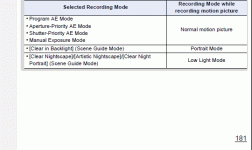
Oh, also see pages 180-181. The chart on the bottom of 181 shows the recording mode for those 4 settings on the Mode Dial. All it records is "Normal motion picture" which is their way of saying... auto everything! Note the two extra special, odd, strange, unusual Portrait and Low Light modes that are accessible by going to other settings on the Mode dial and then through the menus.

modes.gif
 

Attachments

  • head.gif
    head.gif
    9.7 KB · Views: 0
Back
Top