GH5 Report of the trip in Ethiopia with the GH5

I have this rubber lens hood, which has 72mm male threads for attaching it to the lens, and 72mm female threads above for attaching a lens cap or filter. Collapsing it down makes it easier to access the front filter threads.

I thank you for your info but I think it is impossible to add an ExpoDisc because every ExpoDisc has a bayonet-like attack. Therefore I have to consider the diameter of the external part of the hood. How do you add it?
 
I have it and not only it. I have also a grey card and I use them in my country but I never sue them in my trips in Africa or in other countries. I need somethink very fast and maybe an Expodisc is faster. But I don't know it and I don't know if it is really faster. I don't take interest if it is precise in the measurement of white. For me it is important don't get anymore those underexposed and brown clips. I shudder seeing them. I make video for more than 30 years and I never got so bad video.
 
Fox how often do you think you need to manual white balance? You do realize that when you white balance you can keep shooting for an hour or so in th same lighting conditions and not have to white balance again? I understand things get hectic in a fast paced environment but it’s not like it’s somethign that has to be done every single time you hit the record button.

This is why we suggested creating your white balance presets ahead of time. That way even if you are running around between sunlight, shade and indoors you can just quickly switch to the custom preset you created. Plenty of people shoot weddings which are just as unpredictable and manage to manual white balance through the day. Once you get used to it it’s honestly not that time consuming or difficult to manage.
 
just take care not to overcrank your VND. Don't put it past max. In fact, it is best to keep it a notch or two back from max if conditions allow.
 
You could also stop down the lens (deeper depth of field), or choose to shoot in slow motion mode like 59.94 (so still get audio) and then use conform/interpret footage in post to get slow motion and still have audio (which you could still seperate audio from video and use at normal speed, but it would not be synced).

You could also adjust the shutter speed, but don't do it too much, it changes the look of the motion.

FInally, you could buy a new VND such as one that only covers the TOP end of the spectrum to get a more intense result, such as the brand new PowerXND-II 2000 which covers 5 up to 11 stops.

I think your SLR magic filter might only cover 5 stops, is that right? Can you link to your variable ND? You want to get a more powerful default filter if always in really bright sunlight. You can bring a couple with you for different situations. But a quality VND that covers 5-11 stops, for example, would give very good picture quality results at 8-9 stops.

Next, please consider the Xume adaptors which might help you stress less with filter changes. They are a little expensive but make your work very fast to change filters.

https://www.bhphotovideo.com/c/product/968074-REG/xume_xla77_77mm_lens_adapter.html

You need the lens adaptor, filter adaptor, and lens cap. They all work together.

I also recommend for multiple lenses using step up rings so they are all the same front thread diameter, such as:

https://www.bhphotovideo.com/c/product/6269-REG/General_Brand_62_77_62mm_77mm_Step_Up_Ring_Lens.html
 
Yes, it is a good correction. Did you used only the first one of the three corrections on the YUV panel? I have always used Primary Color Correction panel and Im getting enough good result. But what I like to know is: why I got this problem even with in a cloudy day? Maybe is it the VND filter the real problem?
 
Yes use the first Y panel in the YUV. Don't play with the other two unless you really know what your doing. Mathew Scott has some good instruction on his site http://mattscottvisuals.com/tutorials/ It has more control than the PCC exposure correction or its YUV panel at the bottom of the PCC info panel.

If you wanted to expose for the people in the lower left that are dark now then you underexposed for them. It is easier to get some detail out of dark areas than the over expose and then loose detail in the bright areas that will be lost for ever !!!
 
I took the footage into Resolve.

Immediately I got a big improvement using the "Shad" control (set it to 25), this is under the primary wheels in panel 2.

The metadata shows you took the clip at aperture F10 which was a surprise to me. I think as I would expect this has caused some diffraction. Personally I never go beyond F8. So to increase local contrast in the mid tones I used the MD control (Mid Tone Detail, set to 34).

Lastly, since the Shad control can increase saturation I lowered it back very slightly with the Sat control in panel 1 (changed from 50 to 46).

This has not lost any detail in the highlights and the aerial tower in the distance is much, much clearer. The scopes show the process has not messed with colour balance and is still nicely in Rec.709 limits which it was before. Unfortunately I have no way to send the result, maybe someone else might try.
 
The metadata shows you took the clip at aperture F10 which was a surprise to me. I think as I would expect this has caused some diffraction. Personally I never go beyond F8. So to increase local contrast in the mid tones I used the MD control (Mid Tone Detail, set to 34).

I'm going into depression. Someone says that it is better to use the VND filter not at maximum and you are telling F10 is too much. Can anybody tell me how I have use that filter?
 
I'm going into depression. Someone says that it is better to use the VND filter not at maximum and you are telling F10 is too much. Can anybody tell me how I have use that filter?

To get a good exposure in bright sunlight, here is a simple workflow:

1. Set aperture to yield the depth of field you desire. (Generally in the range of f2-f4, but if you don't mind a very deep focus, then go as high as f8.)
2. Lower ISO (as low as 400). If still over exposed...
3. Adjust ND filter until properly exposed.

Avoid changing the shutter speed/angle as that changes the feel of the motion.
 
To get a good exposure in bright sunlight, here is a simple workflow:

1. Set aperture to yield the depth of field you desire. (Generally in the range of f2-f4, but if you don't mind a very deep focus, then go as high as f8.)
2. Lower ISO (as low as 400). If still over exposed...
3. Adjust ND filter until properly exposed.

Avoid changing the shutter speed/angle as that changes the feel of the motion.

I think the biggest error was the ISO. I always shot at 400 ISO in Africa. With your workflow that you have just written would you use 1/100th at 50p?
 
I think the biggest error was the ISO. I always shot at 400 ISO in Africa. With your workflow that you have just written would you use 1/100th at 50p?
Yes, I would, as that matches a "cinematic" shutter angle of 180º. (I set my GH5 to display shutter angle, leave it at 180, and never think about it again, even if changing frame rates, it will always be correct.)
 
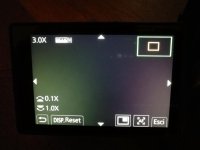
Hi, maybe I mistakenly changed something in the Menu of my GH5 and I realized that I use the focus manually at the maximum extension of the focal length, then if I go in wide angle everything becomes blur. Usually it happens the opposite. What could have happened? I would also like to inform you that when I focus something is changed in the viewfinder that I have never seen before and that I would like to remove that screen, but I don't know how I can do it. I see this in the viewfinder. Look at the pic please.
 

Attachments

  • SIII.jpg
    SIII.jpg
    41.3 KB · Views: 0
Push the little display button on the back of your camera to the select the various screen options....it looks like you've tapped the magnification part of the screen....tap screen reset on the screen
 
Press exit in the bottom right corner. You set this by placing two fingers on the display and spreading like zoom on your phone or tablet. Like I have said before there is a lot you need to learn about the GH5.
 
Back
Top