GH5 Report of the trip in Ethiopia with the GH5

Ron, you are telling me the same suggestion for many times. But I'm sure I know well basic option about my GH5. In my country I got good videos. Now some people is telling me I got a problem with IR light pollution. Uffff, did you know this problem? I can't go in Etiopia twice to make the video, twice in Cameroo, twice in Chad, etc. etc. In every place there is a different light. Why with my camera I never got those problems? What should I do to solve my problem without buying another filter? Now I post a clip of my shots. It is one of the best clips: https://www.dropbox.com/s/lqazlbk8wpsnaoi/P1066605.MOV?dl=0

Use your eyes.

Being able to turn on the GH5 and hit the record button does not mean you know it well enough. You clearly don’t or else you wouldn’t be on here basically asking us to teach you how to use the camera. There is using a camera and then there is using it well. You do not have the experince to handle difficult situations.

We can’t tell you of every possible situation you may run into. You have to learn how to deal with them as you face them. At some point you need to figure this stuff out on your own as well.

By the way a video camera can suffer from the exact same issues. Aperture is aperture and if you crank the aperture down to a tiny hole than that video camera is also going to suffer from diffraction. You need ND on a vid o camera as well in those extreme sunlight situations. ND filters can also affect the IR pollution. White balance is still an issue no matter if you use a DSLR or a video camera. Bad color is bad color.

While the video camera is easier to use your final image will ultimately suffer from the same issues that plague you now. Like you said in your home country the GH5 looked great. Clearly it isn’t the camera then. You just don’t know how to combat thos extreme conditions.

Perhaps you should just go back to adjusting exposure with the aperture. The image will be softer but it’s the easier path here. You can always do both and use a small amount of ND and adjust the aperture to maybe f8, or f11. Experiment and play with options and use your eyes to judge the color. We have color displays for a reason.
 
There’s no IR pollution noticible in that clip.

This

It's just a little warm... it also is my understanding from having been there that much of Africa creates a very brownish palette. Brown dirts, dark skins, wood, smokey haze, etc.

I don't see what the problem is or how mild color grading would not make this footage work ok?
 
This

It's just a little warm... it also is my understanding from having been there that much of Africa creates a very brownish palette. Brown dirts, dark skins, wood, smokey haze, etc.

I don't see what the problem is or how mild color grading would not make this footage work ok?

Yes, you are right. In fact I solved the problem of that clip with color grading but I already told you that clip was enough good. I have many worse clips like this: https://www.dropbox.com/s/g14z2qv1ka2sulo/Prova1077024.MOV?dl=0
It is very hard to correct it. Out of curiosity: in your opinion how can I decrease that the browsnish colour while I'm shooting in Africa? Thanks for your suggestions. For me they are important.
 
Yes, you are right. In fact I solved the problem of that clip with color grading but I already told you that clip was enough good. I have many worse clips like this: https://www.dropbox.com/s/g14z2qv1ka2sulo/Prova1077024.MOV?dl=0
It is very hard to correct it. Out of curiosity: in your opinion how can I decrease that the browsnish colour while I'm shooting in Africa? Thanks for your suggestions. For me they are important.

First of all manual white balance.

White balance presets are just a baked in color temp. For example 5600k for daylight. Different times of day, cloud cover and regions of the world all affect the actual color temperature. This is why the color can look correct in your home country and be way off in Africa. Here are your options:

1. Try another preset or auto white balance.
2. Manual white balance. Even use a piece of paper will help a lot. Sure it may not be pure white but you would rather get 95% there 100% of the time vs letting the camera guess.
3. Learn to grade.
4. Understand what color temperatures are affecting you during specific times of the day and dial in that color temperature. For example if the scene is around 4300k then dial in 4300k and you should be pretty accurate. A color/light meter can help with this.
5. Use manual white balance presets the day before. If you white balance at 12:00 noon on one day you can use that preset again on the day of the shoot. Africa tends to not have a ton of cloud cover to affect the color temp too much.
 
What Thomas said.

White balance works on a scale of very specific numbers. Presets are just ballparks, estimating for example 3200k for indoors, 5500k outdoors in sunlight, 9000k outdoor in the shade, etc.

But what if your color temperate is 7300k and you set to 5500k, or 9000k? The camera is not set correct and it behaves accordingly.

You can make your own presets as Thomas selected, 1-5. You can set them for morning, afternoon, evening, indoors, so on and so forth. A piece of white paper will work just fine, or even white clothing or fabric. Or you can buy a foldable white/gray card to balance to.

I would recommend reading some articles on color temperature, and specifically learning things like why the color temperate OUTSIDE is different in direct sunlight VS in the shade - these will really help you understand.

Like I mentioned earlier, a lot of this has to do with understanding basic photo/video/image acquisition technique - not the GH5. You need to understand both.
 
In your opinion could I use a White Balance Cap (ExpoDisc) instead of the card to make the WB? Is it better to make a fast and maybe not perfect WB or is it better to adjust the color temperatures manually? In other words, which is the faster solution to get enough good colours? Even if I will not get good colors, I'm happy. The essential thing is not to get underexposed and very brownish clips.
 
Last edited:
Adriano. Earlier in this thread I mentioned storing settings in the presets C1, C2, C3-1, C3-2, C3-3. If each day is very similar in light then store settings as I mentioned for morning, noon, late afternoon and evening. Just as starting points. When you have the camera with these settings it does not stop you changing them as you shoot but it is a quick way of getting close. That is also why I said set the lens return ON and set at 3 M before you switch off. Then when you switch on with a preset the camera will have the parameters set and the focus at 3M. Then you can adjust anything after that even while you shoot. Looks like you were in auto focus for that last clip too.
 
In your opinion could I use a White Balance Cap (ExpoDisc) instead of the card to make the WB? Is it better to make a fast and maybe not perfect WB or is it better to adjust the color temperatures manually? In other words, which is the faster solution to get enough good colours? Even if I will not get good colors, I'm happy. The essential thing is not to get underexposed and very brownish clips.

Your white balance source has to fill the lens completely when you look at the LCD screen or through the viewfinder....it does NOT have to be in focus, but your white card has to be hit by the same source light as your subject, be it the sun, cloudy sky or your own light source....judging by your clip sample your white balance was off...seeing that you are filming alone, you need a way to secure a white balance card close enough to your subject (clamped to a light tripod perhaps) to white balance and if the light changes, you need to do it again...us not knowing how you film does not cut it....this is your project, and when you go back, you have to prepare for being better prepared. I liked the clip you posted....this camera with some elbow grease on your part,may be perfect for your purposes after all...just apply yourself and don't be fooled by the GH5... it may go for a consumer price but in the right hands it's a complex professional tool...your posted clip already proves you're very close to getting there....I would not go back to a camcorder unless it's a very good one, and then your carrying an extra 10 + lbs on your trip....far more impractical....as for the advice the other members have been giving you....they have shared ideas generously and without being pedantic in the slightest...dont act petulant!...what these members have been giving you is invaluable, and once you start putting all the pieces of the puzzle together your results will be great.
 
Fox,

Your second clip does not look to be IR contaminated either. Both clips you’ve posted have been filmed in overcast, & subdued, lighting where I typically wouldn’t expect to see IR contamination.

It second clip does look underexposed, & too my taste, a bit over saturated. How are you determining exposure? And what Picture Profile did you use, & what were it’s settings (sharpness, saturation, contrast, etc).

A ExpoDisc is a great White Balance tool, especially for documentary, & what I use with the GH5. Highly recommended.

The Red/Brown cast your complaining about is largely due to color of the earth where your filming. The light is bouncing off the warm ground, & filling your subjects with the cast. And it doesn’t bother me as it looks natural, so wouldn’t be scrapping your documentary.
 
Last edited:
Bern, the GH5 is the worse camera I used still now about WB preset. I used WB preset, 50p, 1/100, stop = 8 and Natural profile but I lovered -2 as contrast as colour saturation as sharpness, then I rotare the variable ND.
I will buy an ExpoDisc because I think it is faster than with the grey card to make WB. But the problem I have a filter 72mm. Can you suggest an ExpoDisc?
 
Fox,

I’m not a fan of Variable ND for a variety of reasons, but am especially averse to the polarization, especially on skin. Wouldn’t be surprised if some of your concerns have to do with the filters, as I also often use preset White Balances, but rely on Hoya’s ProND filters attached to Xume Adapters, which allows quickly swapping densities.

ProND’s, & some others, have a metallic coating that provides the density, & are relatively neutral across the various strengths. The metallic coating also provides a degree on IR protection, & the only issues I’ve had with them is they’re a bit harder to clean then the traditional ND that uses dyes to provide the density.

For filming 50p I’d use a 1/50th Shutter Speed, or a 360* Shutter Angle. You won’t get motion blur associated with a 180* Shutter Angle “Film Look” with a 1/100th Shutter Speed, & risk some of the footage looking a bit staccato. 50p & 60p timelines are associated with the Live TV look (Sports, News, Comedies, Soap Operas), & don’t typically rely on a 180* Shutter Angle.

Whatever ExpoDisc you purchase it must completely cover the front of your lens, or any filter attached to it. Believe they’re only made in 77mm, & 82mm, these days, but I’ve bought other sizes off eBay as needed, & never had problems with used versions. Do not get the ‘Warm’ versions for your needs, though I sometimes do for interviews.
 
Last edited:
That is also why I said set the lens return ON and set at 3 M before you switch off. Then when you switch on with a preset the camera will have the parameters set and the focus at 3M. Then you can adjust anything after that even while you shoot. Looks like you were in auto focus for that last clip too.

Usually never I use Autofocus, but I don't remember if I used it on that clip.
I have just set the lens return ON but I am not able to find focus at 3M. Maybe the reason is I don't have english language in my Menu. Where is that option please?
 
For filming 50p I’d use a 1/50th Shutter Speed, or a 360* Shutter Angle. You won’t get motion blur associated with a 180* Shutter Angle “Film Look” with a 1/100th Shutter Speed, & risk some of the footage looking a bit staccato. 50p & 60p timelines are associated with the Live TV look (Sports, News, Comedies, Soap Operas), & don’t typically rely on a 180* Shutter Angle.

Some people here told me to set my GH5 with 50p 1/100th and I did what they suggested me.

Whatever ExpoDisc you purchase it must completely cover the front of your lens, or any filter attached to it. Believe they’re only made in 77mm, & 82mm, these days, but I’ve bought other sizes off eBay as needed, & never had problems with used versions. Do not get the ‘Warm’ versions for your needs, though I sometimes do for interviews.

Unfortunately I never could use an ExpoDisc with my lens because on the lens I have the ND variable with hood. The hood is 91mm. Everything is against me. :Drogar-Sick(DBG):
 
Usually never I use Autofocus, but I don't remember if I used it on that clip.
I have just set the lens return ON but I am not able to find focus at 3M. Maybe the reason is I don't have english language in my Menu. Where is that option please?

Focus at 3M is not an option in the menu. I intended you to find something at about that distance and focus on it before you shut down. That way when you switched the camera on again it will return to that focus. With that distance and I assume your 12-60 a lot will be in focus and give you time to set exactly. If you also have your main parameters set in a custom dial setting the camera will be ready to shoot in seconds. You will then have time to fine tune any of the parameters.
 
Is the hood made of rubber & does it collapse? If so you’ll only need a ExpoDisc as large as the filter’s diameter.
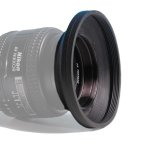
I don't understand well. I like to understand because in my filmaker life I never did WB for reasons of shooting speed. I always use the preset. The hood on the ND filter is around (not the same) like that in the pic I attach and it is in plastic (not rubber). I 'd like to solve my problem with WB, but when in the fast way ready to shoot.
 

Attachments

  • s-l1600.jpg
    s-l1600.jpg
    44.3 KB · Views: 0
Last edited:
I have this rubber lens hood, which has 72mm male threads for attaching it to the lens, and 72mm female threads above for attaching a lens cap or filter. Collapsing it down makes it easier to access the front filter threads.
 
Last edited:
Back
Top