AC90: Recommended "Flat" Scene Settings?

I'm still waiting for Berry's book to come in the mail and I was just wondering if anyone could offer some flat settings. I've seen a few for the other AC's but never for the 90. I'm looking for something I can grade later and match with footage from the GH3. Anyone out there try to match the GH3 or GH2 with the AC90?
Thanks!
 
I have not seen anyone with both the GH3 and the AC90, but there is a couple of posts on this forum about matching the AF100 and the GH2. To me that would be a starting place, but its also quite complicated, some may involve what hack on the GH2. I am also seeing recommendations to not shoot "flat" on the AG-AC90 (though I don't know what settings that would be). At least you seem to understand there is a need to match them as best as possible. It seems everyone's scene settings vary by situation and personal preference.
 
Thanks Steve, here's to color matching all three. Anyone else have any general flat scene recommendations?
If I get anywhere I'll share my settings.

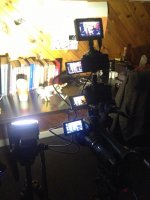
IMG_1055.jpg
 
Haven't tried matching to that particular camera but have found the stock Cine-D (scene file 6) to be a nice flat setting for grading. Barry's AC90 book would defintely help you brew up a custom file if you aren't happy with the stock Cine-D. Good luck!
 
Haven't tried matching to that particular camera but have found the stock Cine-D (scene file 6) to be a nice flat setting for grading. Barry's AC90 book would defintely help you brew up a custom file if you aren't happy with the stock Cine-D. Good luck!
I over wrote all my scene files and I wished I wrote the factory default ones down. Anyone have Scene 6 handy?
 
Sure thing, here are the default parameters for Scene 6 (Cine-D)

Detail level - 0
V Detail level - 0
Detailing coring - 0
Chroma level - 0
Chroma phase - 0
Color temp A - 0
Color temp B - 0
Master ped - -1
Auto iris level - -3
DRS - Off
Gamma - Cine D
Matrix - Cine like
Skin tone DTL - off

You'd think Panasonic would have included the default values in the Advanced manual but it doesn't look like they did. I know you can reset the values but I think it's an all or nothing scenario. I haven't tweaked many of my scene files yet so I'll try to find some time to reset them all and post all the default values for future reference. Good call, definitely something worth having on file.
Cheers.
 
Sure thing, here are the default parameters for Scene 6 (Cine-D)

Detail level - 0
V Detail level - 0
Detailing coring - 0
Chroma level - 0
Chroma phase - 0
Color temp A - 0
Color temp B - 0
Master ped - -1
Auto iris level - -3
DRS - Off
Gamma - Cine D
Matrix - Cine like
Skin tone DTL - off

You'd think Panasonic would have included the default values in the Advanced manual but it doesn't look like they did. I know you can reset the values but I think it's an all or nothing scenario. I haven't tweaked many of my scene files yet so I'll try to find some time to reset them all and post all the default values for future reference. Good call, definitely something worth having on file.
Cheers.
After seeing these settings I was noting them down in Barry's Book. He also comments and explains why the Auto iris level needs to be negative when using Cine D and Cine like. Sometimes it's a bit funny how much detail his book has and I can learn something even after reading it the 20th time.
 
Yeah the book really is an invaluable tool. The only thing I feel it's missing is a slight insight into color grading with the AC90 as I've heard alot of conflicting info. I know the codec records to 4:2:0 but can you still get decent results if you shoot in a flat settings and don't "push it" too far? I've played around a bit and thus far I've been happy with the results. Hope I'm not overlooking something as I plan on shooting in Cine-D mode for a short independent documentary project this summer...
 
Yeah the book really is an invaluable tool. The only thing I feel it's missing is a slight insight into color grading with the AC90 as I've heard alot of conflicting info. I know the codec records to 4:2:0 but can you still get decent results if you shoot in a flat settings and don't "push it" too far? I've played around a bit and thus far I've been happy with the results. Hope I'm not overlooking something as I plan on shooting in Cine-D mode for a short independent documentary project this summer...
I was playing around with that Scene 6 and found something (to me) more interesting than the scene file. I was really curious about the Auto Iris setting and so I was shooting some well lit landscape at full zoom. I had my Professional Lilliput 663/o/p 7" 1280x800 IPS Peaking Focus Hdmi in + Output 1080p Monitor and was looking at whether to expose to the right (relying on zebras) vs going by the histogram. What surprised me is this, Auto Iris setting of course only works when using the Intelligent Auto. I had not really thought about why who the automatic iris was exposing with the histogram much more to the center (instead of to the right) ETR and therefore more light. The histogram on the AG-AC90 was saying there was no "detail" so it was "fine" to push it over, BUT the Lilliput's histogram was (for the first time) showing there was image detail on the right side of where the AG-AC90 histogram was not showing any. So I did a simple test. I recorded the image as i adjusted the iris, then I put it on FCPX. When I looked at the detail of a "desert" tree in the distance I was surprised what was happening as I ETR. The green leaves would start disappearing as the exposure was raised. So I was loosing quite a lot of green details as I ETR. So basically I learned I need to be much more careful at least with that setting (I should have tested another) and I could trust the histogram on my Lilliput. I tried correcting in post, but it wasn't going to get there. BTW the spot mode was like jut 42%. Even that test could have been done several ways.
 
If you want a FLAT setting, use SCENE #!. This is the DEFAULT setting for the 130,160 and 90.
If I am guessing correctly Scene #1 would be using HD Norm and Norm 1. That looks the flattest to me and I think that is what Barry's book indicates.
 
If you want a FLAT setting, use SCENE #!. This is the DEFAULT setting for the 130,160 and 90.

Scene 1 certainly does provide a nice flat, true image however for maximum latitude it looks like it may not be the best due to the "HD Norm" gamma setting. As Barry indicates in the book, "Cine-Like D can results in the most latitude the camera can deliver"
However as Barry notes exposure becomes more crucial as there is no "knee protection"

On a side note I've noticed that Detail Coring (even at 0) can be a real detail killer, causing ugly blotchy detail rendering. I realize that detail coring essential fights noise but I found that even in well lit scenes with minimal gain use, fine detail is sometimes blotched out. Perhaps this is simply a limitation of the codec but I did find improvements when reducing the coring to -2 or -3. I will create a dedicated post on my findings shortly as this has been my only gripe with the picture quality of this camera thus far.
 
Back
Top