C200: RAW roundtripping 50FPS problem

MaximL

Member
Hi all,

I'm at the end of my tether. About to launch my computer into the wall over this.

So I used do a pretty simple roundtrip from Premiere Pro (basic cut down w/proxies) -> Resolve (Grade RAW + Export to useable format) -> Premiere Pro/After Effects (Final cut, transitions etc). So far this has worked fine by using a batch renamer to rename my CRM to match the MP4's however today has been a poo pooing nightmare.
Everytime I import my XML into davinchi it just comes up with something about the timecodes not matching or somes*%t.

The difference between the two projects that don't work and the one that does, 50FPS. I've done a further test today, and sure enough 50FPS doesn't seem to work. I've tweaked endless settings in Resolve, double, triple checked my project settings is 50FPS etc and can't get anything to work. Does anyone have any idea what this isn't working.
 
Hi all,

I'm at the end of my tether. About to launch my computer into the wall over this.

So I used do a pretty simple roundtrip from Premiere Pro (basic cut down w/proxies) -> Resolve (Grade RAW + Export to useable format) -> Premiere Pro/After Effects (Final cut, transitions etc). So far this has worked fine by using a batch renamer to rename my CRM to match the MP4's however today has been a poo pooing nightmare.
Everytime I import my XML into davinchi it just comes up with something about the timecodes not matching or somes*%t.

The difference between the two projects that don't work and the one that does, 50FPS. I've done a further test today, and sure enough 50FPS doesn't seem to work. I've tweaked endless settings in Resolve, double, triple checked my project settings is 50FPS etc and can't get anything to work. Does anyone have any idea what this isn't working.

Without you posting the exact error, it's hard to say; but this does sound like an issue I ran into with BMCC raw files. Something about extends or extents not matching? The issue was that the timecode did not match between the RAW and proxy files because my ingest settings in Resolve wasn't set correctly (you have to do this manually). I had to manually add the correct timecode to the proxy files in Premiere ONE AT A TIME. This was s short with a couple hundred individual clips used, so it took forever...
 
Yeah that's the issue with mine, timeline extents not matching. That sounds like a nightmare mate. Is this something you had to do every-time or did you correct the ingest settings in Resolve? I just don't understand why 25fps works fine but 50fps doesn't.
 
Yeah that's the issue with mine, timeline extents not matching. That sounds like a nightmare mate. Is this something you had to do every-time or did you correct the ingest settings in Resolve? I just don't understand why 25fps works fine but 50fps doesn't.

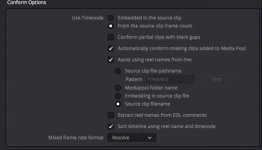
I still wake up in cold sweats thinking about that weekend of tedious copy/paste TC values from Resolve to Premiere. The bad news was that I was far enough in the workflow that it was faster to add the data manually than to start the conform all over again. The good news is that pain taught me a big lesson. In Resolve, under Project Settings> General Options> Conform Options, you have settings for how Resolve will read the timecode from the files. Unless the proxy files and RAW files have the exact timecode, they won't relink. You'll have to make sure you set it correctly for your project, but I check "Assist using reel names from the:", and choose "Source clip filename". Of course this was all from my generating proxy files from the raw (which you might want to consider doing and replacing the camera generated files). YMMV.

You should check out this thread where someone had an issue with camera-generated Proxy and RAW files having different timecode values. You might be running into the same thing...
https://community.usa.canon.com/t5/...C300-Mk-II-or-C200-Proxy-Workflow/td-p/218245


Screen Shot 2018-02-15 at 2.25.53 PM.jpg
 
Last edited:
Cheers for the help Fahnon but it still doesn't work. Same issue still occurring.

I just don't get why 25fps is perfectly fine but 50fps is a nightmare. I will have to think about another camera/software if this is something that can't be solved.
 
Cheers for the help Fahnon but it still doesn't work. Same issue still occurring.

I just don't get why 25fps is perfectly fine but 50fps is a nightmare. I will have to think about another camera/software if this is something that can't be solved.

Sorry you didn't have any luck. I honestly think you'll have more success over on the Resolve forum than here. Last thing I can think to check: Resolve used to not support round-tripping files that were conformed in Premiere. I'm assuming you slowed the 50p clips down to play at 50% speed on a 25p timeline. Can you try removing any speed effects from the clips and trying again?
 
I've posted there, hoping for the best and no, literally just just brought it into a 50p timeline in PP, cut it down and then export the XML. I just did a test where I film some stuff in RAW with proxies at both 25p and 50p. Took the 25p into a 25p timeline and 50p into a 50p timlime. Chopped them up a bit, exported an XML for each. Importing into Resolve 25fps worked as expected, but 50p was full of timecode errors. At this point I'm just gonna have to export the clips graded in their entirety out and then re-link them in Premiere Pro. Going to demolish harddrive space :crybaby:
 
Strange... Well if you care about futzing around with it more, I'm game to try it on my end if you want to dropbox me a RAW and proxy file to play with. I think there's a clue in the two different timelines, but I'd need to try it myself.
 
That would be awesome dude cheers! Really appreciated. Wish Canon would just patch in a decent proxy system, matching files names etc. Hopefully this firmware update on the horizon has it! Uploading little test footage to Dropbox now, will PM the link when it's done!
 
Cheers Fahnon.

Just discovered something that really confuses me. I compared the start timecode for the proxies in PPro and RAW files in Resolve. The proxies start timecode is exactly double for example
RAW=04:20:33:06
PRO=08:41:06:12

so where the hell is this all going wrong? In the camera, in the software?
 
Cheers Fahnon.

Just discovered something that really confuses me. I compared the start timecode for the proxies in PPro and RAW files in Resolve. The proxies start timecode is exactly double for example
RAW=04:20:33:06
PRO=08:41:06:12

so where the hell is this all going wrong? In the camera, in the software?

I was just about to look at your footage when I saw this. Is this only for the 50p clips?

The guy in the Canon Community thread below says he ran into issues with TC on proxy vs RAW, and had to: "...reformat both MP4 SD Card and the CFast Card and before shooting reset the timecode in C200 System menu."
https://community.usa.canon.com/t5/...Proxy-Workflow/m-p/226445/highlight/true#M723

You can change the TC values in Premiere to the ones you're finding in Resolve. Can you try that with one clip and see if it reconnects in Resolve?
 
I was just about to look at your footage when I saw this. Is this only for the 50p clips?

The guy in the Canon Community thread below says he ran into issues with TC on proxy vs RAW, and had to: "...reformat both MP4 SD Card and the CFast Card and before shooting reset the timecode in C200 System menu."
https://community.usa.canon.com/t5/...Proxy-Workflow/m-p/226445/highlight/true#M723

You can change the TC values in Premiere to the ones you're finding in Resolve. Can you try that with one clip and see if it reconnects in Resolve?

Yeah it's only for 50p clips. However I think it was just a consistence that batch of clips had double timecode start time. Other clips were just off by random amounts. Thanks for the link, will do that in the future. Just doesn't make sense though that I don't have to do that for 25p. The test footage I sent you, literally just swapped between 25p and 50p, nothing else. 25p worked fine and timecodes match, 50p doesn't work with a timecode mismatch.

As for the changing the TC values it does work, spent all morning doing it :cry: Just need to sort the problem before the next shoot as that is just too time consuming and not something I think the client would like to be billed for haha. Also contacted Canon, was told I would be contacted "soon", when I asked for the more solid timeframe or the average response time to technical problem I was told they didn't have that sort of information. You'd think after spending all that money on a brand new product you could get some decent after-care.
 
Yeah it's only for 50p clips. However I think it was just a consistence that batch of clips had double timecode start time. Other clips were just off by random amounts. Thanks for the link, will do that in the future. Just doesn't make sense though that I don't have to do that for 25p. The test footage I sent you, literally just swapped between 25p and 50p, nothing else. 25p worked fine and timecodes match, 50p doesn't work with a timecode mismatch.

As for the changing the TC values it does work, spent all morning doing it :cry: Just need to sort the problem before the next shoot as that is just too time consuming and not something I think the client would like to be billed for haha. Also contacted Canon, was told I would be contacted "soon", when I asked for the more solid timeframe or the average response time to technical problem I was told they didn't have that sort of information. You'd think after spending all that money on a brand new product you could get some decent after-care.

Well at least we've identified the problem and have a (cumbersome) workaround.

If you test what that guy in the Canon thread says and it works to keep the TC values consistent, you're golden next time. The other solution for next time would be to forgo the in-camera proxies and generate proxies from the original media as the first step in post. You could use FCPX or Resolve to do it (With FCPX being the easiest because you can cut while you wait). After seeing several people having TC issues with proxies, I may go that route on my next job until Canon releases an update to address it.
 
Back
Top