RAW 4K from Beta O7Q FW and quick workflow

olof

DVXuser Sponsor
I am a Beta tester for the new FW on O7Q, and I am very impressed by the 4Kraw, and a few other things that I can't talk about.

Here is a sample, this is a very tough scene in my studio, bright outside and totally unlit interior. I would say at least 12 stops needed to make this look good. So a kind of camera torture, normally you would light a scene like this.

I am very happy with the quality I am getting from the FS700, this is iso 2000 29.97P set using the WF and zebra in the O7Q. Very easy to see what you are recording.

The lens is a Canon 24-70 f2.8L at 24mm f13 v1 180 degree shutter (1/60).

The detail and lack of noise is very impressive. There is no color grading at all just set to 5400K in Camera.

Go ahead and ask me more questions if you like I can elaborate a bit. I am putting the new FW through its paces and it is very impressive. This is what we have all been hoping and waiting for...

I did this in Adobe RAW soon we can use Speedgrade like this and we already can in Resolve, but it is great to see PSD workflow that works this well.

I have played with similar footage in Resolve then exported to ProRes and into FCPX. The 4K files play back perfectly in my maxed iMac in real time and display on my Eval monitor through a BM card as real time 1080. Or I can put it in a 1080 timeline and blow it up 4 times and play that back real time in the same setup including adding pan and scan to the footage. I am very impressed. I do use very fast RAIDs.

JPG of the finished image
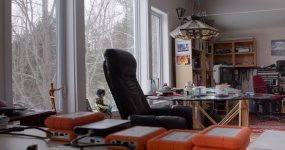
WAVE--7Q029_0001896moretweaking.jpg

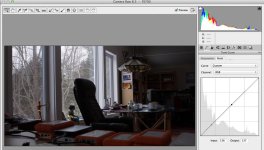
RAW DNG

Screen Shot 2014-03-02 at 7.59.11 AM.jpg

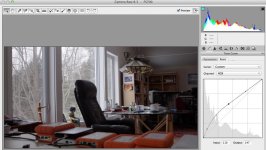
Lift Blacks and Mids in curves

Screen Shot 2014-03-02 at 8.01.09 AM.jpg

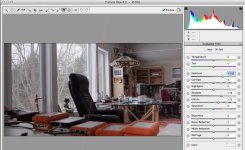
Apply Grad Filter adjusting exposure

Screen Shot 2014-03-02 at 8.03.16 AM.jpg
 

Attachments

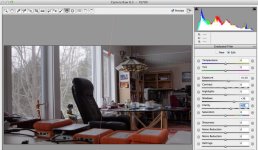
  • Screen Shot 2014-03-02 at 8.02.23 AM.jpg
    Screen Shot 2014-03-02 at 8.02.23 AM.jpg
    84.1 KB · Views: 0
Last edited:
Olaf, unless you're also beta'ing some Adobe products, as it stands right now the output of the ACR is a 10 bit version of what you tweak in ACR. If you take that into Speedgrade then you will NOT have the full range to play with. The only method right now is to produce a log based version of the linear range and use that in PPro and add a LUT via speed grade. It's really not ideal, it's very difficult to get >10 bit into PPro and SG. (It's easy to get direct into SG though)

cheers
Paul
 
thanks for sharing Olof! I really would like to know a little more about your DNG AC RAW workflow. As I wrote in the other thread I played with P Bloom's files and it took me 30mins to render a 1116 frames Clip (22 sec / 50p) from AE to ProRes on an iMac 2012 (24 GB RAM, 2 GB Geforce 680MX) Seems that I have to buy a BMDCC to get the full version of resolve plus the camera for 350€ net ;-)
 
thanks for sharing Olof! I really would like to know a little more about your DNG AC RAW workflow. As I wrote in the other thread I played with P Bloom's files and it took me 30mins to render a 1116 frames Clip (22 sec / 50p) from AE to ProRes on an iMac 2012 (24 GB RAM, 2 GB Geforce 680MX) Seems that I have to buy a BMDCC to get the full version of resolve plus the camera for 350€ net ;-)

Mine took about the same, bummer that it takes so much to process these files!
 
I found out that AE is a real diva! Cuda is only for 3D renderings.
You can only try to active parallel frame rendering and supply as much
as RAM as possible. Sometimes it works sometimes it doesn't.
 
Olof (or anyone really) I'm using CS6 and if I try to use ACR I can't get more than a few seconds of raw files to load into ACR. i.e. if I drop all the Bloom dng's onto the photoshop icon , it starts up photoshop but when ACR tries to start it fails and says the file name is too long. If I take a batch file renamer and rename all the files to 00000.dng, 00001.dng etc etc , I get about 3 times as many file to load (because the file names are about 1/3 the length now) but still not enough for even a 15 second clip. If I pop about 90-100 DNGs in there it loads fine, I do the corrections on image #1 and select all, synchronize, It works fine. Just can't get the whole clip to load?? I like working in ACR better than Resolve but Totally not usable for production work as is. Is it me? Am I doing something wrong? How do you guys us it in a production environment? (rather than just correcting a few DNGs)
 
I am working on refining my workflow for these files. However this was really just an experiment to see how much you can push these 4K RAW images.

To actually use the footage in a video project I use Resolve and it is pretty fast and you can speed it up with heavy hardware. However soon we will have compressed 4K from CD, so it will be much faster and easier to work. Adobe will also have Speedgrade working in the not to distant future.

The main thing here is how much improved the FS700 is with 4K, it seems the camera was really designed for this.

Going to 4K RAW workflow is a huge task in hardware and learning new tools that are changing rapidly. It is not for everyone. It is a much bigger leap than going from SD to HD back a decade or so ago.

I was trying to make the point that a few very simple quick adjustments produce fantastic results from the RAW files. I basically fixed an unlit scene and made it acceptable, with 2 quick adjustments. These can easily be done in Resolve and soon in Speedgrade if I can believe my sources. I edit mostly in FCPX so I use Resolve. The biggest way to speed up your workflow is to use very fast RAIDs, both for transfers and for renders to a codec that works in FCPX or PP, Avid or whatever you use to edit. Of course a TOL CPU and GPU's help as well.

There are really no shortcuts working 4K RAW. But soon you will not have to except for projects that demand the very best quality. And this is from a very affordable kit.
 
The main thing here is how much improved the FS700 is with 4K, it seems the camera was really designed for this.

I'm very pleased to see this, i think i've always maintained that 4K is the best and cleanest way to get the 700 working. You can tell from the 4K stills that it could take right from the beginning. Anything less that 4K is sub sampled, scaled, artefact ridden...

IMHO, 4K or something derived from the full 4K is the best route you can take with this camera.

CD have basically handed us a new camera, something for which we should be very grateful. I cannot think of any other camera that has been 'upgraded' to this degree (and kudos to Sony for allowing them access)

cheers
Paul
 
AFAIK, 4k is a non-starter for me, a novelty, an outlyer, something to play with that will never be a daily workflow. so, the question remains, can C-D downsample the 12 bit 4k images into an improvement to 1920p1080? that's the question of the week.
 
Not sure about 'should be very grateful' am happy to be able to upgrade to mooted spec for 3-4k but would like to see what it can do first hand.
 
Back
Top