Rainbow-like Moire?

I mean, why include something in the first place?

Yes, I don't have a clue either! For me this camera is only worth the price, mainly because of the Canon Log. Why would anyone want to spend $14 big ones on this camera to shot EOS Standard, beats me!

I edited my post because, looking at the link you posted of the sea, I could tell that wasn't a Canon Log image, then I went back to look at the Reduser thread, and there it was, shot on EOS Standard.

Now, why did he want to shoot this on EOS standard also confuses me, because it's much easier to select the Cinema Lock Profile than the EOS Standard, which is buried away in the menus... Comparing a Raw image to a EOS Standard on purpose is pretty lame if you ask me...
 
Agreed. Too many people are willing to take ONE image from a camera and judge the performance of that camera without any other input. And this isn't about people here on this thread, this is about people I've met in person. They'll see one thing they don't like and claim that the camera is absolutely crap because of it, no joke.

That's why I help to get to the bottom of questions, because truthfully, others will get this result as well, now when they search on it, they'll find some meaningful help on how to possibly not get it. I get people asking me how to reduce the HL problem on the FS100. I tell them, well, you have a few options. You can not over expose, or, if that doesn't work, drop your saturation down to -2 (what I do) and it helps to reduce the speed at which you blow-out a color channel independently.

So now if somehow someone is getting these artifacts, one can say "Hey, why not shoot in C-Log?" And if they say, "Well it's 8-bit and the image will fall apart when I grade" I will say, "okay, show me an example of the image falling apart" because right now, I've not seen that happen yet (and not saying it won't, I mean, I am sure someone will find the ultimate horrible test to prove me wrong! :P ) Hehe.
 
Again with Canon lock enabled - your sharpness setting is at 0. Go to CP8. Sharpness is defaulted to -10.

Rick, why include EOS standard? Because they could I guess. FWIW on the CP menu you can clear that and change it to anything you like.
 
Can you shoot with sharpness set to -10 to see what happens to those edges?

Noel, maybe they didn't even spend a lot of time with it when they created it. One thing I notice about the higher up the line cameras you go, you get SO MUCH control of the algorithms, you can make things look bad if you want.

I was NEVER a fan of the default profile in my AF100 when I had it. A few people like it, but most I've seen dial down the sharpness A LOT.
 
Id also like to add you can set all CP's to LOG gamma and change anything you like. Theres complete image control in there. I was able to recreate the issue shown in this thread by setting up an extreme example. It was only minimal but was there. Ive not yet seen it shooting anything Im being paid to shoot yet. Simply I think because in those circumstances Ill beg for some control before I press record OR people trust me and allow me to set my shots. When I did my initial testing however I shot to a few blown out windows and never saw it because I wasnt focused on the blow out - I was able to recreate it by EXTREMELY blowing the highlights on the object I had precision focus on. I cant see it ever being a real world issue for me. That said, keep looking for a solution if its something of concern to you.
 
Mine never ventures higher than -4.

Mine was -6, and I was happy with the results. I've noticed I am more in the camp of less sharpening now, which I wasn't when I started using video. I guess the best way to explain it is you start to be able to easily recognize the damage too much sharpening can do. When my compression algorithms were not the greatest, I didn't notice it as much because it was hidden in the compression artifacts. Now that things are getting cleaner, these sorts of things pop out.

Of course, I bet the people that watch the stuff I do probably would never notice this stuff. :)
 
You're a hard bunch to please. I'll do another test tomorrow with various CP's selected. Personally I think it has nothing to do with sharpening or even CP's at all but the proof will be in the pudding as they say and I will be very happy to be wrong :)
 
You're a hard bunch to please. I'll do another test tomorrow with various CP's selected. Personally I think it has nothing to do with sharpening or even CP's at all but the proof will be in the pudding as they say.

Haha! Well if you want to send me your camera, I will gladly test this out for you :P My interest is in curiosity because I am a pixel peeper, there, I admitted it (who am I kidding, I've admitted this before). But, let me just say thank you for going through all the effort. With extensive testing I have done in the past, I know how much of a thankless job it can be.

I spent A LOT of time on the AF100. I am still spending a lot of time on the FS100 trying to get THE BEST out of the camera.

I might just have to try and create this on my FS100 since I haven't yet just to see what does it. The engineer in me is CURIOUS!!!
 
It's not so easy to replicate when it's dark outside but I've managed to show it to a degree. See the following stills, look at the very top of the headstock...

Canon Lock 1080/25p: http://www.pauljoy.com/images/c300test_clock.png

Canon Lock 1080/50i: http://www.pauljoy.com/images/c300test_clock50i.png

CP8 1080/25p: http://www.pauljoy.com/images/c300test_CP8.png

It's a lot more apparent in the video as I slowly moved the camera and you could see the red / green pixels moving along the top in an orderly fashion.

Any help?
 
I tried the same test this afternoon after seeing Paul's test results with a rather large oak tree that grows at the bottom of my garden, my settings are at 720 50p no ND and 9dBs of gain, tree was way overexposed yet there was no fringing. I think this may be a batch problem. Paul has only recently got his C300 from a new batch of cameras. I know Canon are now pushed to the limit producing C300s !
 
I tried hard this morning shooting through a tree into the sun. Maybe HDwarrior is right and your cam has a problem.
I would never blow out an image this way...still I am not able to see any green fringe.
It is shot with Alister Chapmans Nat-1 setting (sharpness -4)
EDIT: I don´t know how to upload so you guys see it 100%!? Anyway trust me, there is no green pixel garbage around these branches.
 

Attachments

  • blowout.jpg
    blowout.jpg
    20.2 KB · Views: 0
  • blowout2.jpg
    blowout2.jpg
    20.4 KB · Views: 0
Intetesting thread. My tests were C-log at -12 sharpness and I could make the issue come ip, although it was subtle. In previous shoots we saw no issues at all. I'll test some more this weekend, shooting normally but perhaps in doc style and SE tough subjects like water, again using c-log. I'll see what happens.

Im now wondering if this is a variable issue that doesn't apply to all of the cameras. Though many who have tested have been able to reproduce it.
 
Paul, do you have any Zeiss or Leicas you can test out?
I'm afraid not, I have a lot of canon glass though. I've just been out doing some more tests and I was struggling to replicate it. Then it occurred to me that I was shooting at 1080/50i by mistake when I noticed the problem so I tried doing an A/B test between 25p and 50i with the same settings and it was when I switched to 50i that I could see it clearly.

I don't normally shoot interlaced so that's good in a way but it would be interesting to know if you guys can see it when shooting in 50i or 60i mode rather than 24 / 25p.
 
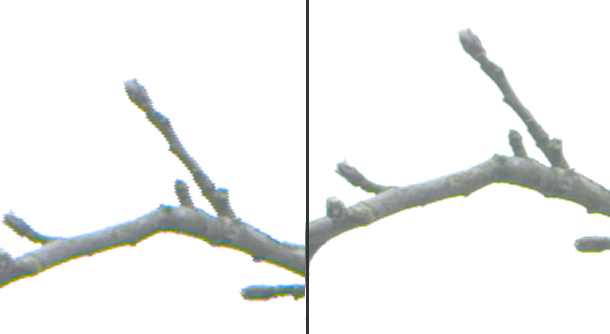
Here's some examples from this morning. Both do suffer from green fringes but it's the 50i version that makes it stand out. I'd be very interested to know your thoughts and whether you get similar results with interlacing enabled.

50i: http://www.pauljoy.com/images/c300_50i.png

25p: http://www.pauljoy.com/images/c300_25p.png

c300_25p_v_50i.png
 
I see if I get the chance to shoot branches later. In my 25p shots from above I cannot see any of this. I tried looking at 500% and there is no fringing around the branches like yours.
 
I don't know about anybody else but I'm a little sick of branches! Hopefully the sun will shine tomorrow and I can get down to the coast and start shooting something a bit prettier.
 
Back
Top