

maarten_smeenk
Active member
Hi,
***UPDATE SEE ATTACHED GRAB, for the quality issue!***
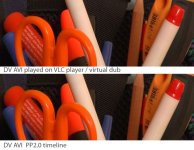
A comparison between the way VLC player / virtualdub shows a clip and PPpro2.0 (same in adobe after effects, vegas and premiere pro 1.5).
Uncompressed Tif
http://www.brainstorm-studios.nl/dv_compared.tif

DV AVI clip
This is the clip i have in my timeline, please see if you get it clean or messed up!
http://www.brainstorm-studios.nl/original_dv.avi
My solution?
Make a roughcut in ppro2.0. Export it as dv-avi (don't recompress).
Use virtualdub to convert the dv-avi to uncompressed RGB video (color depth RGB 24 bit RGB888)
Import the uncompressed into Adobe After Effects for CCing. Then export as??
Makes me confused! Why cant i edit the material in pppro and ae so that it looks the way as vlc player/virtualdub shows it! The quality is in the avi, but gets messed up somehow! It seems to have something to do with RGB and YUV.
Who knows?
***Original post****
I found a huge quality issue with my DVX102BEN (pal model from asia). When i capture with PP2.0 (tape mode, so i capture a feed directly from the dvx firewire port) it looks stunning in the capture window. But when i import the video in the timeline its horrible. Take a look at the screengrab. (settings are 25p cinelike_V, line thin)
http://www.brainstorm-studios.nl/edge_problem.tif
The orange siccor and red marker for example get horrbile jagged edges! When i saw it in the capture window it was clean, but maybe a tad bit less sharp, but without this "red/orange" problem!
When i use vegas it looks terrible, same like what pp2.0 captures! What can i do to capture in the same quality as the feed from pp2.0?
Hope you guys know an answer!
Maarten
***UPDATE SEE ATTACHED GRAB, for the quality issue!***
A comparison between the way VLC player / virtualdub shows a clip and PPpro2.0 (same in adobe after effects, vegas and premiere pro 1.5).
Uncompressed Tif
http://www.brainstorm-studios.nl/dv_compared.tif
DV AVI clip
This is the clip i have in my timeline, please see if you get it clean or messed up!
http://www.brainstorm-studios.nl/original_dv.avi
My solution?
Make a roughcut in ppro2.0. Export it as dv-avi (don't recompress).
Use virtualdub to convert the dv-avi to uncompressed RGB video (color depth RGB 24 bit RGB888)
Import the uncompressed into Adobe After Effects for CCing. Then export as??
Makes me confused! Why cant i edit the material in pppro and ae so that it looks the way as vlc player/virtualdub shows it! The quality is in the avi, but gets messed up somehow! It seems to have something to do with RGB and YUV.
Who knows?
***Original post****
I found a huge quality issue with my DVX102BEN (pal model from asia). When i capture with PP2.0 (tape mode, so i capture a feed directly from the dvx firewire port) it looks stunning in the capture window. But when i import the video in the timeline its horrible. Take a look at the screengrab. (settings are 25p cinelike_V, line thin)
http://www.brainstorm-studios.nl/edge_problem.tif
The orange siccor and red marker for example get horrbile jagged edges! When i saw it in the capture window it was clean, but maybe a tad bit less sharp, but without this "red/orange" problem!
When i use vegas it looks terrible, same like what pp2.0 captures! What can i do to capture in the same quality as the feed from pp2.0?
Hope you guys know an answer!
Maarten
Attachments
Last edited:


