Pulldown plugins for PPro CS5

Ah, what you have is called the lemming condition. Either you don't know what you're doing or everything always works for you. It would seem in this case its the former as if you had actually wanted to prove a point you would have given us something more concrete to benchmark off of instead of a fuzzy picture of a plant.

Proof:

Avisynth


Adobe-


That was on premiere AVCHD 1080 24p and 30p timelines, which yielded identical results. Also tried a 60i timeline which was much worse, but that would make sense as only adobe can fu¢k up a 60i clip on a 60i timeline.
 
Thank you again for the lecture.

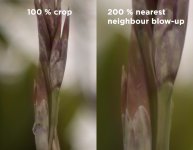
Obviously a shallow-focus picture of a plant is not ideal. I think you're missing my point. I wasn't trying to show you how much resolution is gained or lost. I was trying to show that for a moving picture, the Avisynth method left interlacing artifacts in some small ways.

Also, I did note that I may have done something wrong.

Hilariously, though, even though you don't like to spoonfeed, you now finally showed the screenshots. You did have it in you! Although I'd be curious what your export settings are.
 
I did have image issues with Premiere when I didn't have the proper video card driver installed. didnt originally think that could cause it, cause everything else played thevideo just fine. fixed the driver and all is good. ive been using cs5 and cannot find any loss in resolution and i am displaying my video on a 1920 x 1080 screen.. might have to get a copy of that chart, though.
 
Ah, what you have is called the lemming condition. Either you don't know what you're doing or everything always works for you. It would seem in this case its the former as if you had actually wanted to prove a point you would have given us something more concrete to benchmark off of instead of a fuzzy picture of a plant.

Instead of being insulting perhaps you should carefully examine the picture provide by butler360 which shows a clear motion pulldown removal artifact that a test chart would not show. Below is both a 100% simple crop of the middle and a 200% blow-up to clarify what the problem is.
 

Attachments

  • avisynth-error.jpg
    avisynth-error.jpg
    261.5 KB · Views: 0
It probably doesnt show it because it trashed half your vertical resolution.

Anyways if were talking about motion then we have to get into uploading movies as even the mts contains progressive frames. I've checked back at a test panning shot i did when i was previously troublshooting the presence of combing artifacts in various pulldown methods, and after comparing the mts and IVTC'd clip frame by frame they both pulldown correctly, its just that premiere deinterlaces the image which is why the resolution is trashed. Neither has any combing artifacts, except of course for the mts when played in media player. This is nothing new, premiere has always, read always attempted to deinterlace without the users consent or control from when CS began and adobe has refused to give its users any control over it. CS3 notoriously would deinterlace a progressive clip on a progressive timeline based on certain effects used.

Now that i'm looking back at the clips, it appears not only does it trash the resolution, it also messes with the colors, in this case everything seems to have a bright red tint to it which is not true to the source, even though the source is what's on the timeline. My IVTC'd clip remains true on the timeline.
 
Hah, well I don't know what to say. I guess the only thing for me to do is shoot a test chart since you haven't given the settings you used on your Premiere export. And I've followed the AviSynth posts exactly. And it did produce a 24P file that for the most part looks good.

Guess it's test chart time.
 
it also messes with the colors, in this case everything seems to have a bright red tint to it which is not true to the source, even though the source is what's on the timeline.

just trying to help you out, mi amigo... have you checked your video card driver?... again, i had similar issues to what you are experiencing, and might also add that when I had the wrong driver installed, my colors were off as well.. not red though, it had a green tint.
 
just trying to help you out, mi amigo... have you checked your video card driver?... again, i had similar issues to what you are experiencing, and might also add that when I had the wrong driver installed, my colors were off as well.. not red though, it had a green tint.

That's just because YOU have LEMMING SYNDROME.

;-)
 
I've imported interlaced 1080p GH1 files into Premiere Pro and After Effects CS4 23.976fps timelines and tried out all of the various pulldown options that are offered. While some settings are better than others, none of them correctly extract all of the original progressive frames from the telecined MTS files.
I recently upgraded to Adobe CS5 and tried this test again with a GH1 FHD clip, 24p in the 60i wrapper. In contrast to CS4, After Effects CS5's Interpret Footage dialog correctly guessed the pulldown sequence of the MTS file and reconstructed the progressive frames without interlace artifacts.
 
yes cs5 suite is a darn good. i started with pp cs5. do basic editing. then import the pp project from ae cs5.
 
I recently upgraded to Adobe CS5 and tried this test again with a GH1 FHD clip, 24p in the 60i wrapper. In contrast to CS4, After Effects CS5's Interpret Footage dialog correctly guessed the pulldown sequence of the MTS file and reconstructed the progressive frames without interlace artifacts.

Do you have Premiere. After Effects has had some form of pulldown removal for some time, and was the way I dealt with the DVX100 24pa type of thing. But I think the question is, does Premiere
benefit by the After Effects capability... or were the engineers locked away from each other and the Premiere group is busy reinventing the wheel...
 
Ah, what you have is called the lemming condition. Either you don't know what you're doing or everything always works for you. It would seem in this case its the former as if you had actually wanted to prove a point you would have given us something more concrete to benchmark off of instead of a fuzzy picture of a plant.

Some of us don't have the couple hundred bux for 'test charts', or have buddies that have them just hanging on their walls... some of us use newspaper tacked to the wall...

But I'll presume that you are using CS5 Premiere, since CS4 has already been noted as 'not good' in regard to pulldown removal. (In addition to not very good at AVCHD play back in the first place...).
 
Do you have Premiere. After Effects has had some form of pulldown removal for some time, and was the way I dealt with the DVX100 24pa type of thing. But I think the question is, does Premiere
benefit by the After Effects capability... or were the engineers locked away from each other and the Premiere group is busy reinventing the wheel...

I tried the various methods in after effects cs5 without success, and no, the two teams at adobe dont work together else they would have just fused the two programs already and had a solid product, but premiere has always been the weakest link.

Some of us don't have the couple hundred bux for 'test charts', or have buddies that have them just hanging on their walls... some of us use newspaper tacked to the wall...

That chart cost me $30 in all, printed at kinkos. http://www.graphics.cornell.edu/~westin/misc/ISO_12233-reschart.pdf
 

What dimensions and resolution was the output you got from Kinko's?

The reason why I ask, is when I load the PDF you reference, Photoshop gives the PDF the dimensions of 15.573x9.723.

But when I look on the web I find an example of a purchased test chart for ISO-12233 from imatest.com, and the dimensions of that chart
are significantly bigger.

---------------------
Large ISO-12233 Ink Jet on Paper $250.00

Large ISO-12233 Ink Jet on Paper

Large ISO-12233 Digital still-camera resolution chart - Ink Jet on Paper

The I3A/ISO Camera Resolution Chart conforms to the ISO-12233 standard, "Photography-Electronic still picture cameras - Resolution measurements". Hyperbolic wedges for resolution evaluation range from 100 - 2000 lines per picture height. Other features include checker patterns, multiple slant-edge lines, a center-focus zone plate and framing marks for 1:1, 4:3, 3:2, and 16:9 aspect ratios.

* Active Area: Charts are available in two sizes. It is recommended that the smaller charts be used to test imaging systems with sensors up to 8 MP, and the larger charts be used for testing of sensors above 8 MP.
o The smaller chart has an active area of of approximately 22 X 39 inches and is printed on 24 x 40 inch paper.
o The larger chart has an active area of approximately 33 X 59 inches and is printed on 40 X 60 inch paper.

* Paper/ink type: Semi-gloss OR Matte. Matte paper/ink can be used to reduce reflected light, but is slightly less sharp than semi-gloss paper. Semi-gloss paper/ink is recommended for most applications.

Available Options:
Paper:
Size:
This product was added to our catalog on Wednesday 22 July, 2009.
----------------------------
 
Last edited:
Well the pdf is a vector graphic, so if you zoom in it will maintain its resolution at any scale. I told the printers i wanted it 3' wide and to keep the AR the same. They have two different print types, the cheap b/w thin paper that only costs 50c a sqft, and the nicer color printer with thicker paper thats like $7.50 sqft. I did a color chart on that and the gradients came out kinda weird, so it has its uses, but the printing resolution on the b/w is kinda limited so you wont actually get the super fine parts of the chart, which doesnt matter anyways as the camera cant pick up that fine of detail.
 
Correction:
I had some files that looked OK when CS5 did the pulldown, but I just recently shot some video with the Panny 20 mm. The scene had a lot of detail and a lamp near the middle. When CS5 did the pulldown, there was truly horrendous pulsing and junk in the area of the lamp. I redid the video with cineform, and, viola, perfect.
So, even if it works sometime, I'm not using it for the time being. This was not a small difference. Updated graphics driver, no change in CS5.
 
Back
Top