GH2 PTool with GH2 support released

Ben, HX9V...not a pro tool, but mounted on hot flash of GH2...1080-60P...350usd...gotta see it to believe it.

Client isn't going to care if it's 720p or 1080p, but they are going to care about the quality of the shots, doubt that sony is gonna get me better shots than the GH cameras. Thanks for the heads up though.
 
I've started a Google Docs Spreadsheet for testing results. Maybe something like this will help.
https://spreadsheets.google.com/spreadsheet/viewform?formkey=dEgzTkhsZGRqdWZZdk5raWFxbmtobXc6MQ

The "see responses" pie-chart generated is not helpful, but the full spreadsheet is. There must be a way to share/publish the plain spreadsheet, maybe with separate sheets if Google Docs can allow form input.Please feel free to fill in the form with suggestions for other fields of what to put in. Right now, the spreadsheet itself is still in Alpha mode. You probably can't break it, but do be polite, clean and no buffer-overflows.
 
Last edited:
If you are reading this thread, and have a gh2, start testing! There are thousands of variables and we need a mass of people to put their cams on the altar of Vitality.
 
Right now the Encoder settings are the only thing that matter. Specifically you can add B-Frames to 720p by adjusting Encoder 1 and 4 for 720p. No other changes are necessary. We need to find out how the other settings react for 1080p and 1080i though. I know it is tempting to only mess with the max bit rate settings. However, there is no benefit to them at the moment.
 
p1040510t.jpg

Great!!
 
Client isn't going to care if it's 720p or 1080p, but they are going to care about the quality of the shots, doubt that sony is gonna get me better shots than the GH cameras. Thanks for the heads up though.

If youre shooting outside or in good light you might be very suprised. Of course indoors and lowlight it'll all go wrong but as a extra tool.
I have a hacked GH1 recently got a GH2 and HX9...HX9s 1080p 50/60p is in some cases better than GH1 hacked and on par with GH2s detail....but with benefit of fast AF,minimal rolling shutter and smooth motion and good zoom.
Bit embarrassing really...DSLR companies need to step up.
 
Right now the Encoder settings are the only thing that matter. Specifically you can add B-Frames to 720p by adjusting Encoder 1 and 4 for 720p.

To what value do we have to change the encoder 1 or 4 to get B-Frames in 720 PAL mode?
 
Hello Landsmann AKED,


these are the settings from user mpgxsvcd

to avoid malfunction, first after starting camera take a short footage with 24p cinema mode, then go to mode variable mode, 720p

the setc.ini original due to credit mpgxsvcd´s work , set additionally the parameter for Video Bitrate FSH/SH to 28000000

to your question:
the encoder settings for 720p changes are:

ES1 720p from 2 to 3
ES2 from 3 to 6
ES3 from 4 to 8
ES4 from 9 to 17

the changes are like 1080i settings original, this causes -it seems- the buffer is correctly set by shooting firstly 24p cinema mode only before using 720p variable, why ? we don´t know yet

Tests had been taken on PAL camera, switched to NTSC (in ini-File original not included), my own set.ini at the bottom

[Information]
Comment=This Profile Adds B-Frames to the 720p setting like the <br>1080i setting has. It lowers the 720p GOP from 30 to 12 as <br>well. The 1080p 24 FPS is unchanged except for moving <br>the GOP from 12 to 6. The setting is stable for manual <br>movie mode 720p. It will fail for all 720p auto modes <br>though.
SD_Card=Any
Camera=GH2 v1.0E
[Settings]
Version increment=1
E1 Quality=150
E1 Table=86
E2 Quality=130
E2 Table=56
E3 Quality=115
E3 Table=26
E4 Quality=100
E4 Table=4
Video Bitrate FSH/SH=16000000
Video Bitrate FH/H=12000000
Video Bitrate L=8000000
Video Bitrate 24H=22000000
Video Bitrate 24L=16000000
720p60 GOP Size=15
1080i50 and 1080p24 GOP Size=6
1080i60 GOP Size=15
Video Bitrate 24H ADD=24000000
Overall Bitrate=18000000
Overall Bitrate 2=9000000
Constant for 720p=345600
Encoder setting 1 720p=3
Encoder setting 2 720p=6
Encoder setting 3 720p=8
Encoder setting 4 720p=17
Encoder setting 1 1080i/p=3
Encoder setting 2 1080p=3
Encoder setting 3 1080p=4
Encoder setting 4 1080p=8
Encoder setting 2 1080i=6
Encoder setting 3 1080i=8
Encoder setting 4 1080i=17
Video buffer=0x2400000
Video buffer 24p=0x2400000


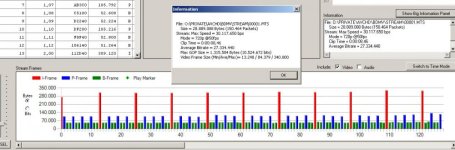
streamparser01.jpg

but other bitrates of 1080p/i seems to be downgraded at this time, need further testings

my settings:

[Information]
Comment=This Profile Adds B-Frames to the 720p setting like the <br>1080i setting has. It lowers the 720p GOP from 30 to 12 as <br>well. The 1080p 24 FPS is unchanged except for moving - <br>added NTSC switch<br>the GOP from 12 to 6. The setting is stable for manual <br>movie mode 720p. It will fail for all 720p auto modes <br>though.
SD_Card=Any
Camera=GH2 v1.0E
[Settings]
Version increment=1
30min limit removal=Checked
PAL<->NTSC Menu=Checked
E1 Quality=150
E1 Table=86
E2 Quality=130
E2 Table=56
E3 Quality=115
E3 Table=26
E4 Quality=100
E4 Table=4
Video Bitrate FSH/SH=28000000
Video Bitrate FH/H=12000000
Video Bitrate L=8000000
Video Bitrate 24H=22000000
Video Bitrate 24L=16000000
720p60 GOP Size=15
1080i50 and 1080p24 GOP Size=6
1080i60 GOP Size=15
Video Bitrate 24H ADD=24000000
Overall Bitrate=18000000
Overall Bitrate 2=9000000
Constant for 720p=345600
Encoder setting 1 720p=3
Encoder setting 2 720p=6
Encoder setting 3 720p=8
Encoder setting 4 720p=17
Encoder setting 1 1080i/p=3
Encoder setting 2 1080p=3
Encoder setting 3 1080p=4
Encoder setting 4 1080p=8
Encoder setting 2 1080i=6
Encoder setting 3 1080i=8
Encoder setting 4 1080i=17
Video buffer=0x2400000
Video buffer 24p=0x2400000
 
Last edited:
Something important for PAL is missing.

720p60 GOP Size is on 15 so half of the original value.

There is nothing written about
720p50 GOP Size would be important to know, if for PAL one has to reduce it to 12 from the original value of 24.
12 or 24?
 
Ben, HX9V...not a pro tool, but mounted on hot flash of GH2...1080-60P...350usd...gotta see it to believe it.
I had a HX9v and it was bad in low light. It was nice in bright light with unlimited DoF, but indoors the video went downhill.

Looking forward to all these new "features" coming to my GH2! 60p would be sweet.
 
Hello Landsmann AKED,


these are the settings from user mpgxsvcd

to avoid malfunction, first after starting camera take a short footage with 24p cinema mode, then go to mode variable mode, 720p

[Information]
Comment=This Profile Adds B-Frames to the 720p setting like the <br>1080i setting has. It lowers the 720p GOP from 30 to 12 as <br>well. The 1080p 24 FPS is unchanged except for moving <br>the GOP from 12 to 6. The setting is stable for manual <br>movie mode 720p. It will fail for all 720p auto modes <br>though.
SD_Card=Any
Camera=GH2 v1.0E
[Settings]
Version increment=1
E1 Quality=150
E1 Table=86
E2 Quality=130
E2 Table=56
E3 Quality=115
E3 Table=26
E4 Quality=100
E4 Table=4
Video Bitrate FSH/SH=16000000
Video Bitrate FH/H=12000000
Video Bitrate L=8000000
Video Bitrate 24H=22000000
Video Bitrate 24L=16000000
720p60 GOP Size=15
1080i50 and 1080p24 GOP Size=6
1080i60 GOP Size=15
Video Bitrate 24H ADD=24000000
Overall Bitrate=18000000
Overall Bitrate 2=9000000
Constant for 720p=345600
Encoder setting 1 720p=3
Encoder setting 2 720p=6
Encoder setting 3 720p=8
Encoder setting 4 720p=17
Encoder setting 1 1080i/p=3
Encoder setting 2 1080p=3
Encoder setting 3 1080p=4
Encoder setting 4 1080p=8
Encoder setting 2 1080i=6
Encoder setting 3 1080i=8
Encoder setting 4 1080i=17
Video buffer=0x2400000
Video buffer 24p=0x2400000

With these settings i do not get more than 18 mb average. i have to increase the 720p sh mode compression to 24 or 28 mbit to get an average bitrate of 22-24 mbit.
 
The only setting you need to change is Encoder setting 1 720p=3. That's it. Uncheck everything else. If you check any other AVC-HD setting it will mess it up. It will record as high as 28 mb/sec in 720p mode with B-Frames with that one modification. Quality is outstanding. You must record a 1080p file before you record a 720p file though. Otherwise it will freeze.

Ptool Setting B

http://www.personal-view.com/talks/uploads/FileUpload/91/c65831911541b0fe02303bb040bdc0.zip
 
mpgxsvcd,
Will I need to record something in 1080p first and then switch to 720p every time I turn on my camera?
You also checked mpeg 720p compression settings in your ini file. I assume I can uncheck them if I never use mpeg movie mode?
 
@Boon: not only , for PAL change GOPSize 720p50 to 12 additionally, is tested PAL, prodecure same as for NTSC


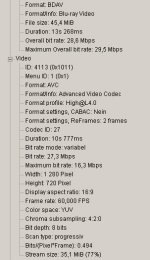
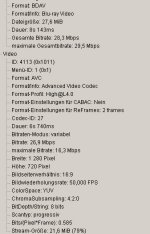
mediainfo302.jpg


Streamparser067.jpg
 
Last edited:
mpgxsvcd,
Will I need to record something in 1080p first and then switch to 720p every time I turn on my camera?
You also checked mpeg 720p compression settings in your ini file. I assume I can uncheck them if I never use mpeg movie mode?

Yes, right now you have to record a 1080p @ 24 FPS or a 1080i first every time you turn on the camera to avoid the high bit rate 720p error.

Yes the MJPEG settings are independent from the AVC-HD settings.
 
Back
Top