C100: Prores LT vs AVCHD

Doug_EX

Well-known member
Hi,

I'm about to purchase a monitor/recorder to use with my C100 and to record the output of my A/V switcher.
At first, I was looking at the Panasonic HMR10 (AVCHD) to go with my switcher...I need for this, low bit rate.
Is the Prores LT comparable with AVCHD? If so, I will surely buy a Atamos Blade and will be able to use it with my C100 (in Prores HQ) and my switcher (in Prores LT).

thanks!
 
Why do you need a low bit rate? Is it for fast turnaround webinars or something similar?

To answer your question, it might help if you let us know what you're trying to achieve and your proposed workflow.

Ben.
 
Why do you need a low bit rate? Is it for fast turnaround webinars or something similar?

To answer your question, it might help if you let us know what you're trying to achieve and your proposed workflow.

Ben.
The low bit rate is for when I record a multicam set-up of meetings and stuff like that. For that, I don't need Prores HQ..the Panasonic HMR10 would be perfect for that, but I don't want to buy 2 recorders.
I could use the Atamos as a monitor for my C100 as well for recording high bitrate 422 when I need it.
 
The recorders cost similar money, once you factor in SSDs - one is at the start of it's product life (Atomos), the other distinctly Old Skool - but reliable (Panasonic.)

ProRes LT vs H264 - not sure. They're different beasts - one an Intra Frame edit-friendly codec and the other more suitable for quick web upload.

LT = 46 GB per hour; ProRes 422 - 66 GB per hour. Not much in it. I'd suggest you record everything at ProRes422 (that's what we currently do.)

Sounds like you need to look at the whole workflow and the entire life of the asset - do you want to archive it for later re-use? Do you need to get it straight out of the recorder and edit quickly? Or are you taking the mixed output and uploading it immediately for web streaming?

If you can handle the slightly greater storage reqs, ProRes422 is a very good compromise. ProRes HQ is possibly overkill for most needs.

And, if you go for the Blade, you get decent monitoring too.

If you do need to go down the H264 recorder route, consider the Blackmagic H264 Recorder, if you have a Macbook to hand.

Ben.
 
The recorders cost similar money, once you factor in SSDs - one is at the start of it's product life (Atomos), the other distinctly Old Skool - but reliable (Panasonic.)

ProRes LT vs H264 - not sure. They're different beasts - one an Intra Frame edit-friendly codec and the other more suitable for quick web upload.

LT = 46 GB per hour; ProRes 422 - 66 GB per hour. Not much in it. I'd suggest you record everything at ProRes422 (that's what we currently do.)

Sounds like you need to look at the whole workflow and the entire life of the asset - do you want to archive it for later re-use? Do you need to get it straight out of the recorder and edit quickly? Or are you taking the mixed output and uploading it immediately for web streaming?

If you can handle the slightly greater storage reqs, ProRes422 is a very good compromise. ProRes HQ is possibly overkill for most needs.

And, if you go for the Blade, you get decent monitoring too.

If you do need to go down the H264 recorder route, consider the Blackmagic H264 Recorder, if you have a Macbook to hand.

Ben.

Thanks Ben!

The reason I want low bit rate is for handing off the footage directly to the client (multicam events) and to save on hard drive space. For meetings and stuff like that, Prores 422 or HQ is pretty much overkill.
But I just realize something...I thought that ProresLT was 36mb/s...but that's proxy right? Would not help much then. I can't give to a client a 150GB file of a meeting.
 
But I just realize something...I thought that ProresLT was 36mb/s...but that's proxy right? Would not help much then. I can't give to a client a 150GB file of a meeting.

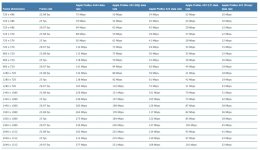
It varies according to frame size, so my figures above are somewhat subjective. Here's the ProRes spec chart below. Also, why not consider a hybrid route - get the Ninja for camera work (and when you need a high quality mixer recording) and something like the BM H264 recorder, which allows you to copy off the TX file to a client's USB drive? The Panasonic seems very expensive for just that requirement.

Ben.

ProRes.jpg
 
Thanks you very much Ben for the info. But, don't you need to plug the BM H264 recorder via USB to a computer? USB is not he most ''secure'' connecter out there...it's worst that HDMI. What happens if the BM loses contact with the computer...do I lose the file? I need something reliable.
 
Thanks you very much Ben for the info. But, don't you need to plug the BM H264 recorder via USB to a computer? USB is not he most ''secure'' connecter out there...it's worst that HDMI. What happens if the BM loses contact with the computer...do I lose the file? I need something reliable.

I'm not sure if USB is less reliable than HDMI - I'd put them on par for their ability to induce brown-trouser-moments.

However, I think if you rack-mount stuff and find ways of keeping plugs secure, the risk is substantially reduced, no?

Ben.
 
You're probably right...but my laptop would still not be rack mounted. Also, I did a quick search on the BM H264 recorder and reviews are quite bad...some people like it, but a lot of people had problems with it (usb port that stop working, unit failed in the midde of a recording, etc.). This unit is definitaly not reliable.
 
Back
Top