GH5 Problems with my DC-GH5 in Adobe Premiere

kilerb

Member
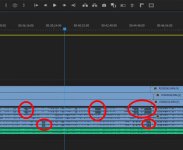
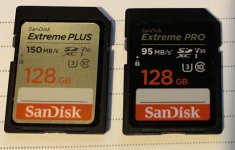
Hey there... So, I have 3 Panasonic DC-GH5's. I primarily use them to shoot video during a podcast. 3 different angles. I have had 2 major issues. (I updated the firmware prior to my last attempt on all 3 cams.) The latest issue being that when I drop these into Premiere, on 2 of the cams it seems like there are gaps in the waveform... Which is not a huge deal because we use the audio from the mixer anyway. But, when Premiere hits one of these audio gaps the software freezes. I'm using the MP4 format on all 3 (the one that says it's suggested for use with PC editing in the menu) and doing 29.97fps on all 3. One thing I did just notice is that I have 2 different SD cards in a couple of the units. They are ALL Sandisk, but a few of them are 95 mb/s and a couple are 150 mb/s... I am using both slots on each camera (recording the same thing to each) Just mentioning this in case that's a no no (using different speeds like that?) But I would imagine if they're both at least the minimum speed for recording it should work? Doing 1080p btw, not 4k. I attached an image of the premiere timeline. You can see the gaps in the waveform on 2 of the cams. The green audio beneath that is the actual podcast mp3.
issuespremieregh5.jpg

The other things which is probably a total noob question is I believe before I had it recording one long file to the SD card. Now it seems to be giving me 20 or so minute files. So it's multiple files per angle. Prefer just 1 since it's easier to synch everything that way later in Premiere.

Anyway, my big issue is the first paragraph. I really can't even edit it. It keeps freezing. A few weeks ago, before I updated my cams, there was some pixelation once in awhile on some basic video shots I was doing. Is it possible the cam(s) are broken? Seems like things that shouldn't be happening. Appreciate any suggestions from people with more knowledge than myself, which I'm guessing is most of you! Haha... Thanks!
 
Little update while trying to figure this out. I deleted all the blue audio tracks in the screenshot above in hopes that it would run without those gappy audio tracks. Just left the solid green track from the mp3 we created with a rodecaster pro. Runs a bit smoother maybe... But I was just editing using the multicam feature and about 7 minutes in the picture froze and wouldn't let me go any further. Rebooted the computer and the same thing. It won't let me get past that 7 minute mark. It freezes and then eventually says "media pending" even though there is about another 45 minutes of video after that. Are my cameras created corrupt video files? Or is there another possibility? Not sure what to do. I can't really edit this at this point. Also, these are the 2 SD cards that were in slot 1 and 2 of two of the cams... Thanks again!
unnamed.jpg
 
Last edited:
First. Did you format the cards in the camera ? Essential to do that and not in the PC. Cards should be at least V30 cards. How was the level set for the audio recording in the camera and from internal mics ?
 
Thanks Ron.... Yep, I always format them in the camera. I actually did slot 1 and 2 prior to this podcast. Both cards are V30. I put an photo of the 2 types I was using above. Thanks
 
It's mostly odd that the issue occurs on multiple different GH5 cameras, this would suggest it's something they have in common. Potential 3rd party accessories or more probably the computer you are using or the version of the editing software is where the troubles lay.
 
It's mostly odd that the issue occurs on multiple different GH5 cameras, this would suggest it's something they have in common. Potential 3rd party accessories or more probably the computer you are using or the version of the editing software is where the troubles lay.

I do use third party power supplies. They seem to work fine. We’ve done successful podcasts in the past. I don’t know what’s been happening this past month or so... But the files seemingly have these issues. I mentioned this above… And wanted to bring it up again. I did notice that two of the cameras did have different SD cards in slot 1 than they had in slot 2. With that matter if the cards were different speeds? Could that possibly glitch something? I put a photo of the two different cards above. I didn’t even realize I had different cards in the two different slots until I was writing the very first post here.
 
The different card speeds won't matter, the camera will just use the slower cards speed to record at but in this case the write speeds of these cards are identical, only their read speeds differ which doesn't matter for recording. These cards both offer a minimum write speed of 30MB which is what the v30 means. Unless one of them is fake? Then it would be a big issue since you may drop frames, you should use a speed test app to see if they are meeting their specs.

3rd party wall adaptors are a red flag, never cheap out on power as supplying the incorrect voltage and ampage be it lower or higher can cause the camera to have stability issues which might explain the audio drop outs.

Next is to check your computer. What's your computer specs and what editing software are you using/ what version are you running?
 
Have you tried checking the audio dropouts for your camera files outside of premiere? If the audio doesn't drop outside of premiere then it might be an issue with premiere handling the files.

I've found clearing the preferences and caches helps get things working normally when premiere starts acting up.
 
The 20 min file issue is more indicative of AVCHD recording which is FAT32 by default. Doesn't explain this in mp4 format though. You may want to try recording UHD with the same cards after formatting again and see if the issue is still there. Also agree you need a fast card reader. I have a USB C version to connect to the fastest port on my PC.
 
The different card speeds won't matter, the camera will just use the slower cards speed to record at but in this case the write speeds of these cards are identical, only their read speeds differ which doesn't matter for recording. These cards both offer a minimum write speed of 30MB which is what the v30 means. Unless one of them is fake? Then it would be a big issue since you may drop frames, you should use a speed test app to see if they are meeting their specs.

3rd party wall adaptors are a red flag, never cheap out on power as supplying the incorrect voltage and ampage be it lower or higher can cause the camera to have stability issues which might explain the audio drop outs.

Next is to check your computer. What's your computer specs and what editing software are you using/ what version are you running?

When I was looking on Amazon, I didn't see any authentic Panasonic AC adaptors. I guess I should have looked elsewhere, assuming they even make them?
The computer is pretty super-charged. I use it to make deepfake vids. So I have an i9 with 64gb of RAM and an RTX Titan video card with 24gb of VRAM. All good ssd drives and I never have any issues editing any videos that haven't come from the cams. I think the SD Cards are legit. Got them at Best Buy and off Amazon. And I believe they worked on prior projects without an issue. Thanks! :)
 
I don't think you have an SD card problem. I'm more inclined to think there is something flaky about your Premiere setup and the computer you are running Premiere on. After all, that is something your files all have in common.

Just as a way of doing some quick troubleshooting, try playing back the files on your computer *not* using Premiere. I don't know if you have a Windows or Mac PC. Whatever computer you have, just play the files as though they were any other MP4 files. Do they play properly? Is there any sort of glitch in the image or sound when the playback reaches the points you circled in the image above? If they play right and sound good, I think your files are fine and the problem is something with Premiere in your computer. If there are glitches in either the sound or picture (or both), then your camera and/or SD card is the problem. The cheapest way to troubleshoot that is to get a new SD card and try again.

I have a reasonably powerful HP computer running Windows 10, but something about its playback of Panasonic video files causes occasional software crashes in Premiere, and frequent software crashes in DaVinci Resolve and Corel VideoStudio. Software does not crash on an older Dell computer, which will work all day with Resolve and VideoStudio using Panasonic camera files. Likewise, if I edit video files from Sony or Canon on my more powerful HP computer, there is no problem -- only Panasonic video files have a problem, and only when played back in editing software on that computer.

Okay... with that out of the way, I have a suggestion for you. But first, a question: What quality setting are you recording your files at? HD at 20Mbps? 4K at 100Mbps?

The GH5 has two MP4 file formats with different audio encoding standards. For both HD and 4K, you can record 4:2:0 8-bit files with either standard AAC audio encoding or LPCM audio encoding. If you are using one file format, try the other and see what happens.

Good luck!
 
Last edited:
I don't think you have an SD card problem. I'm more inclined to think there is something flaky about your Premiere setup and the computer you are running Premiere on. After all, that is something your files all have in common.

Just as a way of doing some quick troubleshooting, try playing back the files on your computer *not* using Premiere. I don't know if you have a Windows or Mac PC. Whatever computer you have, just play the files as though they were any other MP4 files. Do they play properly? Is there any sort of glitch in the image or sound when the playback reaches the points you circled in the image above? If they play right and sound good, I think your files are fine and the problem is something with Premiere in your computer. If there are glitches in either the sound or picture (or both), then your camera and/or SD card is the problem. The cheapest way to troubleshoot that is to get a new SD card and try again.

I have a reasonably powerful HP computer running Windows 10, but something about its playback of Panasonic video files causes occasional software crashes in Premiere, and frequent software crashes in DaVinci Resolve and Corel VideoStudio. Software does not crash on an older Dell computer, which will work all day with Resolve and VideoStudio using Panasonic camera files. Likewise, if I edit video files from Sony or Canon on my more powerful HP computer, there is no problem -- only Panasonic video files have a problem, and only when played back in editing software on that computer.

Okay... with that out of the way, I have a suggestion for you. But first, a question: What quality setting are you recording your files at? HD at 20Mbps? 4K at 100Mbps?

The GH5 has two MP4 file formats with different audio encoding standards. For both HD and 4K, you can record 4:2:0 8-bit files with either standard MP3 audio encoding or LPCM audio encoding. If you are using one file format, try the other and see what happens.

Good luck!

Thanks for the troubleshooting advice. Here's all the info... I just tried playing it in Windows 10 and I finally found a spot that glitches. You can see right at the start of this video there's a weird purple color that covers the bottom part of the video for a second. Then if you what a bit, you can see the sound just stops and makes some glitchy noises which you can hear in the video and then freezes. After I stopped recording it eventually did resume playing without sound and it played until the end of the video without sound, which was only about 10 more seconds.
In regards to the settings, I'm recording MP4 (AAC) "Best for viewing on PC" is what it says on the cam. Record quality is 1920x1080 29.97p 420/8bit/LongGOP 20Mbps AAC. The computer is really powerful. i9 64gb ram and a titan rtx video card with 24gb Vram. Premiere works well with any other source I've put in it and it's the latest updated version. I am using 3rd party AC adaptors and v30 sd cards. So it sounds like it's either the cam, the sd card or the aftermarket ac adaptors and not the computer or premiere I guess. Not sure why it would do this, not even trying to record at 4k here.
 
Thanks for the troubleshooting advice. Here's all the info... I just tried playing it in Windows 10 and I finally found a spot that glitches. You can see right at the start of this video there's a weird purple color that covers the bottom part of the video for a second. Then if you what a bit, you can see the sound just stops and makes some glitchy noises which you can hear in the video and then freezes. After I stopped recording it eventually did resume playing without sound and it played until the end of the video without sound, which was only about 10 more seconds.
In regards to the settings, I'm recording MP4 (AAC) "Best for viewing on PC" is what it says on the cam. Record quality is 1920x1080 29.97p 420/8bit/LongGOP 20Mbps AAC. The computer is really powerful. i9 64gb ram and a titan rtx video card with 24gb Vram. Premiere works well with any other source I've put in it and it's the latest updated version. I am using 3rd party AC adaptors and v30 sd cards. So it sounds like it's either the cam, the sd card or the aftermarket ac adaptors and not the computer or premiere I guess. Not sure why it would do this, not even trying to record at 4k here.

Interesting. Try the other HD setting, the one that uses LPCM audio encoding. It records HD at 100 Mbps, but it will play back fine in Windows. If that has problems, then there is something wrong with the SD card or camera or (possibly) your power supply. Can you swap in a battery to eliminate the power supply as a problem? (I have a battery replacement power supply that works brilliantly -- never had a problem with it, and it's perfect for animation projects and time-lapse.)

The next simple thing to test is swapping in a new SD card or one that you know works fine in another device. If you get glitches with it, you found your culprit: The camera is bad. If you get no glitches with it, then you have a couple of bad SD cards. If you're shooting HD at 20Mbps, a C10/U1 SD card is sufficient. The MUCH higher speed cards you have should yawn when thrown 20Mbps. But something strange could have happened and two cards failed simultaneously.

Good luck!
 
The 20 min file issue is more indicative of AVCHD recording which is FAT32 by default. Doesn't explain this in mp4 format though. You may want to try recording UHD with the same cards after formatting again and see if the issue is still there. Also agree you need a fast card reader. I have a USB C version to connect to the fastest port on my PC.

UHD is 4k, correct? Wouldn't that be more likely to cause issues than the 1080p i've been recording at? Also, are you saying that if I'm recording in MP4 format, it shouldn't be doing 20 minute files like it is? Are you suggesting the faster sd card reader for testing the cards? Or for transferring the files to the pc? If it's for PC transfer, I thought that would just help it move to the PC faster? No? Thanks!
 
I am puzzled why you use a GH5 to record at the almost lowest quality it can record with AVCHD just a little lower but maybe better audio than AAC. I would certainly try recording MP4 with LPCM option and see if there is an improvement.
 
UHD is 4k, correct? Wouldn't that be more likely to cause issues than the 1080p i've been recording at? Also, are you saying that if I'm recording in MP4 format, it shouldn't be doing 20 minute files like it is? Are you suggesting the faster sd card reader for testing the cards? Or for transferring the files to the pc? If it's for PC transfer, I thought that would just help it move to the PC faster? No? Thanks!

UHD is 3840x2160, 4K is incorrectly used these days because 4K DCI is 4096x2160. Most all TV's are actually UHD not 4K. The GH series can do both at different frame rates of course as 4K DCi is for cinema projection at 24fps. If you are recording mp4 on a correctly formatted card it should not be short files. On the GH5 the file size limit is 96GB and then it continues recording on a new file. Short files should only happen if your camera is stopping or you are recording AVCHD. AVCHD default is limited to these short files based on a FAT32 format. Yes faster card readers move files to PC faster and likely with less chance of errors. For your PC as you have stated, it should have no problems dealing with UHD files at 150Mbps. You would get the ability to crop to a HD image as well as much better LPCM audio. mp3 and even AAC are not the best audio files to edit with. No need to go to UHD just use a higher data rate for 1920x1080 with LPCM audio.

How are you transferring the files to the PC now. Have you tried another reader even from the camera itself.
 
I would try using a known brand of V60 card to test your cameras with. Lots of crappy V30 cards from well known brands that are not delivering on their MINIMUM write spec. I use the free ATTO drive benchmark to test my cards to guarantee that they are delivering on their MINIMUM speed spec.

Also use a USB 3.0 or 3.1 card reader when testing your cards...

Delkin Devices USB 3.0 Memory Card Reader $20

Lexar Professional USB 3.0 Dual-Slot Reader $23

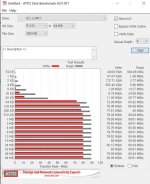
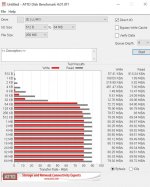
I tried the program you suggested on one of the suspected cards. I used an Anker USB-C SD-Card reader. Here are the results... Is this pretty good? It says 150 mb/s on the card on the first card/test, and and the 2nd card/test was 95mb/sec on the card. (Which seemed a tiny bit faster than the 150 mb/s card for some reason.)
cardtest.jpg
Test2.jpg
Thanks!
 
Last edited:
We might be able to narrow the issue down. Throw up a downloadable link to the files from the camera and mention where you're seeing troubles. Everyone here can try them on their computer to see if it's showing the issue or not.
 
We might be able to narrow the issue down. Throw up a downloadable link to the files from the camera and mention where you're seeing troubles. Everyone here can try them on their computer to see if it's showing the issue or not.

I'm down to do that, but they're about 4gb each file. Also, I have a 2nd computer with similar specs. I just played the same video that had the glitch above (straight off the SD card on the Anker reader, not transferring it to the computer first) and it did not glitch in the same spot it did on the other computer. Can you lose parts of the video while you transfer to the pc? I didn't use the anker upstairs. I used a no-name one. I mean it either transfers or it doesn't, no? I'm so confused. Anyway, it played off both cards on this computer without any glitches in the same parts of the video. Which seems like great news.... But why not on the other computer? That one is an i9 with 64 gb of ram and a titan graphics card with 24 gb of vram. Maybe it corrupted during transfer to the pc? Ugh :) Thanks!
 
Back
Top