Problem with Color Flickering on 7d footage


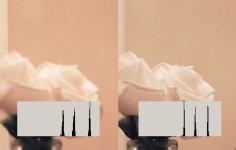
about 4 second in on this video, the out of focus albums on the right side of the screen start flickering in color, from white to blueish-gray. Can anybody tell me what the source of the problem here? It's also apparent at 1:37 on his forehead.

Thanks to jshaw300 for pointing this out.

http://www.vimeo.com/7058271
link to the video.
 
I know you shoot everything on manual, but were you using auto white balance?

Also, does it show up in the original footage?

Also also, how did Ben feel about being in front of the camera? :D
 
Taylor:

1. I was using auto white balance, I hadn't thought of that playing a factor, but that could make sense for sure.

2. Yes, it's definitely there in the original footage.

3. You know Ben, he loves being the center of attention.
 
Auto white balance would cause color shifting. Sounds like operator error and not a problem with hardware.
 
Auto white balance can cause color shifting, yes -- but flickering like this? I haven't spent much time with the 7D's AWB feature, maybe so, but usually AWB has a transition period so you'd see a gradual flow from one color to the other, not a rapid switching like that.

It's possible AWB could be the culprit, or it could be the lighting compensation thing maybe, or a high shutter speed interacting with fluorescent lights. But I wouldn't immediately leap to "operator error", especially since there is a near-identical type of situation on the GH1 which is almost unquestionably hardware-related.

Even if it does turn out to be AWB, this would be aberrant AWB behavior and something that we would all be wise to take note of.
 
Ok, maybe he should reshoot in full manual to test if the results are the same. Until then I doubt any definite conclusions can be made. Just trying to avoid any mass hysteria. Had far too much of that lately.
 
Were you using the Highlight Priority mode?
Seems to be occurring on highlights that are bordering between clipping and not clipping...as though the encoder is trying to push them back down to legal levels.

Just a shot in the dark.
 
Getting to "full manual" takes some effort, because it's not just the obvious things (shutter, iris, and white balance) but many other things (such as light optimizer, ISO, perhaps highlight tone priority...) All sorts of things could be contributing.
 
Ok, maybe he should reshoot in full manual to test if the results are the same. Until then I doubt any definite conclusions can be made. Just trying to avoid any mass hysteria. Had far too much of that lately.

I'm not trying to cause mass hysteria, as you say, Isaac. Just noting that the weird flickering effect is indeed occurring and I'm trying to get some feedback on how to make sure that the operator (myself and others) can operate the hardware without a flickering effect. The reason I posted this was to figure out how to fix whatever error it is, not to get a "better luck next time" response.

Auto white balance can cause color shifting, yes -- but flickering like this? I haven't spent much time with the 7D's AWB feature, maybe so, but usually AWB has a transition period so you'd see a gradual flow from one color to the other, not a rapid switching like that.

It's possible AWB could be the culprit, or it could be the lighting compensation thing maybe, or a high shutter speed interacting with fluorescent lights. But I wouldn't immediately leap to "operator error", especially since there is a near-identical type of situation on the GH1 which is almost unquestionably hardware-related.

Even if it does turn out to be AWB, this would be aberrant AWB behavior and something that we would all be wise to take note of.

Thanks for the input Barry. I almost always shoot in 1/50th shutter speed, and was doing that in this case, so it wasn't due to higher speeds. I'm in agreement with you though that it seems odd that it could be the AWB because of it's rapid frequency. I'll try to do some more test shooting under similar conditions and look for differences with white balance and shutter speed etc.
 
When I first got my camera I got that kind of flickering on some of my first footage, quickly realized it was the auto white balance. And light optimizer was also enabled when it came. I have all that turned off now and get none of that.
 
I also see it at 1:31 on the wall. The light does not change, the scene barely changes (only slighty on focus in other parts of the frame perhaps) but the color response changes a lot within a couple of frames. There is an auto algorithm active and it could be the AWB. The histogram was calculated on the flat uniformly lit wall.

Some AWB algorithms can be tuned to work on a single frame but that would make a strange default for a general purpose camera.

Is it possible that there are two light sources with different temperature in this scene? Flicker combined with the rolling shutter or an inaccuracy in the frame interval timing could interfere with a fast AWB tuning.
 

Attachments

  • balance.jpg
    balance.jpg
    56.2 KB · Views: 0
Last edited:
The auto white balance feature has been strobing color on my 7D as well, the solution is pressing the (*) button to lock white balance. It especially happens while zooming during shooting.
 
i have nothing to add about the camera's performance but i'd like to point out how disappointed i was not to get to listen to Quicksilver messenger service- happy trails, after watching him carefully select it and put it on.
 
When I first got my camera I got that kind of flickering on some of my first footage, quickly realized it was the auto white balance. And light optimizer was also enabled when it came. I have all that turned off now and get none of that.
Good info.
 
Back
Top