C100: Problem filming Car LED lights

tet20

Active member
Hi,

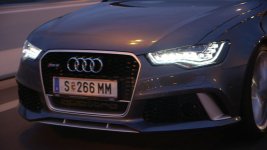
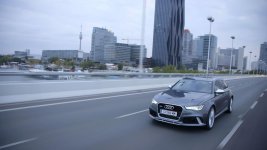
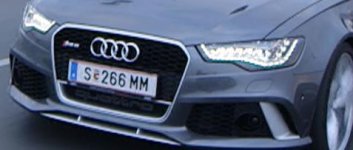
I have been shooting some car stuff and sometimes you can see a green outline on the cars led light..

It was shot 50i to a ninja.. now i also converted the avchd stuff just to see if it´s maybe the ninja but it´s also on the internal recording..

Do you know what this could be and how i could avoid it in the future?

thanks.. :-)
 

Attachments

  • Reichsbrücke_3.jpg
    Reichsbrücke_3.jpg
    40.6 KB · Views: 0
  • Reichsbrücke_2.jpg
    Reichsbrücke_2.jpg
    47.2 KB · Views: 0
  • Reichsbrücke_1.jpg
    Reichsbrücke_1.jpg
    50.9 KB · Views: 0
Sorry for my late reply but thanks for your quick answer...

Yeah.. Probably the LEDs are the cause.. still strange.. on the big HD Screen the green outline is actually pixelating.. uploaded some sample to Vimeo..
https://vimeo.com/76336572

i mean i film cars all the time so LED lights on cars are not new to me and the C100.. this funny green pixelating aura in the headlights is new to me and just strange..
so power window color correction and power window gaussian blur should do the trick ;-)
 
Hi,
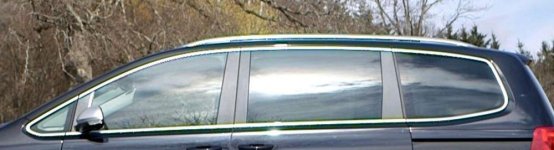
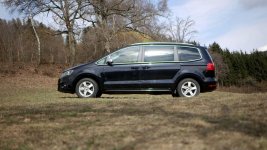
Here it is again.. I had it sometimes now on Car LEDs and lived with it but now it appears in the metal outline of the Windows.. And again its pixelating like hell.. even worse on the big Screen..
Any Idea?

thanks in Advance..c100-green2.jpgc100-green1.jpg
 
That is always a good Tip and thanks but..
Power Window CC gets rid of the green Tint but not the Pixelation..
It is not the green color anymore what is giving me Headaches..

If you watch the Footage on a HD Television or Computer Monitor etc. you actually can see the Pixels along the green lines ...
It is like somebody painted over the Screen with an really old Paint Program.. It does not look like part of the Video.. And this is something which i can not get rid of with color correction..
Gaussian Blur over the affected Area?.. Messes up the whole Picture..Not Possible..

I just want to know if i can avoid it on the Operator side or if i have to live with it..
Nobody knows how to handle this Problem?
 
...Now i am still running the original Firmware on the C100 so i will update..maybe this is doing the trick.. any other Workarounds?

No, try new firmware, I don't meet this on my C100 (green outline on high-contrast diagonal edges), this could solve that problem.
 
just thinking out loud here, but I wonder if this is a side effect of the sensor design where it pulls two green pixels along with a red and a blue to create a single pixel. If you overdo the green, it might be distorting that combination. Maybe there's a way to filter down the green and then bring it back in post? Maybe underexpose a little so it doesn't blow out the bright end of the image?
 
I will have it updated.. I hope this helps..

Interesting Thoughts .. but to technical for me :-)
 
Ok, sorry if I was getting too nerdy there. The basic idea is that the spots that you're seeing the pixelation are two things…way too bright and in the case of the LEDs green tinted because of the white balance. The headlights and reflecting chrome trim is just too bright to be within the camera's range of exposure so it's doing weird things when trying to create those pixels in the image.
For shooting the headlights in daytime, I suppose you could bring the level down a bit by applying a (removable of course) tinted film on the headlights that would act as an ND filter. Not sure how well that would really work in practice as I've never done it, but it's an idea. For the car with the chrome trim, a polarizer might be able to cut down those highlights enough to stop the distortion. It would also take a lot of the reflections off the windows, so I don't know if that's the look you're going for or not.
 
That are some good Ideas.. Ok.. The Tinted film on the Headlights is maybe too much effort but using the Polarizer on not LED Stuff i will try..
The Stuff is low Budget anyway and it just bothers me, not the Client..

But i am still hoping the newest Firmware will do the Trick..
 
Let us know if the polarizer helps. I'm not really sure that you'll see anything magic from the firmware update as it doesn't change the sensor behavior, dynamic range, codec, or any of the core technology that impacts your problem.
 
Back
Top