problem calibrating A7s audio recording level to match Sound Devices Mixpre-D

Has anyone figured out how to set the Sony A7s audio recording to -20db???

I have my Sony A7s hooked up to the Sound Devices Mixpre-D and I'm not able to properly set my A7s audio to -20db.

I read that when using a DSLR with the Mixpre-D, one should set the the DSLR to -20db.

Thanks in advance for any help.
 
I read that when using a DSLR with the Mixpre-D, one should set the the DSLR to -20db.

I haven't heard of this rule myself ( for most low cost digital audio devices the norm is -12 dB ), but I think this will depend on the audio performance of the camera you are using.

For example, my old Canon 60D had a self noise-floor of -52 dB RMS, which pretty much guaranteed that any audio recording was going to sound noisy.

While my GH2 and GH3 cameras have a self noise-floor of -63 dB RMS, which made it possible to achieve a low-noise recording if you were careful with mic placement and recording levels.

Generally Sony gear has been pretty good when it comes to self noise, so it would not surprise me if the A7S has a self noise-floor that's as good or better than the Panasonic GHx cameras.

I don't own or have access to an A7S, but as a rule of thumb I always set my camera audio levels at -12 dB and use the 1 kHz test-tone built into the MixPre-D to calibrate this level.

With higher end professional audio recorders ( like the Sound Devices recorders ) you can calibrate to a -20 dB audio level because the recorders have 100+ dB in dynamic range, so even set to -20 dB input levels you still have at least 80 dB or more of usable range.
 
Thanks very much for your feedback TheDingo. Perhaps -20db was a rule of thumb. I was just going by a youtube video, but that didn't feature the Sony A7s.
I'll try -12db as well. For some reason though, on the A7s, I had to turn my A7s audio level to nearly -infinity otherwise I was hearing a buzzing sound. I must be doing something wrong but I haven't figured out what yet. If anyone knows of a video tutorial regarding recording external XLR audio into the A7s, please let me know. Thanks again.
 
The -20 dB is a broadcast standard. Most location sound people, sound pros, will take a line level from a mixer and put it into the camera as a LINE level, not using mic preamps. You don't have the choice (as far as I know) of going to a line level on an a7S so you are going to have the added noise floor of the mic pre in the a7S over what would normally be a line level input.

Hopefully it uses the same audio circuitry as their XDCAM/CineAlta cameras. If so, it should be pretty good if you are using decent microphones.
 
Last edited:
For some reason though, on the A7s, I had to turn my A7s audio level to nearly -infinity otherwise I was hearing a buzzing sound. I must be doing something wrong but I haven't figured out what yet.

This means the audio you are feeding to your A7s is too "hot" (too strong), which you might be able to fix with a MixPre-D setting. It sounds like you are feeding your A7S a LINE level signal (+4 dB), so switching your MixPre-D outputs to a MIC level signal (-50 dB) may be enough to fix your issue. You will have to test to see how your A7S sounds when recording a -50 dB MIC level signal, if it's too noisy then you may want to try using the TAPE level output on your MixPre-D (-10 dB ) which is what I use with my Panasonic GH3 camera when recording audio.

BTW, it would be easier to diagnose your audio problem if you could let us know how you connect your MixPre-D to your A7S.
 
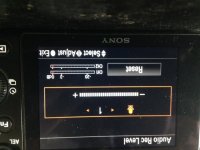
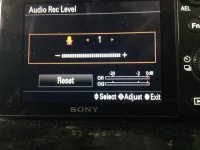
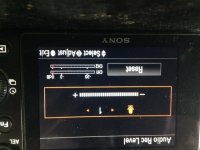
Thank you both again for your help. Here's a snapshot of my A7s audio setting. It's a little hard to make out from the photo, but I had to set my A7s audio recording level literally all the way down to the first audio notch "1". You may not be able to see it, but only the first notch is colored orange.
Unfortunately, there's no -12db indicator, so you have to guess roughly where that would fall...a little over half way between 0 and -20db then.

A7s audio.JPG
 

Attachments

  • photo 1.JPG
    photo 1.JPG
    106 KB · Views: 0
  • photo 1.JPG
    photo 1.JPG
    106.5 KB · Views: 0
Last edited:
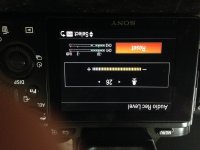
This is the default A7s audio setting after you press "reset". Not sure why the photo is upside down when I post it. It's right side up on my desktop.
At default the A7s audio level is at 26db:

photo.jpg
 
Has anyone figured out how to set the Sony A7s audio recording to -20db???

I have my Sony A7s hooked up to the Sound Devices Mixpre-D and I'm not able to properly set my A7s audio to -20db.

I read that when using a DSLR with the Mixpre-D, one should set the the DSLR to -20db.

Thanks in advance for any help.
You use the MixPre-D's tone feature to send a 1kHz tone, amplitude of 0 dBu on the MixPre-D's meters, to all outputs of the MixPre-D. This includes both mic and line level outputs. That signal is what your camera should see, and you should adjust your camera's audio levels to show this signal at a level of -20 dBfs.

NOTE: the MixPre-D and your camera do not use the same scale to measure levels. The MixPre-D is showing you dBu (it's emulating an analog VU meter, a holdover from magnetic tape days), the camera is showing you dBfs. Not the same thing.

Once you've done that, the camera is calibrated to the MixPre-D. So you don't touch the camera audio again; everything is done through the MixPre-D from now on. And here is where I think you might be having problems. You set levels on the MixPre-D so that peaks come in at around +10 dBu (first red LED on the MixPre-D's meters). Not -12 dBu, which is much too low. But +10 dBu (remember: it's a VU meter). Do that and look at the camera, you'll see the camera showing peaks around -10 dBfs, which is right where you want it.

Don't forget to set the MixPre-D's limiters. I usually set mine to the factory default (IIRC) of +18 dBu (which will show on your camera as -2 dBfs if it's calibrated correctly). Any sound that exceeds this value gets limited by the MixPre-D, such that it's nearly impossible to clip at your camera. Which is exactly what you want, yes? Not clipping is a good thing.

This setup takes some getting used to. People are in general quite leery of setting the MixPre-D to levels above zero on the meter. But that's how Sound Devices intends for the MixPre-D to work (indeed, all their mixers and recorders work like this). I've been doing it like this for years. Works a treat and I've never had anything clip even when the talent screams.
 
Thank you so much for that detailed and very helpful explanation Bruce. I will be sure to redo the test following your approach and will post my results on vimeo with a link to this thread.
 
I've done multiple interviews with the A7s and the fs100 on two cam shoots. I send 1k tone MIC level to the a7s from my Sound Devices 664. The input gain on the A7s is usually at 1 or 2 on the display. The meters on the A7s are usually just above the -20 mark. The audio sounds great. Just as good as running line level to my FS100. Of course these are controlled sit down interviews. If you bump the stereo jack on the A7s it can result in loud unusable pop sounds. Luckily I haven't had it happen.
 
Hi evolvmedia, same here. Now just leave the A7s audio level at 1 or 2 but when you reach 3 or 4 is when I start to hear audio buzzing.

At 1 or 2, the sound level looks like it's around -12db, like it's slightly more than half way to -20. So I'm guessing it's -12.
My audio hasn't clipped though and sounds crystal clear now. Very happy with my SD Mixpre-D. I'm also using a Sennheiser MKH 416 boom mic.
 
Did anyone ever solve this?

Since you can't get the test tone to -20db it appears the audio clips/distorts in the A7S II before the MixPre-D limiters kick in.

-Alex
 
Back
Top