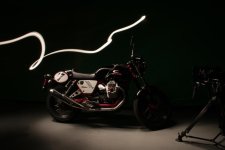
Practically Lighting this

I agree with that aspect of it. What about animating it? After effects composite? The video is completely smooth. I think you can do something like this with an EX1 or EX3. You think it could be done with a 7D, RED or FS100?
 
I'm actually quite interested in how smooth they animated it. I know how to do this in photography, and step printing, but that would require many small exposures additive to the timeline, yes?

I can get one long exposure with light trails, but that does not show the light moving in frame. I could do many smaller long exposures, but that is very smooth... I feel like this could be done just the same at wideopen shutter 1/24th second and blended in post.

If anyone has insight, my curiousity is very peaked.
 
Last edited:
OK lets think it through.

Once the light has been somewhere it stays lit.

Ive got no idea how is was actually done.

You could do a long exposure with a stills cam and film it with a movie cam too (closely positioned)

Then lets say the frame of a shot with the op using left to right you cut the two frames in half use the still one side and the current motion frame on the other

But there is something about the motion that makes me think this is done in a simple better and cleverer way without lots of scissors

Frame 2 is basically frame 1+2, frame 3 is 1+2+3 etc

S
 
Last edited:
I would say take a clip of the car and pop it on your ae timeline. Take the same clip and copy it and underexpose it so you get the dark version you see. Put this copy over your properly exposed clip. (and probably a third layer that is VERY VERY over exposed)

Now use an animated mask to "wipe away" the under exposed layer. (this would be the light streaks) lock a second mask to the animated mask that would "lighten up" the car portion only as the first mask passes by. (this would be the reflections of the light streaks)
 
I really don't think this was done "in camera" per se. It looks to be a combination of two or more stills (depending on the shot), one with the light trail(s) (as in Bayne's example) and one with that light off (in other words, just the basic scene with no light trails). One (the basic scene with no trails) is laid on top of the other and masked/faded out to reveal the layer below. Sometimes it's a wipe, sometimes it's just a change in opacity to gently bring up the highlights. Obviously in practicality it's a little more complex than that, but I think that's the general technique.

If you download the video from youtube and study it frame by frame, you'll see that while it looks pretty good in motion it's really not very convincing when scrutinized. That's no slant on the guys who produced this - they did a stellar job.
 
While I don't think this example was done in camera, I think that it could be possible to some degree, but not with an SLR shooting stills because of the motion that gets lost between exposures.

Using a video camera, if you set the shutter speed to something low (say 1/7.5 for example, which is the lowest my HPX250 will go), then you get almost perfectly sequential exposures without losing any of the motion of the light in between. These could then be stacked to yield a similar result. Of course you would have to figure out the right shutter speed to get the right speed of motion of the light through the shot, but I think it could be done.
 
I like the idea of doing it in AE with masking. So this will be my workflow tonight for a test.

Two stills, long exposure. One has the light streak and the other is lit with other constant light.
Additive overlay the light streak and mask it on.

We'll see what happens.

Might wait to shoot my bike in the studio tomorrow tho to see if it works like the car shot. Whatever I get, I'll post in this thread.
 
Back
Top