PMW EX1/3: Use cheap USB Hard Disk Drives up 168GB!

deti

Member
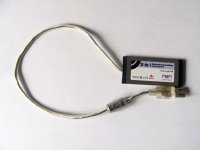
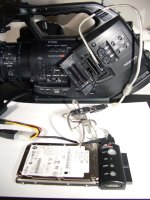
I built an adapter from ExpressCard to USB. How does this work?

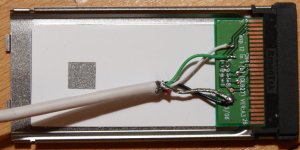
It's pretty easy: On an ExpressCard slot you can find USB data signals on pins 2 and 3. Additionally you need ground at pin 1. Unfortunately the ExpressCard slot does not supply 5 volts which are required for USB device operation.

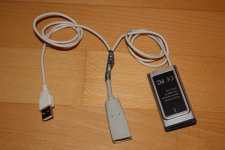
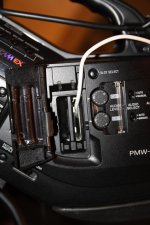
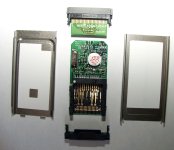
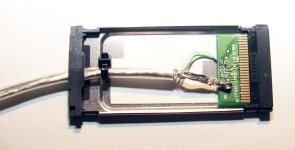
I soldered a cable with connects a cable of an USB socket to the USB pins of the ExpressCard slot. To get a cheap ExpressCard connector I simply removed the PCB from a 9€ card reader (see pictures).

To get the required 5 volts for the USB I connected the ground and 5 volt cable from a normal USB connector to the USB socket. Now it is possible to use any cheap USB connector based power supply which can be found with AC adapter or internal batteries (see http://www.thinkgeek.com/gadgets/travelpower/b4b6/ for an example).

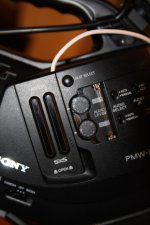
If you now connect any USB device to the self made USB socket the camera is able to recognize it. I tested some common devices with these results:

- USB hubs cause "Unknown Media" and cannot be used therefor,
- 4 of 5 USB 2.0 card readers work without any problems with SDHC or
CF cards (most probably even with Sony memory sticks etc.),
- USB sticks are usable directly,
- Hard disks with IDE or SATA adapters are working fine.

All of these USB based storage adapters need to support a write speed of at least 8.3Mbytes/s. Though the camera creates a maximum stream bandwidth of 4.4Mbytes/s (35Mbit/s) it does not write continuously to the storage medium which causes a data burst every 1 or 2 seconds. These bursts are of about 8.2Mbytes/s.

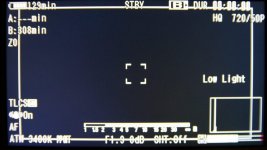
The original Sony hard disk PHU60K is based on a 60Gbyte 1,8" IDE hard disk connected to a IDE-USB adapter. If you connect a bigger hard disk it will be detected, partitioned and formatted by the camera. Currently there seems to be a hard limit of 84Gbytes (308min@35Mbit/s) which cannot be circumvented.

A quick look on the newly created file system shows a partition of 84Gbytes formatted as VFAT. The remaining capacity is not being used at all. An externally partitioned hard disk will not be used and is being repartitioned and formatted by the camera.

Despite this restriction this solution provides a maximum recording capacity of 2x84GB=168GB (716min@35Mbit/s) which is quite more than anything that can be reached by original Sony storage media.

Now it's up to you soldering your own USB adapter ;-)

And no, it is not possible to use the ExpressCard power rails for powering your hard disk drive! The maximum available power is 0.81W (3.3V@0.21A;1.5V@0.08A) which is not sufficient for any hard disk.

Deti

PS: I will not take any responsibility for failures or damages of your hardware!
 

Attachments

  • img_9308_1.jpg
    img_9308_1.jpg
    75.5 KB · Views: 0
  • img_9306_1.jpg
    img_9306_1.jpg
    82.8 KB · Views: 0
  • img_9305_1.jpg
    img_9305_1.jpg
    61.2 KB · Views: 0
  • img_9301_1.jpg
    img_9301_1.jpg
    94.6 KB · Views: 0
  • img_9300_1.jpg
    img_9300_1.jpg
    66.8 KB · Views: 0
these guys are selling this thing isnt it the same?

side_adapt.png

http://mxmexpress.com/
 
Is this right?

1.) The ground wire (and shield) from the USB socket is soldered to the express card connector pin 1, and that same wire is tapped (spliced into) for the ground wire going to the USB connector.

2.) The +5V wire from the USB connector goes to the +5V wire of the USB socket, and thus does not connect to the express card connector.
 
One more question:

3.) Does the polarity of wires 2 and 3 matter?


Hi Tom:

Yes it does from the ExpressCard specs

I'm thinking it does from the connector specifications:

PCI ExpressCard: Pin 2 =usb d- and Pin 3 =usb d+

USB Connector: Pin 2 = usb d- and Pin 3=usb d+

Makes sense for a serial data line.
 
VFAT Utility?

VFAT Utility?

Hi Deti, what is the name of the VFAT 32 formating utility that you used. Did you arbitarly choose 160GB to set this limit? Thanks and a great discovery by the way!!
 
This is VERY exciting. Hopefully a third-party manufacture will produce something that we can all use. The ideal solution would be if you could connect a portable bus powered USB hard drive (so you wouldn't have to power it). But that's probably a dream. :) (I guess Sony offers that option right now, but in a small 60GB capacity)
 
Hi Tom:

Yes it does from the ExpressCard specs

I'm thinking it does from the connector specifications:

PCI ExpressCard: Pin 2 =usb d- and Pin 3 =usb d+

USB Connector: Pin 2 = usb d- and Pin 3=usb d+

Makes sense for a serial data line.

Yes, this looks right to me as well. Moreover, the wire colors on the USB cables use standard color codes, so if you just solder it per deti's picture, should be good.

USB Connector:
Red = 1 = +5Vdc - no connection to express card, but does connect to USB socket
White = 2 = D-
Green = 3 = D+
Black = 4= Gnd

I'm ready to try this mod, will have to make an errand trip for parts.
 
can the usb device be pulled without ejecting the card?? and then another card put in?
My guess is no, much like the sd cards in the expresscard, but would be sweet for running it to somewhere unreachable to eject cards readily.
 
Good question. On the other hand with 160GB of recording time this should be a none issue.

If this actually works, I'm more interested about using over/under cranking on a USB 2.0 hard drive just to confirm if Sony has actually throttled the EX USB bus output.
 
Hi Deti, what is the name of the VFAT 32 formating utility that you used. Did you arbitarly choose 160GB to set this limit

Once again: The camera partitions and formats the connected medium up to 84GB. When using 2 USB mediums (one connected to each slot) you can use 168GB (2 x 84GB).

Whenever you will try to partition and format the medium outside the camera it will be re-partitioned and re-formatted by the camera. IMHO there is absolutely no way to make the camera use a smaller or bigger partition of the medium.

I was using the Linux based fdisk, mkfs and parted utilities.

can the usb device be pulled without ejecting the card?? and then another card put in?
My guess is no, much like the sd cards in the expresscard, but would be sweet for running it to somewhere unreachable to eject cards readily.

When the card is being ejected the USB gets disconnected and the device is no longer available. It does not make any difference if you pull the USB connector of the medium out of the USB socket or if you disconnect the USB power source. As soon as reinserting the ExpressCard, reconnecting power or simply the USB medium it get's recognized again (it's much simpler than changing a SDHC card).

Deti
 
Last edited:
Thanks Deit, I was wondering if you were using the two slots. It also makes sense that the camera would re-format any media whose format it cannot recognize.

Very very early this morning, I completed the electrical mods to an ExpressCard. The wires and solder hoes are very tiny and so it was like trying to thread a needle a metre away. Much patience is required to solder the wires in place. Anyway, it fits into my EX3 as epxected and all the electrical connections going to the proper USB pins. I must go into the city this morning and pick up a USB adaptor before connecting to the hard drive. I have to admit, that feel a little squimish to test it out in such an expensive camera. However, as an electronics engineer my head is telling it should work as you have discovered Deti. Hopefully sometime this afternoon, I will be ready to connect the hard drive. "Fingers crossed"

Thanks Deti for sharing your discovery and your pictures!!! Innovation at its finest :-)
 
Last edited:
I am interested to go this route too. what card should I buy. or I could get any card since this mod will interface the HDD directly to the camera's bus.
 
It DOES work

It DOES work

I finished the mods to the ExpressCard reader very early this morning, then spent the rest of the day rounding up the adaptors to work with some smaller spare hard drives. The old Fujitsu 4200rpm, 40GB hard drive retired from my AppleTV formatted in the blink of an eye - much faster than my 16GB SanDisk Extreme III's.

So far only preliminary recording tests and it does indeed allow me to unplug the USB cord from the EX3 and move it over to the MacPro where clips appear and play as expected.

This is unbelievably simple to do. Mind you soldering the three wires into place on the ExpressCard daughterboard is like threading a needle that is 1m away from your eyes. Truly a test of patience but with rewarding results.

I have many more ideas to work out, such as seeing how over/under cranking works. If nothing else, but to verify my intuitions or prove them wrong about the EX USB throughput. Secondly, I am aiming for SSD drives for the final implementation of 168GB of glorious EX storage.

I have taken pictures along the process but do not know if they are of sufficient quality to post. If they turned out, I will share all. Deti - much thanks for your discovery :-):love4:

Update:
1- Over cranking results: Same as SDHC cards. 720/24p set to 48fps with no media errors. I cycled the record button on/off several times at various times while the hardrive filled up - no media errors. I also moved the harddrive around during recording at these rates as well as giving the drive a gentle tap during recording, again no "media errors". Anyway, no surprises because the 48fps USB limit has been previously verified by others.

2 - Camera Slot Recognition/Switching: The USB harddrive works in both the A and B slot of the camera. It also works with an the harddrive in one slot and a SXS/KXS/MXR card in the second slot, again it does not matter which slot combination. There is a caveat. The USB harddrive power must be cycled when it is moved to the other slot. Once the camera knows which slot the USB hard drive is in, then slot switching works like it is supposed to.

3 - USB Hard drive Recognition: The hard drive power needs to be cycled off and then on for the camera to recognized it's presence. Some extra circuity inside the hacked ExpressCard will be needed for send a proper CPUSB signal response to the camera's PCExpress Card bus on Pin-4. The CPUSB signal is toggled to indicate that there is presence/absence of a USB device. So more work to sort this out in order for the camera to automatically detect the USB hard drive without cycling it's power.

Total time spent about 8 hours.
Total cost was $7.00 for USB coupler.
Fujitsu Harddrive MHW2040AT (retired from Apple TV now at 320GB)
Rest came from my old parts box - excluding the EX3 of course :-)
 

Attachments

  • ExpressCard Disassembled.jpg
    ExpressCard Disassembled.jpg
    167.4 KB · Views: 0
  • ExpressCard with USB Cable.jpg
    ExpressCard with USB Cable.jpg
    96.4 KB · Views: 0
  • USB ExpressCard Assembled.jpg
    USB ExpressCard Assembled.jpg
    113.7 KB · Views: 0
  • USB ExpressCard in Camera.jpg
    USB ExpressCard in Camera.jpg
    179 KB · Views: 0
Last edited:
I've got a couple thoughts on this. I slightly prefer deti's harness because it uses a female socket for the USB hard drive, as opposed to the coupler pictured. And because you didn't connect a ground for a power supply at the harness, you can't use a USB powered hard drive. (Your ground is coming from the ide adapter.)

A thought I had, was to pull +3.3Vdc from express card #12 to USB #1 and use USB flash memory sticks. As deti noted, if you did that you can't budget enough power for a USB hard drive. It looks like the reason the power has to be cycled is because a USB-exclusive interface lacks the wakeup circuit of the expresscard which uses #12 (+3.3Vdc always on output) and #14,#15 (+3.3Vdc confirmation inputs). So in other words, even with a USB flash drive, I suspect it would be necessary to remove and reinsert each time the camera is rebooted.

That also makes me wonder if the notorious power drain of the EX is caused by the always-on power to the express cards. It would be interesting to pull the cards and see how long it takes the EX battery to discharge.

Update:

Express Card Pin #12 cannot budget enough power (up to 500ma) required for USB flash drives.
 
Last edited:
The ground is there it didn't show up to good at the angle this picture was taken. Like Deti, I soldered the USB cable black wire and the shield strand to ground.

I used the male USB end on the cable, anticipating it will plug into a harddrive/battery enclosure. Hence the USB coupler is only needed for this rough prototyping. Deit's USB cable has both male and female connectors allowing him to experiment with USB hubs and FlashCard Readers.

As you conclude, the 3.3v primary voltage sources Pins 14 & 15 as well as the 3.3 Auxilary voltage source do not have enough current to power a USB drive. Obviously enough to power a flash memory card.

If we knew what state Pin 4 (CPUSB) needs to be when the USB cable is connected and what on state voltage, then the camera should detect the presence/absence of the USB drive.

As Deti mentions, you don't need to physically pull the USB ExpressCard out of the camera and then reinsert it so that the camera will recognize the presence of the harddrive. All that needs to be done is remove the power to the drive and then turn it on again. As the drive initalizes, it also initiates dialogue down the USB chain to the camera which then responds knowing that there is a harddrive connected.

Let us know how you make out Tom as you no doubt will have further insights.
 
Back
Top