
Navigation
Install the app
How to install the app on iOS
Follow along with the video below to see how to install our site as a web app on your home screen.
Note: This feature may not be available in some browsers.
More options
You are using an out of date browser. It may not display this or other websites correctly.
You should upgrade or use an alternative browser.
You should upgrade or use an alternative browser.
C100: Please Explain the EF-S Setting
- Thread starter mhood
- Start date

Stephen Mick
Totally Usable
Basically, from what I can see, the C100 does a very, very slight "push-in" on the sensor to accommodate EF-S lenses. It didn't seem to me eye to be enough of a "zoom" to really affect picture quality all that much, but I'd need to do more testing to be sure.
I'm also not entirely sure that ALL EF-S lenses need to have this enabled to work. Others have reported using the Tokina 11-16 without the EF-S mode enabled, without any issues.
I'm also not entirely sure that ALL EF-S lenses need to have this enabled to work. Others have reported using the Tokina 11-16 without the EF-S mode enabled, without any issues.
The EF-S 17-55 2.8 is fine without the EF-S enabled.I'm also not entirely sure that ALL EF-S lenses need to have this enabled to work.
However you need to be careful when the IS (image stabilization) is turned on -- if you make sudden movements with the camera,
the optical elements will shift enough that you will see vignetting in the corners.
I uploaded a sample which demonstrates this:
http://www.palsomedia.com/c100/
File: C100_1755_IS_On.MTS
The lens was zoomed at the 35mm setting.
Edit: This was tested without any hood on the lens.

J Davis
Veteran
Others have reported using the Tokina 11-16 without the EF-S mode enabled, without any issues.
for c300 no issues, therefore should be same with c100
The EF-S 17-55 2.8 is fine without the EF-S enabled.
+1 this is my c300 ( and c100) go to lens

Eric Coughlin
Veteran
I read on one of these topics that someone had mapped the EF-S option to a button. How do I do that? In the custom button area I can't find EF-S as an option to map.

Curnsie
Well-known member
I have an old Tamron 17-50 non-IS...I wonder if it will work?
I have Version 2 of this lens and i haven't had to use the EF-S switch yet.
If it's simply a digital push in, I think the most sensible operation would be to leave the EF-S mode off, and if a stabilised lens (such as the 17-55mm f2.8 IS) then vignettes in a fast pan due to IS, then you just crop it out yourself in post - just the one shot that needs it.
Right?
Or does the digital push-in of the EF-S mode somehow come before the 4K sensor is downsampled to 1080p, resulting in a superior (effective/real) resolution than you would get with a simple crop in the NLE on your computer?
If there is such a thing as a EF-S lens that clearly vignettes, then you just use the EF-S of course. Just haven't heard about such a lens yet.
Right?
Or does the digital push-in of the EF-S mode somehow come before the 4K sensor is downsampled to 1080p, resulting in a superior (effective/real) resolution than you would get with a simple crop in the NLE on your computer?
If there is such a thing as a EF-S lens that clearly vignettes, then you just use the EF-S of course. Just haven't heard about such a lens yet.
Eric Coughlin
Veteran
With the Tokina 11-16, at 11-13 I get the lens hood in my shot, only on the left side of the shot, for some reason. With EF-S on, I get the lens hood in my shot at 11-12.5. I never got that when shooting with my 60D with the 1.6x crop. The solution of course was to remove the lens hood, though I like using them mainly to protect the lens, and also to help with glare.

MattDavis
Well-known member
A propos the 18-135 STM, definitely getting a bit of vignetting on the wide end. Also getting some extra vignetting with Stabiliser switched on:
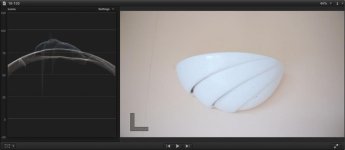
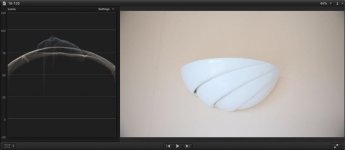
If I just switch on the EF-S (zoomed in) setting, there's not enough to clear the vignetting:
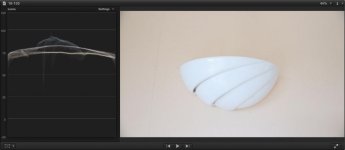
So, in the next picture, I turned on Peripheral Illumination Correction - which has much more of an impact, but there's a little bit of a dark patch in each corner (and this can be seen when the stabilizer is working overtime):
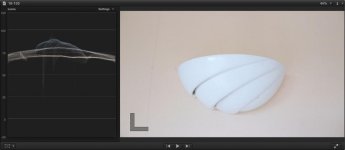
In conclusion, the 18-135 STM seems to need BOTH the EF-S setting (to hide the IS) AND the Peripheral Illumination Corrector (to compensate for fall-off):
I've got both dialled in to my 'My Menu' setting now. ;-)
If I just switch on the EF-S (zoomed in) setting, there's not enough to clear the vignetting:
So, in the next picture, I turned on Peripheral Illumination Correction - which has much more of an impact, but there's a little bit of a dark patch in each corner (and this can be seen when the stabilizer is working overtime):
In conclusion, the 18-135 STM seems to need BOTH the EF-S setting (to hide the IS) AND the Peripheral Illumination Corrector (to compensate for fall-off):
I've got both dialled in to my 'My Menu' setting now. ;-)
Last edited:

anatusa
Veteran
With the Tokina 11-16, at 11-13 I get the lens hood in my shot, only on the left side of the shot, for some reason. With EF-S on, I get the lens hood in my shot at 11-12.5. I never got that when shooting with my 60D with the 1.6x crop. The solution of course was to remove the lens hood, though I like using them mainly to protect the lens, and also to help with glare.
i am sorry , maybe there is something that i dont understand , but you CANT enable EFs mode for non Canon lenses , as tokina is a non canon lens then HOW do u enable efs mode for it? so what are u talking about?
anatusa
Veteran
If there is such a thing as a EF-S lens that clearly vignettes, then you just use the EF-S of course. Just haven't heard about such a lens yet.
for example my Canon EFs 17-85mm f/4-5.6 - i clearly see BLACK corners, but after i enable EFs mode , i still see black corners but much less!
Eric Coughlin
Veteran
You can enable EF-S mode on any lens (or even without a lens) including non-EF-S lenses by turning the setting on. As far as I know, all it does is slightly crop the image, so if a lens is giving vignetting, or any other reason you'd want the image slightly cropped, then you can turn the setting on. Sometimes I'll have it enabled for the Tokina 11-16, and then when switching to my full-frame lenses, I'll forget to turn it off.i am sorry , maybe there is something that i dont understand , but you CANT enable EFs mode for non Canon lenses , as tokina is a non canon lens then HOW do u enable efs mode for it? so what are u talking about?
anatusa
Veteran
You can enable EF-S mode on any lens (or even without a lens) including non-EF-S lenses by turning the setting on. As far as I know, all it does is slightly crop the image, so if a lens is giving vignetting, or any other reason you'd want the image slightly cropped, then you can turn the setting on. Sometimes I'll have it enabled for the Tokina 11-16, and then when switching to my full-frame lenses, I'll forget to turn it off.
you r absolutely right, u really can enable it for non canon lenses.... i did not know it.... i just tried it on my tokina 50-135 f/2.8! there is no needs for it as i did not notice any vignetting, but again i noticed that after efs is on i get image a little brighter .... i wonder if anyone also see it, and i wonder why?