NeedCreative
Well-known member
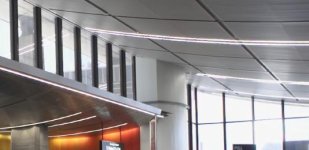
Hello all. I was going back and forth with a few people on Twitter last night about some nasty artifacting I am seeing with the FS100 - a pink chromatic aberration-style fringe on white highlights. This happens on every lens, even nice high priced Zeiss glass. Here's an example where it was particularly horrible - this is a white LED strip in a ceiling (here shown in about a 300x blow up):
I thought for sure in this instance I was seeing aliasing as well as the perils of the internal 4:2:0 codec. But then I've seen it fully in the frame on other shots. Example:here, on the sparkles off of water:

Another close up, not as bad:

And yes, it shows clearly in motion as well.
My friend James who has an Atomos Ninja tested this for me as well and the issue is even sharper on that, so it's not the internal codec.
Someone suggested that perhaps a knee setting or "flare" setting that can be applied in a picture profile (of which there is none in the Sony) might work as it does on a Panasonic camera (he didn't give me the model). Anyone have any ideas how to combat this? I was running off PP5 in the ceiling case with some minor tweaks based on Frank's settings posted here.
I thought for sure in this instance I was seeing aliasing as well as the perils of the internal 4:2:0 codec. But then I've seen it fully in the frame on other shots. Example:here, on the sparkles off of water:
Another close up, not as bad:
And yes, it shows clearly in motion as well.
My friend James who has an Atomos Ninja tested this for me as well and the issue is even sharper on that, so it's not the internal codec.
Someone suggested that perhaps a knee setting or "flare" setting that can be applied in a picture profile (of which there is none in the Sony) might work as it does on a Panasonic camera (he didn't give me the model). Anyone have any ideas how to combat this? I was running off PP5 in the ceiling case with some minor tweaks based on Frank's settings posted here.