C100: Picture profiles specifically for C100 Mark II

BrandonT

Well-known member
Hey everyone. I haven't seen much discussion on profiles specifically for the C100 Mark II. I've been shooting on Wide DR, but am just realizing that it's not for me. My color grading setup isn't the best and most of my stuff is freelance, handing the footage off. So I'd like some good saturation and all for an end-product.

I tried the one profile that got popular here (sorry, I have forgotten who contributed that). But it had some issues. I'm guessing because of the differences in the Mark II.

And I just recently purchased Shane Hurlbut's profiles. The first one is intended for not needing color correction. I haven't used it in a real world setting yet. So we'll see how it does. Here's the link.

https://www.hurlbutvisuals.com/blog/product/canon-c100-mk-ii-custom-picture-profiles/?tm=ic

And there's always EOS Standard. Short of finding something else or Hurlbut's working well, I might have to go to it for a while. But I know that it isn't recommended because it kind of takes the colors to where Canon's DSLRs are.

Any help is appreciated!
 
I think your thinking of Cowpumk whom has lots of "cred" here. I would start with a email to him. Lots of discussions about white balance here regarding the difference in the MK1 and MK2 models.
 
Yes, Cowpunk, that's who it was from. Thank you. And I'm definitely having the custom white balance issues, as well. I'll send him a message and see if he has any thoughts on it.

In the meantime, Hurlbut's profile looks like it's going to be too dark. So I think I'm going to go with the EOS one for a while.
 
New c100 mk2 user here, any leads on good picture profiles would be appreciated.

So I'd like some good saturation and all for an end-product.
^ I'm looking for something close to good out of camera as well. Minimal grading.

So the Hurlbut profile is not cutting it for you?
 
On the Mk1, I really loved using Paul Frederick's Wide PF profile. It was a modified Wide DR profile he created. See more here: https://vimeo.com/77931546

It looked gorgeous without grading, though you could grade it if you wanted to. The only problem was the noise at high ISOs.

I have not yet found a solution on the Mk2. I believe Cowpunk is on record now saying that the color science of the Canon cinema cameras are so good, he would start with a stock gamma (wide DR, Cine 1, etc) and just lower the black and boost the saturation to your liking.
 
On the Mk1, I really loved using Paul Frederick's Wide PF profile. It was a modified Wide DR profile he created. See more here: https://vimeo.com/77931546

It looked gorgeous without grading, though you could grade it if you wanted to. The only problem was the noise at high ISOs.

I have not yet found a solution on the Mk2. I believe Cowpunk is on record now saying that the color science of the Canon cinema cameras are so good, he would start with a stock gamma (wide DR, Cine 1, etc) and just lower the black and boost the saturation to your liking.

Yep. If you like the colors overall, I'd play with the black gamma level for contrast and the color matrix gain for saturation. That should get you where you need to be. I usually start with Wide DR because I like it overall and adjust to taste.
 
New c100 mk2 user here, any leads on good picture profiles would be appreciated.


^ I'm looking for something close to good out of camera as well. Minimal grading.

So the Hurlbut profile is not cutting it for you?

Well I had issues getting it to load. It said unsuccessful, but it was there. So there's a slight possibility that it loaded incorrectly. But as it displays on mine, the exposure is way down versus the other profiles. I might try to load it again. Not sure what the problem was. I followed the directions, and it's pretty straightforward. Does using a Mac to load the profile to an SD card mess things up because of the ghost files that a Mac writes? Anyone know?


I have not yet found a solution on the Mk2. I believe Cowpunk is on record now saying that the color science of the Canon cinema cameras are so good, he would start with a stock gamma (wide DR, Cine 1, etc) and just lower the black and boost the saturation to your liking.

Yep. If you like the colors overall, I'd play with the black gamma level for contrast and the color matrix gain for saturation. That should get you where you need to be. I usually start with Wide DR because I like it overall and adjust to taste.

Very good info there. Thank you to both of you. I will definitely give that a try.
 
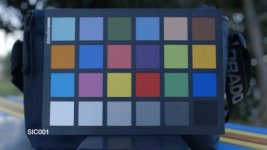
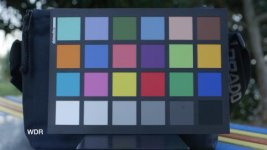
I just did a quickie screenshot between Shanes #1 profile and WDR. There's not much info but I think that's supposed to be the "out of the box" profile, maybe the details are hidden away in his inner circle. Some of the colours look good but the red is definitely orangey - btw I don't get more complex than just looking at the colours and seeing if I like it. C100 MKI, middle grey @ ~50%, ISO850, shot on Ninja ProRes HQ422.

Shane #1:

SH_Test_1.jpg

WDR:

SH_Test_WDR.jpg
 
Yes, I tried Shane's Profile #1 too. I like the look of it, but when I compared it to stock Wide DR, I didn't see much of a difference.
 
You actually PAID for a picture profile ?

I would just make a copy of wide DR in an empty PP slot, crush the blacks as much as you like, add saturation as well, and that's it. No need for a cooked profile. If you really want to improve more you can use selective color correction to adjust skin tones as you like.
 
You actually PAID for a picture profile ?

I suppose you are one of those people who also ***** about paying $0.99 for an app.

If someone wants to spend their time, effort, know-how and equipment to work out a couple of good profiles then I have no problem giving them $4.99 for their effort.

I'd have happily dropped that on Cowpunks profiles, back in the day.
 
I suppose you are one of those people who also ***** about paying $0.99 for an app.

If someone wants to spend their time, effort, know-how and equipment to work out a couple of good profiles then I have no problem giving them $4.99 for their effort.

I'd have happily dropped that on Cowpunks profiles, back in the day.

No I'm not, because I don't know how to make an app, so I'm happy to buy one when I'm satisfied with it. But here we're talking about 3 clicks with your thumb, to add a little contrast and saturation ...
 
I purchased the profiles from Shane as well. I honestly had some issues where it threw the light meters off completely. All the footage that says it was exposed according to the light meter was easily underexposed 2 stops. I just added Nathan's color profiles after seeing some many positive reviews. I'll be testing them out this weekend. For anyone interested, here's the site:

http://www.nathanblairfilm.com/canon-c100-color-profiles
 
But here we're talking about 3 clicks with your thumb, to add a little contrast and saturation ...

There's a lot more to a custom picture. Just look inside the color matrix menu. That's honestly where most of the "look" starts to come from, and it can intimidate people.

With good reason too, it can seriously mess things up if you don't know what you're doing.
 
I purchased the profiles from Shane as well. I honestly had some issues where it threw the light meters off completely. All the footage that says it was exposed according to the light meter was easily underexposed 2 stops. I just added Nathan's color profiles after seeing some many positive reviews. I'll be testing them out this weekend. For anyone interested, here's the site:

http://www.nathanblairfilm.com/canon-c100-color-profiles

Awesome! Would you report back, maybe with some sample footage? From the comments, it sounds like the profiles work well with both the C100 Mark II and the C300 OG. I'm going to give it a try, too.
 
There's a lot more to a custom picture. Just look inside the color matrix menu. That's honestly where most of the "look" starts to come from, and it can intimidate people.

With good reason too, it can seriously mess things up if you don't know what you're doing.

agreed. but here the topic is not about correcting a little blue tint or something, that might take time to adjust, like cowpunk used to give us with MKI earlier firmwares.

Here the guy just want a nice saturated and contrasted picture. That, is really 3 clicks away.
 
agreed. but here the topic is not about correcting a little blue tint or something, that might take time to adjust, like cowpunk used to give us with MKI earlier firmwares.

Here the guy just want a nice saturated and contrasted picture. That, is really 3 clicks away.

Yes, I paid for a picture profile. Yes, I regret it because it wasn't what I needed. Yes, if it was what I wanted, I would have been happy that I paid for it. Yes, I think that a small amount of money for something like a great picture profile is worth it to compensate the person that took the time to make it. Even if it's someone who makes a very large income (I'm making a very likely assumption here) like Shane Hurlbut. Yes, I had a shoot the next day and hadn't had much time to play with the camera and was hoping to get what I needed for the next day quickly and easily while prepping equipment and doing producer duties.

You obviously know more than I when it comes to color science and settings. I honestly wouldn't have thought that I could get what I wanted in a profile by changing just three settings. Even with that being the case as you say it is, I'd like something with a little more thought put into it than just that.

So your criticism is duly noted and appreciated. I'd like to ask that we continue the thread in a more constructive tone, and leave any further criticism out of people (like myself) who have paid for a profile or who are not as advanced as you are in camera color science. I'd still like more info to come to this thread and I don't want critical comments to keep that from happening. I would appreciate it. Congratulations on your 100th post, btw! :)
 
Back
Top