Panasonic LUMIX GH4 V-Log L FunctionFirmware Upgrade Kit DMW-SFU1
$99.99 DMW-SFU1 Pre-Order at Texas Media Systems
ETA September 15, 2015
G-CUP Eyecup Adapter for Panasonic GH4 $35.00
GH4 Body $1497.99 - $100 Instant Rebate $1397.99
GH4 YAGH Kit + FREE 128GB SDUC Card $2297.99
V-Log Features:
V-Log Update Process:

$99.99 DMW-SFU1 Pre-Order at Texas Media Systems
ETA September 15, 2015
G-CUP Eyecup Adapter for Panasonic GH4 $35.00
GH4 Body $1497.99 - $100 Instant Rebate $1397.99
GH4 YAGH Kit + FREE 128GB SDUC Card $2297.99
V-Log Features:
- LUMIX GH4 function enhancement for film production/professional videographers
- Increases dynamic range from 10 stops to 12 stops
- Makes color grading easier with improved compatibility between LUMIX GH4 and Panasonic Varicam
- V-Log / V-Log L were developed to feature similar characteristic to Cineon
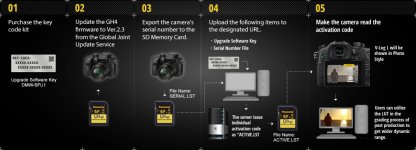
V-Log Update Process:
- Purchase the key code kit DMW-SFU1 from this page. This is not for immediate download, as its kit that will be shipped to you.
- Update a fully charged LUMIX GH4 with firmware Version 2.3 from the Global Joint Update Service http://av.jpn.support.panasonic.com/support/global/cs/dsc/download/fts/index.html
- Export the camera’s serial number to an SD Memory Card by inserting the SD card into the camera and press [Menu] -> [Setup] -> [Activate] -> [Export Serial Code] to save serial code as "SERIAL.LST" file.
- Upload the SERIAL.LST file by inserting the SD card into your computer. From the Update Portal Web Page use BROWSE to find and select "SERIAL.LST" file on the SD card. "SERIAL.LST" is saved in folder of PRIVATE > PANA_GRP > PAVC > LUMIX > ACTV > "SERIAL.LST then press [Upload] to proceed.
- Input "Key Code" from the kit you purchased in "Upgrade Software Key" to this website to get activation code. [ Alphabet on key code must be big letter to input. Please be careful with misspelling such as 1 (one ) and I ( big letter of "i") or 0 (zero) and O ( big letter of "o") Please input key without hyphen (-). ] Click Register
- ACTIVE.LST should auto download from the site. Save this file to the SD card in the folder PRIVATE > PANA_GRP > PAVC > LUMIX > ACTV .
- Insert the SD card into the same fully charged LUMIX GH4 and press [Menu] -> [Setup] -> [Activate] -> [Import Activation Code]
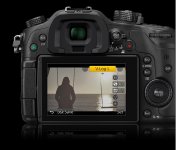
- When prompted power cycle the camera. You will find your new V-LOG L feature under the Menu “Photo Style”.
Last edited: