GH5 Panasonic DMW-XLR1 on a GH5 not recording audio

tired

Well-known member
I just picked this up 2nd hand and can't seem to get it working.

The camera shows XLR input, the light on the unit is on and the camera appears to be getting audio signal. I have a lapel connected to one channel and a wireless mike connected to the other, both appear to work, I can see the levels on the camera.

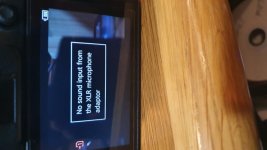
My problem is, as soon as I hit record, the levels drop and after a second a warning shows on the camera screen "no sound input from the XLR microphone adaptor"

I've tried this on a GH5 & GH5s with the same result.

any ideas?
 

Attachments
  • 20210205_222735.jpg
    20210205_222735.jpg
    46.2 KB · Views: 0
Last edited:
Do you know if there is a setting on the GH5 to tell it to take the audio from the XLR1? I assume that it is auto-sensing, but it can't hurt to look through the menu to see if there is a setting for external audio from an XLR1.

It's odd that you get audio before recording but not during recording. I wonder if it looks like the audio is coming from the XLR1 but it is actually being picked up from the camera's built-in mics. Have you checked that to confirm? In the bizarre possibility that the audio is coming from the built-in mics, then I strongly suspect there is a menu setting for the XLR1.

FWIW, I have an XLR under-camera adapter from Comica that works well with the GH5, but it plugs into the camera's analog 3.5mm mic input. I have a video about the Comica XLR mixer/adapter here: https://youtu.be/_VRcJnQ-eEE
 
The camera senses the adaptor automatically, I can see the XLR note above the meters, I've tested each meter individually for levels and with headphones and everything works perfectly till I hit the record button. I cant find any menu option apart from the ability to set the bit depth of the audio. I'm about to reset the camera to it's default and see if that changes anything
 
As a last resort if nothing else - and at your discretion - cycle through the switches during recording a few times; mic/line, +48V, gain, etc...see if anything helps.
 
In the Movie tab settings (second tab down), you need to turn on the adaptor by selecting a sample rate and bit depth rather than OFF. (You need to be recording to MOV file format, not MP4, to get the 24-bit options, by the way.) You’ve checked that?

Also, have you set the gain on the DMW-XLR1 (for whichever channel you’re plugged into) high enough to bump the meter? I noticed you didn’t make much noise in the video after pressing the record button – not enough noise to register on the meter if the levels knob on the adaptor was set low.

To troubleshoot, turn ALC (automatic level control) off and the gain knob to max and try again.
 
Hi Sam, those settings were tested initially otherwise I would not have been getting audio levels from the unit. The video just shows an example of the error message (that's the important bit) I've been running tests all day with different, mikes, settings and cameras to find the problem.
 
I would save my camera settings to the SD card do a full reset of the camera (you can later reload your settings) and see if it works after the full reset.


Hi Sam, those settings were tested initially otherwise I would not have been getting audio levels from the unit. The video just shows an example of the error message (that's the important bit) I've been running tests all day with different, mikes, settings and cameras to find the problem.
 
What frame rate and record format do you have the GH5 set for and have you tried different ones. Also how is the GH5 powered.
 
Good point...maybe check that some sort of HFR/variable framerate mode isn't enabled which doesn't allow sound recording (when the record button is pressed).

Probably not the issue though since it seems the settings have been double-checked.

Also maybe try in the 'M' manual mode where some video equipment is designed to be used in that setting (I see a 'P' there).
 
I've tried different recording modes, reset the camera to factory default but no luck
 
How are you connecting your mics to the XLR inputs, tired? By the sounds of it they might not be XLR microphones? Plug-in power? Phantom?

What the meters show before hitting the record button could be misleading. The camera might be using its internal mics or massively boosting the gain (the way the camera in certain modes will gain up the image for the finder and autofocus to work even though the recorded exposure is ten stops too low and returns solid black). That’s why I mentioned making sure ALC is turned off on the XLR adaptor and the gain is set to maximum. You’re leaving us guessing as to which troubleshooting steps you’ve already definitively tried.
 
Last edited:
Back
Top