Panasonic announces UX180 and UX90 pricing & availability

Filming fast moving action at night under flood lights. Personally think it came out quite well but would be interested to know if would be good to increase shutter speed and probably up the gain to compensate for smoother action? Anything else to improve?

2160p60
Scene file 3 (Spark)
Iris fully open
Shutter 1/120
High sense mode
Gain 12db


The reason i use a fast shutter is so i can get a perfect slow motion "replay" and freeze frame. If that wasn't my plan then i don't think i would use it at all. 1/120 isn't fast enough for that as you can see when you pause the video, you will probably need 250 to 500, but as you know it gets darker as you go up, and you are videoing in a dark area already. It sucks when it's you only option. :(
 
Thanks for the input Phil. Guess I'm limited to 1/120 then unless the artificial lighting at the track was better. Regarding the faster shutter speeds, if I'm filming in really good light, is there any disadvantage to using something like 1/500 for my type of subject matter? I'm filming at an outdoor track hopefully in bright sunshine this weekend so surely I could use 1/500 the whole day (and use medium gain if I really needed it due to restricting light with fast shutter).
 
Someone else will have to answer that depending on the shots you are after.
I have my camera for basically videoing 1 thing, and that's horses, be it free moving or ridden (and maybe the riding instructor). The people who watch the videos are basically only watching the horse, not the artistry of the shots. I either put slow-mo in the videos or if I don't the people watching can do it themselves and its clear, but it's still only to watch the horse/and rider. So you have to decide what is priority.

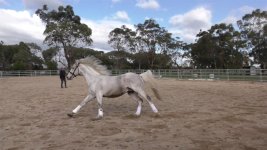
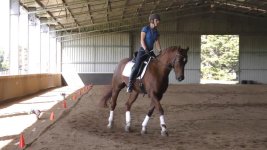
I can't pick any frame I want unless I change the SS. I think this was 1/250

Video 4k 50p.Still003.jpg

Video 4k 50p.Still002.jpg

Ps. This was done with a hc-x1000, not one of the new cameras.
 
Nice shots! Thanks for sharing Phil. Trying again tonight so will be interesting to see if 1/250 will be bright enough. Interestingly when I have filmed model aircraft at 1/60 the camera screams at me to apply NDA filter. If I set 1/250, so I can get good slo mo, it won't do that and when I point at ground occassionally (and get less light) I suspect the auto gain control will step in to brighten the image.
 
Hi
Sorry disturbing you guys with newbie questions
My son and me ordered HC-X1 which will come to us at the end of February.
Till then I am reading operating manual to get to know the camera better.
Maybe my English is not on the high level to understand that.
I got stuck on the next:
AUTO/MANU switch is in auto mode and I want to manually setup only IRIS or SHUTTER, leave other functions in auto
How to do that?
Tnx
 
Hi
Sorry disturbing you guys with newbie questions
My son and me ordered HC-X1 which will come to us at the end of February.
Till then I am reading operating manual to get to know the camera better.
Maybe my English is not on the high level to understand that.
I got stuck on the next:
AUTO/MANU switch is in auto mode and I want to manually setup only IRIS or SHUTTER, leave other functions in auto
How to do that?
Tnx

Easy. Go into the AUTO SW menu and set it to "A.IRIS: OFF" and "AUTO SHUTTER: OFF".
 
Clients requesting raw footage would probably be happier with the UX camera's footage, mainly in that it records in Quicktime .MOV or straight .MP4 files. No more AVCHD headaches (unless, of course, you want AVCHD, because that's offered too).

I have put in an order for the UX90 and it will arrive next week. Wanted to ask you since the lens is 2.8 to 4.5 and I like to shoot manual, does it make sense to shoot manual and have the gain on auto so when I am zooming and loosing a stop or so the gain automatically compensates, can the camera do the auto gain in manual mode? Would this be a proper working solution to maintain constant exposure?
 
I finally got to check out the UX180 (and the HC-X1). I was very happy to find that the algorithm for FINE setting of the Focus Ring control appears to be the same as was recently implemented for the DVX200.

However (and this is a big however), the display font is very small and lightweight... so much so that I cannot read it in the LCD without diopters, and even then it requires a great deal of effort. The font is comparable to that of the AC30 (which I complained about with comparison photos to the AC90 previously).

I was with a fellow sports shooter and he agreed with me that this lack of readability makes these cams not suited to sports, or any fast action doc work for that matter.

Not to just pick on Panasonic because Sony and other makers appear to be all heading in this direction of having focus readings just about unreadable. But that doesn't let Panasonic off the hook.

Perhaps I'm beating a dead horse here because I have not seen anyone chime in with a similar complaint. Does anyone else find this trend toward small thin display fonts to be a problem?
 
I suspect the auto gain control will step in to brighten the image.
If you press the IRIS button on the side you can then adjust it yourself with the small lens ring (with my camera anyway), if you are talking about what I think you are.
I have to shut it off because it cant adjust quick enough for the light.

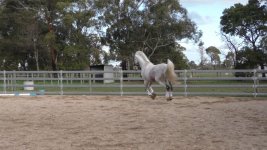
HD 1080 50p.Still001.jpg

If it tries to compensate for the light on the open side and the door at the end then by the time the horse gets to the other side the picture is to dark, and vice versa the dark around to the light.

Ps. all these pic's I have put up are only for this post. They aren't ones I have used for anything else.

Pps. I think this pic was taken out of 1/120 SS video, that's why it has some motion blur.
 
I have put in an order for the UX90 and it will arrive next week. Wanted to ask you since the lens is 2.8 to 4.5 and I like to shoot manual, does it make sense to shoot manual and have the gain on auto so when I am zooming and loosing a stop or so the gain automatically compensates, can the camera do the auto gain in manual mode? Would this be a proper working solution to maintain constant exposure?
The auto gain could be used as you describe, yes. I'm not a big fan of gain at all, but if you needed to use it, it wouldn't be that much. The difference from f/2.8 to f/4.5 is only about 1 1/3 stops, so about 7 or 8 db of gain would compensate.
 
The reason i use a fast shutter is so i can get a perfect slow motion "replay" and freeze frame. If that wasn't my plan then i don't think i would use it at all. 1/120 isn't fast enough for that as you can see when you pause the video, you will probably need 250 to 500, but as you know it gets darker as you go up, and you are videoing in a dark area already. It sucks when it's you only option. :(
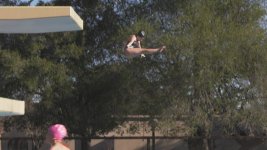
I grabbed some platform diving this past weekend at 1/1000 (in filmlike3, and even with ND at 1/4 the highlights still went hot -- direct sunlight ... argh). The problem with diving is that the movements happen a lot faster than 60fps, and the 120fps loses a lot of resolution compared to 4k. So, yeah, it's all tradeoff -- resolution, light, gain, noise. Fortunately I don't care about the loss of sound in 120fps!

Still0121_00000.jpg

Still0121_00001.jpg

[I should note that I dialed the red back out of the 4k shot, but I didn't spend the time to do that on the 120fps shot]
 
This video was shot in 4K60p using the UX180 camcorder. Everything was in auto. I used a lossless editor to put the clips together and so their was no re-compression (except for a few frames where the clips touch each other) before I uploaded it. It's only showing me 1080p60 at this time. I also uploaded a sample 4K file directly from the card and even that video doesn't go higher than 1080p60 yet. Yes I did check the properties on the videos before I uploaded it.
For anyone who has uploaded native 4K60p files to YouTube from either the UX180 or HC-X1, what was the duration of your clip and how long did it take to see a 4K60p option on the video? I just read elsewhere that it can take a while.
 
Last edited:
This video was shot in 4K60p using the UX180 camcorder. Everything was in auto. I used a lossless editor to put the clips together and so their was no re-compression (except for a few frames where the clips touch each other) before I uploaded it. It's only showing me 1080p60 at this time. I also uploaded a sample 4K file directly from the card and even that video doesn't go higher than 1080p60 yet. Yes I did check the properties on the videos before I uploaded it.
For anyone who has uploaded native 4K60p files to YouTube from either the UX180 or HC-X1, what was the duration of your clip and how long did it take to see a 4K60p option on the video? I just read elsewhere that it can take a while.

Did you have the OIS on? Your pans where a little too fast. There is too much noise in the blacks, I wonder if gain was all the way at max!
 
The camera was on full auto and so it didn't say the gain value but for sure it was very dark in their so it wouldn't surprise me at all if the gain was very high. The stabilizer should have been on.
 
It appears in multiple formats on my PC on all my browsers. I seem to remember that the browser used is important and not sure if Safari will show for instance.
 
The icon indicated that it was on.

-Edit-
I see that 4K60p showed up on Chrome now.

4K 60p files can take a while to process and so if you upload 4K60p, you'll all need to keep in mind that it might take many hours for a short clip or over a day for a clip that's many minutes.
 
Last edited:
Back
Top