Panasonic announces UX180 and UX90 pricing & availability

Can't get my UX180 to go into SUPER SLOW mode (i.e. 120 FPS). Am in FHD 1080/59.95p ALL-I 200M rec format, and have tried the other FHD rec formats to no avail. Just says 'INVALID' when I hit USER 1 which I assigned SUPER SLOW to. Any advice appreciated.
 
Can't get my UX180 to go into SUPER SLOW mode (i.e. 120 FPS). Am in FHD 1080/59.95p ALL-I 200M rec format, and have tried the other FHD rec formats to no avail. Just says 'INVALID' when I hit USER 1 which I assigned SUPER SLOW to. Any advice appreciated.

i do not have the camera but...

...according to the manual (http://eww.pass.panasonic.co.jp/pro-av/support/content/guide/EN/agux_handbook_e_59.94.pdf)

on page 27 under menu settings they state that vfr mode is accessed by turning it on.

did you turn on vfr mode before attempting to shoot 120fps?

again, i do not have the camera but did download the manual to see if i remain interested in a 1" chip fixed lens camera.

be well.

rob
smalltalk.productions
 
Thanks Rob. I assigned VFR to a button and I get INVALID with that as well! One page states that VFR does not work if using dual card slot features. Turned that off and still get INVALID. Had not seen this manual. Had been referring to the DVX200 e-book so will read more tomorrow. Going to a local zoo tomorrow to try out the UX180. Cheers.
 
Yes, I can help with that! So, you need to be in a 30p or 24p FHD record mode before you can access VFR.
I cannot tell you how long I spent today finding this out! Drove me batty.

[Also, note that there is a second page of FHD record modes....]

I would VERY much appreciate any shots you can share on the UX180, as I am concerned about the noise level I'm seeing on the HC-X1. I'd feel stupid if I can get a substantially better picture by spending another $300! :)
 
Last edited:
@dnavas, I am thinking about the small noise that UX180 produce even in daylight. UX180 have a function that reduce the noise (NR CONTROL on Page 146). Do you play with it?

Can you make some daylight test to see if this small noise reduced and to see how much detail we will lose (maybe you can check all possible values from -7 to +7 while recording something static)?

So, I spent a lot of time with the camera today. First, I could not replicate the problem with the wheelbarrow. All my wheelbarrow shots are fine. Took the camera indoors, and had a much easier time with the walls.
[Also spent an ungodly amount of time getting VFR/super-slo-mode on -- frustration!]

NR may solve the problem in dim areas, though mostly what I see is detail loss, but the issue with sparkly bright areas is edge enhancement. I turned down the master detail and the wall is fine. I need to spend another few hours figuring out what the right master detail setting is, but 0 is just not going to work indoors.
with the master detail and v.detail turned all the way down, I see roughly the same amount of noise on the HC-X1 (blown up 2x) as on the TM700, though the HC-X1 isn't quite as sharp at that point. There are a ton of other differences as well (the HC-X1 is way more sensitive, the TM700 has a flatter DR, the AWB is more effective on the HC-X1, etc. etc.). I'm hoping I can turn the detail up a bit, the NR up a bit, maybe use the knee ape...?

My outdoor shots all look pretty good, actually, so I think the "swimming" is specifically from the edge enhancement on the textured walls.

More as it develops! Night shots in a few hours.....
 
There is a complex interaction between NR, Gain, and the Detail settings which are ... difficult to disentangle. On the scene I was looking at, the difference between +3, +4, and +5 on NR was significant, while the others were not (down to around -3). The difference between Gain 10 and 11 was huge -- the dim background details disappeared, as did the noise, leaving a nice, consistent wall. I think I've decided that V.Detail all the way down, and MR Detail at around -16 gave the best all-around results (indoors), but given how many combinations there are here, I'm not going to commit. The more A-B shots I do, the fewer differences I note as well -- I'm assuming that's fatigue on my part, though it is possible that as I find the correct settings in one area, difference to others result in less noticeable changes. I'll try to capture some shots tomorrow eve if I have time to demonstrate some of these differences, but for now I'm fairly comfortable that one can capture a pretty high quality image indoors (much better than the ones I've previously uploaded), but it does seem to take some effort.
 
Thank you dnavas, all your comments are useful.

Yes, that’s true, to find the perfect settings for each shot is complex. Not all settings will work on any light/situation. It needs time to find all this small parameters that makes the difference.

We will be waiting for more of your clips. Sharing original file (and not on youtube that destroys the details) it’s the right way to understand the camera behavior. Youtube is only useful to see colors and focus.

Thank you again.
 
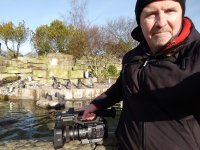
Liking this cam the more I use it. Mostly on auto today at the Zoo with it guiding on ND filters, switching to manual focus when needed and macro for closer shots. Too much fun.

a20161227_101916.jpg

aIMG_20161227_151227.jpg
 
Last edited:
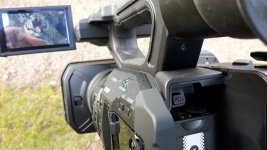
Wow, what did you do to make the LCD visible in the sun? I turned the LCD up to +1 and the brightness and contrast all the way up, and that was pretty much at a level where I could claim that there might, indeed, be a picture on there. ;/

Nothing honest! Stock settings. Just got the angle right to prevent any reflection when I took the snap with my mobile phone.

First vid I cut together of my Zoo visit today shot in UHD 60P (although that resolution isn't available at time of posting as still processing).

 
YouTube does support UHD at 60fps and has for a couple of years now. Here's one such video uploaded in 2014, for example:
https://www.youtube.com/watch?v=-iSFM-T-F_0

Keep in mind, however, that for higher resolutions and frame rates (such as 2160p60), YouTube may only create VP9 encodings and may not create H.264 versions at these higher resolutions. This means that 4K/UHD playback for such videos will be limited to certain browsers such as Chrome and Firefox, and may not be available in other browsers like Safari and Internet Explorer/Edge. This is the case for the above video which maxes out at 1080p60 (delivered in the H.264 codec) in Safari, but can play back in 2160p60 (delivered in the VP9 codec) in Chrome.

In the case of the zoo video (https://www.youtube.com/watch?v=vLvWz1hs8Xc), it seems like only the H.264 encodings have been created so far and the VP9 encodings are not available yet. It's possible that YouTube is still processing the video in the background to create these additional formats (encoding VP9 is more processor intensive and tends to take longer than H.264).

If you paste a YouTube video URL into this page, it will list all of the different formats YouTube has encoded the video in:
https://www.h3xed.com/blogmedia/youtube-info.php
 
YouTube does support UHD at 60fps and has for a couple of years now.

Interesting. I know that they ran an experiment awhile ago, but as neither my home machine, nor my laptop, is capable of seeing any of these as UHD (I use chrome on both, of course), I leaped to the conclusion that it wasn't available any longer. My bad, and thanks for the correction.

edit: Geez, thanks for the poke -- h264ify was enabled on my Mac. :embarrassed: Honestly don't know how it ever got installed there -- I only remember installing it on my machine at home :( [Removed incorrect post]

The zoo video is available in 4k60p. That video is EASILY cleaner than mine. My HC-X1 would have been humming all over that black, pebbly wall at the end. Running an experiment by uploading some of my noisy shots to youtube. Will update with results....

Update:
https://www.youtube.com/watch?v=GUDeT87n2iQ

you can see noise on the paper and very slight amount on the closest wall, but it would be hard for me to pick it out w/o having seen the raw version first. Would really like to see similar tests on the ux180.
 
Last edited:
Video example from last night: https://drive.google.com/open?id=0B5uYsNiRVpedNXVSdnZaLU5NajQ
Focus on the dark wall near the sickly ficus plant. The first second of this video is at a gain of 10, the switch to a gain of 11 creates a much smoother / less noisy background. I thought that was an interesting step-function last night and wanted to be sure to capture it for you.

NR: Noise Reduction appears to do two things -- it decreases apparent noise, but if you take a video in pitch-black, you'll find a brighter and much noisier image. Pitch black at an NR of -7 produces an RGB field of 19s and 20s, pitch black at an NR of +5 produces an RGB field of values all over the place between 23 and 32. So, not only will you lose detail, you're going to lose dynamic range with NR on. [now, why I'm getting a value of 19/20 in pitch black instead of, say, *0*, is probably worth investigating, but I bet that's a solvable issue] Stability in pitch black of any particular pixel without NR would indicate that noise is mainly constrained to a single bit, which is fine. With NR turned up, noise in pitch black actually covers roughly three bits. I would have to conduct similar examples in better laboratory conditions if I wanted to tell what was going on with grays and whites. Sadly I can only say that there is a real, visible noise reduction, even though measured noise at pitch black seems to be significantly worse.

Measuring the pixel drift on the lined piece of paper in this shot: https://drive.google.com/open?id=0B5uYsNiRVpedN3BVb3lUTUN6b0E I see luminance noise of about two bits. That was taken with NR off. In the first shot, at an NR of +5 and at a gain of 10, noise on the lined paper again seems to also be about two bits, but at a gain of 11, that drops to one bit.

So, increasing gain decreases noise and detail, but increasing noise reduction increases black noise and decreases dynamic range.
WAT? :cry:

I feel like I've learned the technical definition of all the words used solely in an idiomatic language. Shaka, when the walls fell.

All evidence would point to me overlooking something painfully obvious, but I wish I knew what it was.
I'm pretty sure I don't have h264ify on the camera :>

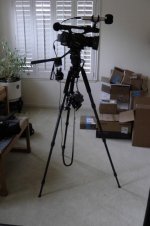
Picture of my rig:
S1280002.jpg
I recorded the second half of my daughter's college music submission today:
Video was taken in UHD, zoomed in 125%, and converted into FHD. Recording was done with an f9 aperture and gain of 3 or 4.
I had to do no color correction (that was a first), so aside from joining the audio and video streams, adjusting volume, and cutting the ends off and going to black on each end, there was nothing to do -- the editing process was far, far easier than it has been recently.
This was a much brighter room than her first recording:
which was done on the day my HC-X1 went into the mail, so my old camera had to carry the load, and you can see why I wanted my new camera, I'm sure....
Leaving aside that awful light behind the pianist, even youtube's NR can't fix all the noise in that video, and one of my old camera's least thrilling bits of quaintness is in full "view" -- whenever the violin is playing, the picture is vibrating too. As much as I'm struggling to learn the HC-X1, it's a tremendous upgrade!

As another point of data, the HC-X1's audio stream was ... a lot stronger on the high frequencies compared to my NT4, and my NT4 is already a little strong on high frequencies for my tastes.
 
Last edited:
Second outing with the UX180 yesterday in very challenging light conditions. Filming fast radio controlled 'toy' jets and planes with the sun directly in front of us. No option as that's the way the land owner mandates that is where the pilots operate from on the airfield. Still was a good test for me and the cam. I started off in auto and progressively got used to adapting setup to the conditions. Results came out OK but know I can do better. Going to a big quarterly jet meeting tomorrow so looking forward to learning more.


Last edited:
Any recommendations on how to carry around a camcorder like this?

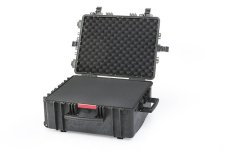
Repeated, as I'd like to know as well. Do people generally carry their cameras with them on-board aircraft, or stow them in baggage? A hard-case for baggage would seem a minimum, but I'm not sure how to weigh that against something that can be watched and carried on board (which wouldn't be able to be quite this large -- max size of 22 cm x 35 cm x 56 cm).
 
The answer is "it depends" on what you are doing for a similar sized camera I use either a
https://www.manfrotto.co.uk/pro-light-video-camera-case-cc-193-pl
(though it was a Kata and therefore less expensive when I got mine.)

or a Peli
https://www.waterproof-cases.co.uk/product/peli-storm-im2750-case/
with the dividers
https://www.waterproof-cases.co.uk/product/peli-storm-im2750-divider-set/

NOT the foam inserts. the foam is not as good as the deciders if you are putting in and out a lot of kit all the time. And dividers are easier to reconfigure when you add remove kit. Not on a daily basis but when you say, buy some new (different) kit to replace something that breaks or no longer does what you want. I can just move the dividers and the kit has a lot of spares anyway. Try doing that with foam.

Where I just need a camera & 1 microphone for run and gun the Kata bag is great. Where I need a lot of kit the Peli is great. That said I am not flying anywhere with it. In the UK it is either car or train and there are no baggage restrictions for either (other than what I can carry). The wheels on the Peli are essential The only thing missing for me is a way of attaching triods and stands to the case.
 
Last edited:
That Kata looks nice for just the camera.
I figure I'm going to wind up with several bags/cases -- one for portability to an event, and one for distance travel. I may even have a third for local events, which would include the mic and the audio equipment (distance events are sporting events, and don't need the specialized audio gear, fortunately).

I've been looking at the Mindshift 40L https://www.bhphotovideo.com/c/product/1164129-REG/mindshift_gear_354_firstlight_40l_dslr.html with the hope that it could fit the camera, tripod (which is a feisol and folds up under 20") and my fluid head, but I haven't tested that yet (I intend to attempt to buy locally). Not sure what I'm going to use that can carry that and the DR-701D, headphones, mic, cables and the rest of it. I do like the portability of that Kata as opposed to hard cases, though the hard case might be the right solution for air-flights.

Another piece of advice I ran across was to buy a UV lens attachment, not so much for UV protection as for lens protection -- that seemed good advice to me, but I haven't gone looking for one of those yet....
 
Back
Top