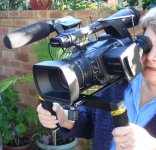
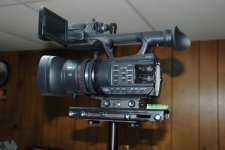
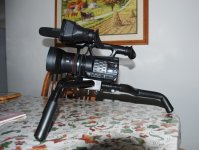
I just received the new AG AC-90 today from B&H PHOTO. This is ONLY a preliminary evaluation/review of the camera. Since we are getting hit with a second storm here in the Northeast and recovering from the Super Storm, I had some time to get a feel of this new camera. Most likely a new forum area will be started for the AC-90.
.WIDE-ANGLE: Seems wide enough BUT I will be purchasing the Panasonic Wide Angle made for this camera for GLIDECAM work when introduced in the USA.
.I know the first question will be from my colleagues who own the 130/160 as I do. The bottom line is that this camera is NOT a AG AC-130/160(A) by any means but the picture quality is not diminished with proper lighting. Unfortunetly, this is a very dreary day and I could do nothing but "shoot' some clips out a snowy window.
.I will "CUT TO THE CHASE" and am happy to inform all that the AUTO FOCUS is right on target. I even designated a USER button on the camera as a TURBO FOCUS BUTTON, as I am a manual shooter. This focus is faster than the instant focus used in my SONY G-10 HD camera.
.CAUTION: There is a pull-out LCD monitor which is 3.5 inches. The preview monitor is easy to pull out but CAUTION, CAUTION,CAUTION.........DO NOT push the monitor BACK with the palm of your hand. Use your two forefingers to lightly push the slide-in monitor back into place. If not, I see the 'handwriting on the wall' that Panasonic repair will see these units in the shop for repairs.
.NOTE: The Lens cap is pretty cheesy and doesn't seem to attach with a "clicK' as do other Panny cameras I own.
.NOTE: It is VERY important to read the Manual. The menu is not that intuitive but took me about 2 hours to really figure the ins and outs. It is essential to STUDY the manual. I can't wait for Barry Green's book which is available via mailing out an enclosed card.
.HINT: The menu is navigated by a touch screen. Don't attempt adjusting the menu screen after eating a greasy chicken leg I discovered that the enclosed REMOTE actually emulates the external button of the 130/160(A) and I used that method to adjust the menu.
.HINT: If you are A 130/160 OWNER like myself, it is essential to copy (handwritten) on a piece of paper your current favorite SCENES. There is NO WAY to transfer your current scene files to this camera. So, I wrote down my favorites and entered them into the AC-90 via the CAMERA SETTING menu. SADLY, there is no way I can discover, to actually NAME each scene in the AC-90. SO, I wrote down the names of the scene files on a postie. Of course, there are default settings that are the same as the Scene Files in the 130/160(A) but, again, no designated file name such as "SPARKLE",etc.
.Intelligent AUTO: This feature is just short of remarkable. I have been a videographer since 1982 and do not use auto-functions, but this amazed me. Since I use the HD4000 Glidecam, this setting will be a godsend.
.STABILIZER: OK.... this is NOT a Steadycam or Glidecam etc. type of stabilizer....BUT.......it is awfully darn good and BETTER to me than a recent test with the new SONY. One must keep the camera in wideangle if there is any type of walking. However, this is the best stabilizer I have used for handheld shooting. I did notice when the I-Zoom was used, once the I-Zoom was in place and at the 25X mark, the stabilizer is not as good. A mono-pod or tripod will be needed as the angle of view is not that of the 130/160(A). For edification, I-Zoom allows a 25X magnification w/o degradation. I really did not test this at this time. However, the 12X optical worked well as stated-with the stabilizer setting.
.Playing back clips, both still and video are easy using the rear "PLAY" switch. DELETING clips is a bit of a challenge, so it is necessary to read the manual. The ZOOM/ROCKER actually changes the clip display from single to multiple. Who would have thought that! There are several functions that require changing menu settings and one can pre-study the VOLUME 2 manual on-line.
.ND filter: Cloudy and snowy....could not test. However, it is my opinion, that high contrast lighting will probably use an external ND filter. I currently have a clear filter that screwed int the non-removable lens hood....YES....non-removable.
.LOW LIGHT: The GAIN 'kicks-in" once the IRIS passes the "OPEN" display. In lowlight the gain went to 20db (can go higher plus AGC) and I did not notice any grain issues on my download. However, it appears at the higher gain, the picture is soft albeit a pleasant soft. For me. lowlight is not an issue as I would alway use lighting anyway. For others, Panasonic did a nice job here with the 1/4.7 chips.
In closing, the camera is a little brother to the 130/160(a) in every respect. I like the balance and feel of the camera and fits well on my shoulder mount. Handheld.... there is no fatigue. Of course, there is lots to discover and more testing of the actual picture quality.
.WIDE-ANGLE: Seems wide enough BUT I will be purchasing the Panasonic Wide Angle made for this camera for GLIDECAM work when introduced in the USA.
.I know the first question will be from my colleagues who own the 130/160 as I do. The bottom line is that this camera is NOT a AG AC-130/160(A) by any means but the picture quality is not diminished with proper lighting. Unfortunetly, this is a very dreary day and I could do nothing but "shoot' some clips out a snowy window.
.I will "CUT TO THE CHASE" and am happy to inform all that the AUTO FOCUS is right on target. I even designated a USER button on the camera as a TURBO FOCUS BUTTON, as I am a manual shooter. This focus is faster than the instant focus used in my SONY G-10 HD camera.
.CAUTION: There is a pull-out LCD monitor which is 3.5 inches. The preview monitor is easy to pull out but CAUTION, CAUTION,CAUTION.........DO NOT push the monitor BACK with the palm of your hand. Use your two forefingers to lightly push the slide-in monitor back into place. If not, I see the 'handwriting on the wall' that Panasonic repair will see these units in the shop for repairs.
.NOTE: The Lens cap is pretty cheesy and doesn't seem to attach with a "clicK' as do other Panny cameras I own.
.NOTE: It is VERY important to read the Manual. The menu is not that intuitive but took me about 2 hours to really figure the ins and outs. It is essential to STUDY the manual. I can't wait for Barry Green's book which is available via mailing out an enclosed card.
.HINT: The menu is navigated by a touch screen. Don't attempt adjusting the menu screen after eating a greasy chicken leg
I discovered that the enclosed REMOTE actually emulates the external button of the 130/160(A) and I used that method to adjust the menu..HINT: If you are A 130/160 OWNER like myself, it is essential to copy (handwritten) on a piece of paper your current favorite SCENES. There is NO WAY to transfer your current scene files to this camera. So, I wrote down my favorites and entered them into the AC-90 via the CAMERA SETTING menu. SADLY, there is no way I can discover, to actually NAME each scene in the AC-90. SO, I wrote down the names of the scene files on a postie. Of course, there are default settings that are the same as the Scene Files in the 130/160(A) but, again, no designated file name such as "SPARKLE",etc.
.Intelligent AUTO: This feature is just short of remarkable. I have been a videographer since 1982 and do not use auto-functions, but this amazed me. Since I use the HD4000 Glidecam, this setting will be a godsend.
.STABILIZER: OK.... this is NOT a Steadycam or Glidecam etc. type of stabilizer....BUT.......it is awfully darn good and BETTER to me than a recent test with the new SONY. One must keep the camera in wideangle if there is any type of walking. However, this is the best stabilizer I have used for handheld shooting. I did notice when the I-Zoom was used, once the I-Zoom was in place and at the 25X mark, the stabilizer is not as good. A mono-pod or tripod will be needed as the angle of view is not that of the 130/160(A). For edification, I-Zoom allows a 25X magnification w/o degradation. I really did not test this at this time. However, the 12X optical worked well as stated-with the stabilizer setting.
.Playing back clips, both still and video are easy using the rear "PLAY" switch. DELETING clips is a bit of a challenge, so it is necessary to read the manual. The ZOOM/ROCKER actually changes the clip display from single to multiple. Who would have thought that! There are several functions that require changing menu settings and one can pre-study the VOLUME 2 manual on-line.
.ND filter: Cloudy and snowy....could not test. However, it is my opinion, that high contrast lighting will probably use an external ND filter. I currently have a clear filter that screwed int the non-removable lens hood....YES....non-removable.
.LOW LIGHT: The GAIN 'kicks-in" once the IRIS passes the "OPEN" display. In lowlight the gain went to 20db (can go higher plus AGC) and I did not notice any grain issues on my download. However, it appears at the higher gain, the picture is soft albeit a pleasant soft. For me. lowlight is not an issue as I would alway use lighting anyway. For others, Panasonic did a nice job here with the 1/4.7 chips.
In closing, the camera is a little brother to the 130/160(a) in every respect. I like the balance and feel of the camera and fits well on my shoulder mount. Handheld.... there is no fatigue. Of course, there is lots to discover and more testing of the actual picture quality.