I'm currently in pre-production of a 10min short based on action si-fi.After discussing with the director the movie is similar to 'Total Recall' but for lighting we agreed to the look from 'The Island'Were shooting on the RED, but I'm wondering about all the over exposure highlights look. Well, since its digital, how do I handle the overexposure? And how to be careful so it doesn't look amateurishAnd any other tips on achieving that high contrasty look from the movie?Like there are a lot of random colours in the 'factory' part. Yellows for whites and blue/cyan for the darker colours.Its more done on camera than in post.

Navigation
Install the app
How to install the app on iOS
Follow along with the video below to see how to install our site as a web app on your home screen.
Note: This feature may not be available in some browsers.
More options
You are using an out of date browser. It may not display this or other websites correctly.
You should upgrade or use an alternative browser.
You should upgrade or use an alternative browser.
over exposure in shots
- Thread starter DDirector
- Start date

starcentral
Veteran
if you're shooting with a camera with that much dynamic range and latitude in post (since you are shooting RAW) I would never recommend blowing anything in-camera. There is no need.
On-set I suggest getting good solid and consistently exposed images in-camera , and let the rest happen in post.
Yellow highlights or other coloured tones shadows can be done in post through a process called split-toning. Contrast "looks" are done by applying additional gamma curves from moderate to excessive depending on one's taste.
Light your talent's skin, light your shadows, and control your highlights.
On-set I suggest getting good solid and consistently exposed images in-camera , and let the rest happen in post.
Yellow highlights or other coloured tones shadows can be done in post through a process called split-toning. Contrast "looks" are done by applying additional gamma curves from moderate to excessive depending on one's taste.
Light your talent's skin, light your shadows, and control your highlights.
If this was me, I would...
1- Try and do the overexposed look in post, which should allow much more variation and control over the finished look. ( more expensive yes, but probably a lot safer )
2- Test until I had the look I wanted before a single frame of the actual film was shot. Testing to create a certain look is often a fun exercise, as you sometimes find out things you never realized before.
1- Try and do the overexposed look in post, which should allow much more variation and control over the finished look. ( more expensive yes, but probably a lot safer )
2- Test until I had the look I wanted before a single frame of the actual film was shot. Testing to create a certain look is often a fun exercise, as you sometimes find out things you never realized before.
starcentral
Veteran
Now you have two recommendations to do it in post but I'm pretty sure I can anticipate the situation and problem you are going to have with this:
Either;
1.) The director will want to see it "on-set" because after all you are working for him as the "cinematographer" and he will expect this to be your job. He may not understand the "post" process nor care to understand. For all he knows you use yellow gels to light white walls and peoples faces.
2.) The production may not have anyone who can do the post work, or if they do, not have the experience to do it, and thus botch it if you don't do it yourself or get involved in that process early on.
So this leaves you in an ugly situation and my advise is to hammer out all of this NOW well in advance before any shooting starts. This lack of upfront communication is how people end up hating other people and their work and spreading gossip. The director is the director and his job is to make decisions, so you ask him if he wants to do the color treatment in post and you can suggest that you are part of that process - or - you ask if he will incorporate the extra hours, time and resources needed to achieve close to the look on-set.
Like TheDingo says, you should be testing this stuff before hand and as I suggested bring the director into that process and make him call the decisions based on your recommendations and results of the tests.
Either;
1.) The director will want to see it "on-set" because after all you are working for him as the "cinematographer" and he will expect this to be your job. He may not understand the "post" process nor care to understand. For all he knows you use yellow gels to light white walls and peoples faces.
2.) The production may not have anyone who can do the post work, or if they do, not have the experience to do it, and thus botch it if you don't do it yourself or get involved in that process early on.
So this leaves you in an ugly situation and my advise is to hammer out all of this NOW well in advance before any shooting starts. This lack of upfront communication is how people end up hating other people and their work and spreading gossip. The director is the director and his job is to make decisions, so you ask him if he wants to do the color treatment in post and you can suggest that you are part of that process - or - you ask if he will incorporate the extra hours, time and resources needed to achieve close to the look on-set.
Like TheDingo says, you should be testing this stuff before hand and as I suggested bring the director into that process and make him call the decisions based on your recommendations and results of the tests.
Last edited:
Like I said. This is a pretty big shoot. We obviously have people working on all positions. We are fully crewed. I am very close with the director. I've worked with him numerous times. I can do what he wants, and he trusts me to accomplish it.The thing is with over exposure, I obviously don't want to over exposure right away in camera. - not blowing the highlights out, but making it close.The thing about post is that when i increase the highlights for that look, everything white/bright will become like that. But I won't want that.Referring to the movie 'The Island' their suits are white but never over exposed. Its always the hair highlights from the light or sunlight.So, even if it is Still done in post, that light will have to obviously be brighter than the mid tone used by quite a bit, but not too much to look blown on camera.The dark spots will not be crushed. I hate when ther is no detail. Its just the highlights as seen in the movie I am trying to recreate.---------------When it comes to the colour, I too believe that this isn't as much of a post thing as in camera. If I were to do split-toning, everything that is bright would become that yellowish colour. Same as the dark spots. It would become that blueish colour. But its not exactly like that. Also referring back to the movie (because there will be robots who will probably be in white) the actors wearing white suits are always white. The lights in the room are always a mix of yellow and blue which creates that look on their faces and the set. Not so much by split-toning as that would make all the bright spots and white stuff to be yellow. Not what I want, nor seen in the movie.So, it seems like the lights were all gelled or something, but the actors were lit with white light.That's what I believe though. I can't see it be a total post thing.Just what happens if we see a bare bulb? It supposed to be yellowish.

Jordan Scott Price
Veteran
Also referring back to the movie (because there will be robots who will probably be in white) the actors wearing white suits are always white. The lights in the room are always a mix of yellow and blue which creates that look on their faces and the set. Not so much by split-toning as that would make all the bright spots and white stuff to be yellow. Not what I want, nor seen in the movie.So, it seems like the lights were all gelled or something, but the actors were lit with white light.That's what I believe though. I can't see it be a total post thing.Just what happens if we see a bare bulb? It supposed to be yellowish.
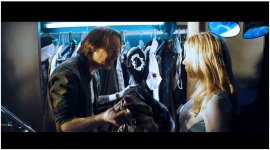
You talking about this?

This is very much accomplished in the grade. Skin tones are selected by a secondary isolator and then adjusted independently of the rest of the image.
starcentral
Veteran
^ Yes to what he said. It could be done by creating a mask based on skin tone and then separately color correcting it from the rest of the image. This process is needed of the actors will be moving around a scene a lot - but depending on the blocking of the scene it can probably be accomplished by using gels on set. In the shot above, they are lit from the floor (making their clothes nice and white) and above eye level or camera level I suspect an amber gelled kino-flo or other soft source that blends well with the first light source. At least that's how I would do it.
But what I don't see (at least in this frame example) is anything that looks like overexposure to a point where detail is lost? I don't recall the rest of the film to really remember the look of it.
Anyway if you are shooting on RED RAW then you have the latitude to move any part of 12-13 stops of the gamma curve up or down by 2 or more stops without degrading the image. This means if you light for middle great at 40 IRE you will have 7 stops up and 5 stops down. This will let you blow your highlights if you want, but I don't think that is really the effect you are after.
But what I don't see (at least in this frame example) is anything that looks like overexposure to a point where detail is lost? I don't recall the rest of the film to really remember the look of it.
Anyway if you are shooting on RED RAW then you have the latitude to move any part of 12-13 stops of the gamma curve up or down by 2 or more stops without degrading the image. This means if you light for middle great at 40 IRE you will have 7 stops up and 5 stops down. This will let you blow your highlights if you want, but I don't think that is really the effect you are after.

Michael Carter
Veteran
Y'know what's rarely discussed when people talk about the "blown out" look? Diffusion on the lens. I see that look a lot, which tends to exaggerate highlights. And it's tough to mimic in post.
Most of "Iron Man" was shot with a 1/8 ProMist but most people do not think of that as a diffused movie, yet the filter effect is visible.
Most of "Iron Man" was shot with a 1/8 ProMist but most people do not think of that as a diffused movie, yet the filter effect is visible.

CharlesPapert
Director of Photography
I don't see any problem with allowing highlights to blow in camera. Not every scene has to be "politely" captured so everything can be shifted in post. You want blown highlights, blow away as long as you know they are gone for good. We did it with film for years, avoided it like the plague with analog and early digital video and now it's do-able again.
But you shouldn't really take anyone's word for gospel here, including mine. Very easy solution: shoot tests. Control the highlights in camera and also let them blow. Take it into post and see what can be done.
But you shouldn't really take anyone's word for gospel here, including mine. Very easy solution: shoot tests. Control the highlights in camera and also let them blow. Take it into post and see what can be done.
I guess my post didn't go through?
I don't want to blow out highlights in camera so there is no detail.
I've been looking at some BTS pictures I found and it looks like it is properly exposed, but the parts the end up to be over exposed (in post) are a few stops higher than the mid-tone, but arent overly over-exposed.
It is done in post, so to recreate that look for post should it be over overexposing by 2-3 stops?
So, in the end it looks similar to these:
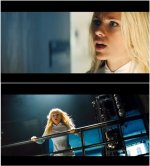
When it comes down to colour as in the picture:
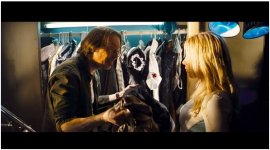
However, there are some times when it looks like it wasnt just in post, but in camera. There are highlights that are white and there is still yellow as here:
And what about scenes like this?
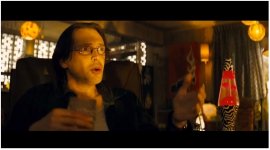
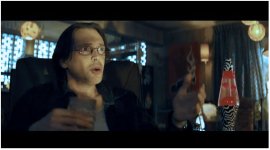
There is also a better example when they are in the factory as you see the yellow practical lights, and you also see cyan BG lights for some separation (which are gelled lights). But the lights are sometimes visible where you can see the bare bulb and its yellow, so it looks like its done in post, but the actors are pretty white still. So, Im not sure if Id want to recreate this, if Id want to gel the lights to have it that final look, or do it in post.
I don't want to blow out highlights in camera so there is no detail.
I've been looking at some BTS pictures I found and it looks like it is properly exposed, but the parts the end up to be over exposed (in post) are a few stops higher than the mid-tone, but arent overly over-exposed.
It is done in post, so to recreate that look for post should it be over overexposing by 2-3 stops?
So, in the end it looks similar to these:
When it comes down to colour as in the picture:
Then, I do see how it can be done in post also.You talking about this?
This is very much accomplished in the grade. Skin tones are selected by a secondary isolator and then adjusted independently of the rest of the image.
However, there are some times when it looks like it wasnt just in post, but in camera. There are highlights that are white and there is still yellow as here:
And what about scenes like this?
There is also a better example when they are in the factory as you see the yellow practical lights, and you also see cyan BG lights for some separation (which are gelled lights). But the lights are sometimes visible where you can see the bare bulb and its yellow, so it looks like its done in post, but the actors are pretty white still. So, Im not sure if Id want to recreate this, if Id want to gel the lights to have it that final look, or do it in post.

Shooter
Veteran
Forget the term "over exposing' for the sake of this discussion.
Nothing is over exposed in the samples. Everything is properly exposed. (The blacks and the whites were protected to mainaindetail)
Its just that the DP and the colorist has set levels as they wished.
Think about "levels" within the entire gamut from Blacks (Shadows) thru Mids (gamma) to whites (highlights).
Use lights to expose what ever you want ..any where you want...but within the full level gamut...(i.e stay within the range the camera is capable of managing)
The colorist can do a lot of "lighting" in post but you have to provide the base to work with.
Test , test... test ...and work with the Colorist.
Nothing is over exposed in the samples. Everything is properly exposed. (The blacks and the whites were protected to mainaindetail)
Its just that the DP and the colorist has set levels as they wished.
Think about "levels" within the entire gamut from Blacks (Shadows) thru Mids (gamma) to whites (highlights).
Use lights to expose what ever you want ..any where you want...but within the full level gamut...(i.e stay within the range the camera is capable of managing)
The colorist can do a lot of "lighting" in post but you have to provide the base to work with.
Test , test... test ...and work with the Colorist.

Ryan a couple of things if your'e going after "The Island" look.
Id be testing the use of a promist / classic soft filter. Something like a 1/8 promist might be a good start point. As to lighting Im seeing a mix of Daylight and daylight plus something like a Lee Medium Yellow (010) or a Rosco Medium Yellow 10 ... or a Rosco Medium Straw 14. ( I wouldnt point these directly at skin FWIW more to mimic light or sun accents)
In set design plenty of blue and yellow depending on the shot.
Id be testing the use of a promist / classic soft filter. Something like a 1/8 promist might be a good start point. As to lighting Im seeing a mix of Daylight and daylight plus something like a Lee Medium Yellow (010) or a Rosco Medium Yellow 10 ... or a Rosco Medium Straw 14. ( I wouldnt point these directly at skin FWIW more to mimic light or sun accents)
In set design plenty of blue and yellow depending on the shot.
starcentral
Veteran
Now that I re-read the thread, I don't think we're talking about over-exposure or blown anything. I think DDirector just wants a hot look on the skin, so for example instead of lighting skin 1 stop below middle grey he wants to go 1-2 stops over. Or to put it another way instead of skin IRE at the low 40's, bringing them up in the 60-70IRE range. You still have a lot of lattitude shooting with a 13 stop camera to capture your high tones without losing them, but controlling them will take all that much more care, time and work.
Looking at that one frame a little more I'm now convinced there was only one light to the left of the male actor at very low angle. Some of the top of the light could have been gelled and if not then someone went through the scene and colored their skin to yellow in post. Search on Google, I'm sure the answer is around.
By the way if you really want to play around in post and learn selective color grading, Andrew from videocopilot.net has a tutorial on this advanced masking technique used to color a scene without affecting the actors or vice versa. His way does not use rotoscoping or animating masks, and its actually VERY slick.
Looking at that one frame a little more I'm now convinced there was only one light to the left of the male actor at very low angle. Some of the top of the light could have been gelled and if not then someone went through the scene and colored their skin to yellow in post. Search on Google, I'm sure the answer is around.
By the way if you really want to play around in post and learn selective color grading, Andrew from videocopilot.net has a tutorial on this advanced masking technique used to color a scene without affecting the actors or vice versa. His way does not use rotoscoping or animating masks, and its actually VERY slick.
I'm not going to be grading the film myself.
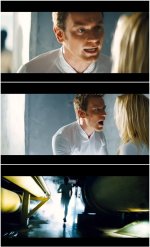
As I said. I dont want to overexpose to blow out highlights so they are lost.
It want that high contrast look by adding bright highlights to the scene/actors. It is almost blown, but is not.
It doest seem all that hard. Just light the side that will be brighter by about 3 stops brighter than the properly exposed skin-tone.
Just, I'm wondering 3 stops is too much or too little if shooting on the Red.
I want it to be noticeable like in the pictures above and not just a subtle difference.
*Not just having this look on the actors, but throughout the set at times, such as light coming through a window, or like the bottom picture above as we will also be shooting in a factory like that.
COLOUR:
I'm still not sure that the yellow look is a 100% post thing and not done at all in camera.
Looking at the pictures up a few posts (closet & living room scene)
They don't really look like they were done only in post. Wouldn't it be better to gel a light yellow than rotorscope them in post (closet scene)?
The one in the living room is something im more curious about.
You see lights in the room (sometimes bare bulbs) and they are yellow (straw colour).
When we`re filming, I will be in a similar scenario. The bulbs will look yellow, but that doesnt mean that the whole scene will be yellow. Not all white in the room will become yellow.
As I said. I dont want to overexpose to blow out highlights so they are lost.
It want that high contrast look by adding bright highlights to the scene/actors. It is almost blown, but is not.
It doest seem all that hard. Just light the side that will be brighter by about 3 stops brighter than the properly exposed skin-tone.
Just, I'm wondering 3 stops is too much or too little if shooting on the Red.
I want it to be noticeable like in the pictures above and not just a subtle difference.
*Not just having this look on the actors, but throughout the set at times, such as light coming through a window, or like the bottom picture above as we will also be shooting in a factory like that.
COLOUR:
I'm still not sure that the yellow look is a 100% post thing and not done at all in camera.
Looking at the pictures up a few posts (closet & living room scene)
They don't really look like they were done only in post. Wouldn't it be better to gel a light yellow than rotorscope them in post (closet scene)?
The one in the living room is something im more curious about.
You see lights in the room (sometimes bare bulbs) and they are yellow (straw colour).
When we`re filming, I will be in a similar scenario. The bulbs will look yellow, but that doesnt mean that the whole scene will be yellow. Not all white in the room will become yellow.
Jordan Scott Price
Veteran
Well, don't forget it's just as much about art direction and production design. Those walls in the closet are painted blue. The walls in the living room with the lava lamp are painted yellow-brown.
Ryan a couple of things if your'e going after "The Island" look.
Id be testing the use of a promist / classic soft filter. Something like a 1/8 promist might be a good start point. As to lighting Im seeing a mix of Daylight and daylight plus something like a Lee Medium Yellow (010) or a Rosco Medium Yellow 10 ... or a Rosco Medium Straw 14. ( I wouldnt point these directly at skin FWIW more to mimic light or sun accents)
In set design plenty of blue and yellow depending on the shot.
Why not point directly at skin?

Bern Caughey
Veteran
And what about scenes like this?
View attachment 59856
There is also a better example when they are in the factory as you see the yellow practical lights, and you also see cyan BG lights for some separation (which are gelled lights). But the lights are sometimes visible where you can see the bare bulb and its yellow, so it looks like its done in post, but the actors are pretty white still. So, Im not sure if Id want to recreate this, if Id want to gel the lights to have it that final look, or do it in post.
The practicals in this shot are mostly not lighting the set. Otherwise they'd be blown out.
Last edited:
starcentral
Veteran
However, there are some times when it looks like it wasnt just in post, but in camera. There are highlights that are white and there is still yellow as here:
View attachment 59855
And what about scenes like this?
View attachment 59856
Never say never.
Look at these frame grabs I edited; Picture #1 to me reveals pure tungsten or maybe some 1/4 straw gelled lights on the actors and an obvious cyan light in the closet (actually look REAL close and on the left side in the closet you will see the end of the florescent tube light that's in there). Picture #2: look at the color temperature outside. The film stock used was probably balanced for tungsten with tungsten lighting used indoors. In post a warming filter gets applied to really bring out the oranges and in that process bring the outdoor color from "blue" to "white".
I believe you will need a combination of good on-set art directing, color separation and post treatment to really pull off the look your after. After all, "The Island" budget was $126 million so you can be sure a lot of time, effort and money was put into achieving a look like this.
Last edited: