GH4 optimum Cinelike D levels in terms of Sharpness, Saturation, Hue???

For those of you who are already shooting with GH4s, what do you consider to be the optimum Cinelike D Picture Style in terms of Contrast, Sharpness, Noise Reduction, Saturation, Hue? ...when shooting in 24p 4K (Cinema 4K or UHD)

Is it safest to leave all those levels at 0, or is that not a good idea?

For example, when it comes to caucasian skin tones, is it ok for Hue to remain at 0? Or should Hue perhaps be more to the minus side? My reason for asking this, is that it seems to me like the GH4 might be slightly warmer than previous GH cameras when it comes to displaying skin tones. So I wonder whether I shouldn't be setting Hue to -2.

Looking forward to hearing your views. Thank you in advance.
 
Last edited:
I understand. But personally do you prefer to leave the picture style at 0,0,0,0,0 or do you have a favorite setting when it comes to the picture style in cine like D? Thanks for your feedback.
 
Here are the current Cinelike-D settings that have worked for me. Adding a simple S-curve in post is all it needs to look great.


Contrast: -1
Sharpness: -5
NR: -5
Saturation: -1
Hue: 0


Highlights: -3
Shadows: 0


Master Pedestal: 0 (set to -1 to -3 when using vintage lenses or in heavy backlight which lifts the blacks)
Luminance Level: 0-255

Here's a video I shot using these settings:

I have found that Contrast at -1 is good for Lumix lenses, which have more contrast than vintage lenses. For vintage lenses, I bump the contrst up to 0. If I am in a very contrasty situation, or if I want to make sure to retain some shadow detail, I may dial the contrast down to -2 or -3.

In terms of Shadow/Highlight, I leave Shadow at 0 as lifting it really adds noise. Cutting the Highlights down to -3 doesn't increase dynamic range really, but it tames the highlights in a way that I find pleasing.
 
Here are the current Cinelike-D settings that have worked for me. Adding a simple S-curve in post is all it needs to look great.


Contrast: -1
Sharpness: -5
NR: -5
Saturation: -1
Hue: 0


Highlights: -3
Shadows: 0


Master Pedestal: 0 (set to -1 to -3 when using vintage lenses or in heavy backlight which lifts the blacks)
Luminance Level: 0-255

Here's a video I shot using these settings:

I have found that Contrast at -1 is good for Lumix lenses, which have more contrast than vintage lenses. For vintage lenses, I bump the contrst up to 0. If I am in a very contrasty situation, or if I want to make sure to retain some shadow detail, I may dial the contrast down to -2 or -3.

In terms of Shadow/Highlight, I leave Shadow at 0 as lifting it really adds noise. Cutting the Highlights down to -3 doesn't increase dynamic range really, but it tames the highlights in a way that I find pleasing.

These settings work pretty nice. I'm finding sharpness at -5 (which everyone recommends) is a little too soft for me. -2 to -3 seems better to my eyes without looking too artificial.
 
These settings work pretty nice. I'm finding sharpness at -5 (which everyone recommends) is a little too soft for me. -2 to -3 seems better to my eyes without looking too artificial.

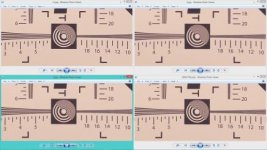
Yeah, I don't get the SHARP -5 either. My testing on charts showed -3 and lower was clearly FUZZIER than the chart in reality. -1 and -2 had almost no HALOing. I've read there is no ZERO Sharp on this camera, and to sharpen in post, but wouldn't one want the most accurate picture to start with? Not an over-fuzzied one before ADDING post Sharpness?

(personal preferences aside of course)
 
Last edited:
but wouldn't one want the most accurate picture to start with? Not an over-fuzzied one before ADDING post Sharpness?

I always read sharpening in post does a better job than quick and dirty in-camera sharpening. I think that's why ppl turn it all the way down and do it in post.
 
Thank you all very much for sharing this. I understand that there are no magic numbers, that it may be down to individual taste. But thank you for taking the time to share your results and to explain why you favor certain settings over others. This is very helpful.
 
what I have read as well. but if -1 or -2 is NULL sharp in camera, and -3 -4 -5 is FUZZIER than reality.... aren't we hurting the image? Not NOT adding sharp, but making it fuzzier than it is in reality, not sure how that is a good thing - unless it is codec based and makes a more pleasing sharpening because the colors all ran together in fuzzy -5?
 
Not NOT adding sharp, but making it fuzzier than it is in reality, not sure how that is a good thing

Not an expert but I don't think it's possble to add fuzzyness in-camera. Some say the sharpening looks fake even at -5 with Panny lenses (I just see clean detail. Then again I don't see other things people talk about). While on the subject I've also heard better cameras somehow look sharp without looking "fake". Maybe I sort of see that one, maybe not. No one's quantified it. These are cinematography oriented forums where reality isn't necessarily a good thing. The "clinical" look doesn't bother me for the nature / outdoor stuff i've been doing.
 
I'll never be a pro, but the tests I did were good enough to me: 2 LED lights pointed at a black and white photo printed resolution chart, auto focused, then manually focus checked, -3 on looked fuzzier than the real live chart itself. check it out
https://copy.com/bK9N78AFM1DG

I know we can blur/fuzz things in post, but I'd hope the camera captures as much REAL as photographically possible
 
Last edited:
wwjd, you may have convinced me into dialing up the Sharpness a bit on my Gh4. What lens did you use to shoot that chart?

My experience is that Lumix lenses are sharper than my vintage glass because of a) modern lens-making techniques and b) some form of electronic image manipulation as the lens and camera "talk" to each other. So I tend to dial Sharpness down more for those and dial up sharpness on my old, softer lenses.
 
Remember, you can pick whatever your eye likes best as preferences. I used the Panasonic Lumix G X Vario 12-35mm f/2.8 set at f 4.0 which I'd read was the cleanest/sharpest setting for that lens.

http://www.bhphotovideo.com/c/product/865111-REG/Panasonic_H_HS12035_Lumix_G_X_Vario.html
http://www.photozone.de/m43/766_pana1235f28?start=1


In my aging memory, I seem to recall reading that LOW SHARP on Canon's DSLR was helpful to reduce the large amount of artifacts that occurred in those camera's output due to compression.... not sure if that issue applies to the new 4K world.... it might? Or I'm on crack again and making stuff up off my head!!! :D
 
Last edited:
I'll add something to this conversation. The value of Sharpness has often been for when the image will be displayed in a lower resolution than the original. Hence the common technique of sharpening hi-res photos when they are shrunk down for display on the web. When you make a large print of a still, let's say for a big poster on your living room wall, you don't want any sharpening because at that size you don't need it, and it will actually create false detail around the edges, increase the visibility of noise, etc.

So, if you are evaluating Sharpness on a 1080p monitor, perhaps -2 looks more "real" than -5, but it is adding electronic edge detail. If your final goal is 1080p, then perhaps Sharpness at -2 is smart. But if your goal is to shoot a film that could be projected on a big screen in 4k, or if you are future-proofing your footage for 4k TVs, then -5 might be the right setting, as on those displays, it won't look soft.
 
I definitely agree with your sharpness theory there, DVDBRO.
For me, I did the sharpness testing, evaluated the video and the still frames pulled from it, and examined at full 4k size (4k but on a 1080 monitor), checking the center area... looked for crisp lines without white halos common in sharpening, when they faded, when the edge lines blurred.
But my entire endgame for the GH4 is C4k, and C4k only - so I want the clearest, most accurate picture in 4K, not softer to be film-like, not halo'd via sharpness.
What I see is -2 is closer to the actual card, and -5 is blurrier. Not sure what the camera is doing tehcnically, but I don't want it softening my nice 4K crispness. :)

Can't wait to get a 4k Monitor to see how things REALLY look! Just waiting a few more months for the competition and tech to heat up, prices to drop
 
wwjd, you may be right, but i would continue to research and experiment. More Sharpness means more visible noise. More visible noise is not good and it may actually affect the encoding. It's a pretty accepted thought that even -5 is applying some sharpening. And it is commonly accepted that an unsharpened image from a Bayer sensor does indeed look soft. So, given these two things, perhaps sharpening might better be done in post. There may be techniques that will sharpen the image without increasing the visibility of noise. I know that adding sharpening to RAW stills in Lightroom, there is a way to do it so that it applies it to edges only and not across the whole image.

So, keep researching. I will, too. I'm looking to see if DaVinci Resolve and Speedgrade use any kind of intelligent sharpening like this.
 
Agreed. Still playing and learning, and having fun with all of it. :)
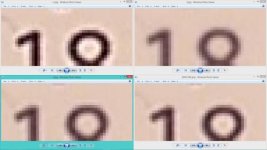
here's some close ups: I'm not really a pixel peeper, just wanted to know exactly what I was dealing with.

so they are lined up like THIS:

SHARP:
+5 -5
-2 -0

The Four Sharps.jpg

The Peepers.jpg
 
Last edited:
Back
Top