
Navigation
Install the app
How to install the app on iOS
Follow along with the video below to see how to install our site as a web app on your home screen.
Note: This feature may not be available in some browsers.
More options
You are using an out of date browser. It may not display this or other websites correctly.
You should upgrade or use an alternative browser.
You should upgrade or use an alternative browser.
Odyssey7 & Odyssey7Q Status Update
- Thread starter Mitch Gross
- Start date
Mitch Gross
Veteran
I suggest you contact CD Tech Support in case there is an issue with your unit. Call us at 720-221-3861 or email cdsupport@convergent-design.com. We're here to help.
mark sanford
New member
Two questions for Mitch:
Are we any closer to seeing Avid codecs on the Odyssey?
What's the feasibility of VC-5 (Cineform) on the Odyssey?
Are we any closer to seeing Avid codecs on the Odyssey?
What's the feasibility of VC-5 (Cineform) on the Odyssey?
I am trying to get RAW DNGs to work with davinci.
The only problem I have is syncing the audio. I am used to that the folders containing the DNGS+WAV are recognized as single clips by davinci. But at the moment davinci only recognised folders containing separate files. One DNG video File and one separate WAV. Is there any setting I was missing? The audio also has not timecode
I have watched the Video "Working with FS700 RAW DNGs in DaVinci Resolve" but there is nothing about audio there.
The only problem I have is syncing the audio. I am used to that the folders containing the DNGS+WAV are recognized as single clips by davinci. But at the moment davinci only recognised folders containing separate files. One DNG video File and one separate WAV. Is there any setting I was missing? The audio also has not timecode
I have watched the Video "Working with FS700 RAW DNGs in DaVinci Resolve" but there is nothing about audio there.
Mitch Gross
Veteran
Avid codec: Yes we are closer, but I don't think it will be on the next release.Two questions for Mitch:
Are we any closer to seeing Avid codecs on the Odyssey?
What's the feasibility of VC-5 (Cineform) on the Odyssey?
Cineform: Not happening for various reasons.
Mitch Gross
Veteran
I suggest reaching out to our Tech Support at cdsupport@convergent-design.com.I am trying to get RAW DNGs to work with davinci.
The only problem I have is syncing the audio. I am used to that the folders containing the DNGS+WAV are recognized as single clips by davinci. But at the moment davinci only recognised folders containing separate files. One DNG video File and one separate WAV. Is there any setting I was missing? The audio also has not timecode
I have watched the Video "Working with FS700 RAW DNGs in DaVinci Resolve" but there is nothing about audio there.

Stephen Mick
Totally Usable
I am trying to get RAW DNGs to work with davinci.
The only problem I have is syncing the audio. I am used to that the folders containing the DNGS+WAV are recognized as single clips by davinci. But at the moment davinci only recognised folders containing separate files. One DNG video File and one separate WAV. Is there any setting I was missing? The audio also has not timecode
I have watched the Video "Working with FS700 RAW DNGs in DaVinci Resolve" but there is nothing about audio there.
I'm having the exact same issue as Daniel. Just shot a broadcast TV spot with my FS5 and 7Q+ and was hoping to edit in Resolve. But no audio sync love.
Mitch Gross
Veteran
Are you using the latest edition of Resolve? I know there was some issue where Resolve broke some function on a recent update, but I can't recall if this is it or if it has already been corrected. You may need to either update or roll back your Resolve, but you should contact cdsupport@convergent-design.com for the lowdown. BMD updates Resolve so often it's hard to keep up, but it also means they correct issues like this fairly quickly.
Got resolve working. But I had to link audio manually for each shot. Luckily there is a shortcut for that but still lot of unnecessary work. It would be much easier if resolve would recognize the folder as a DNG clip which includes the audio.
I did some tests and it seams that resolve requires the folder to be named like "clipname-C0001" important is the "C" and that there are only 4 digits. Also the xml and wav have to be deleted. If the wav has proper timecode it could stay in the folder.
So in a feature firmware update it would be nice to see resolve compatible Cinema DNG folder structure with folder names and timecode in the audio files. XML has to be xmp and it can also stay in the folder I guess.
Another issue was getting the roundtrip from FCPX and proper relinking of the before generated proxy files to the original dngs.
1. Don't use reel names - this seams broken in the current resolve version. So I just turned them of.
2. When generating proxies, use timecode from original clip (not frame count).
I did some tests and it seams that resolve requires the folder to be named like "clipname-C0001" important is the "C" and that there are only 4 digits. Also the xml and wav have to be deleted. If the wav has proper timecode it could stay in the folder.
So in a feature firmware update it would be nice to see resolve compatible Cinema DNG folder structure with folder names and timecode in the audio files. XML has to be xmp and it can also stay in the folder I guess.
Another issue was getting the roundtrip from FCPX and proper relinking of the before generated proxy files to the original dngs.
1. Don't use reel names - this seams broken in the current resolve version. So I just turned them of.
2. When generating proxies, use timecode from original clip (not frame count).
Stephen Mick
Totally Usable
Thanks for the update, Daniel. Honestly, this is a lot of hoops to jump through to make something work that just isn't working.
And I opened a support ticket on Monday and haven't heard anything from CD support.
And I opened a support ticket on Monday and haven't heard anything from CD support.
Stephen Mick
Totally Usable
Heard back from CD support. Here's their response…
"In researching an answer to your question, I have found many experts that state "audio doesn't HAVE a timecode... just a duration." and this is from both Avid and Creative Cow user forums as well as our local engineers. So it is not just an Odyssey recorder issue."
?
"In researching an answer to your question, I have found many experts that state "audio doesn't HAVE a timecode... just a duration." and this is from both Avid and Creative Cow user forums as well as our local engineers. So it is not just an Odyssey recorder issue."
?
So Stephen - trying to understand that response as well... you shot raw with FS5 with audio - both feeding straight to Ody recorder? Assume the dng and wav files show up separately on the Ody drive? In other words, it sounds like the only way to record synced audio when shooting raw - is not to record raw dng files but record raw to ProRes files? Is this just a DaVinci problem?
Stephen Mick
Totally Usable
So Stephen - trying to understand that response as well... you shot raw with FS5 with audio - both feeding straight to Ody recorder? Assume the dng and wav files show up separately on the Ody drive? In other words, it sounds like the only way to record synced audio when shooting raw - is not to record raw dng files but record raw to ProRes files? Is this just a DaVinci problem?
So my setup was FS5 feeding RAW out to the Odyssey, which was recording CinemaDNG RAW. When imported, the CinemaDNG files show timecode, but the corresponding .WAV audio files all have timecode that starts at 00:00:00:00, when it should match the video files. This means we can't sync audio to video via timecode, which is giving us headaches.
Heard back from CD support. Here's their response…
"In researching an answer to your question, I have found many experts that state "audio doesn't HAVE a timecode... just a duration." and this is from both Avid and Creative Cow user forums as well as our local engineers. So it is not just an Odyssey recorder issue."
?
Got the exact same response but am still in contact with CD support. Glad they are listening to our problems.
I did some tests with magic lantern raw dngs from a 5d3 which I converted with an app to cdng files. They work perfectly with timecode in both video AND audio. So they are automatically synced and the folder is displayed as a single clip in Davinci. I hope either CD or blackmagic can give us a fix.
I am wondering why not much more people have this problem? Maybe most are shooting Prores...
I did a show 2-3 weeks ago, with the 7Q recording PRORES LT, and it reach 50C after 3-4 hours
and it shutdown (totally freak me out)!! . Last show I did, when the temp reach 50C, I remove the Samsung SSD (70% full ?)
and put in a fresh empty SSD, and the temp drops to 30C!
and it shutdown (totally freak me out)!! . Last show I did, when the temp reach 50C, I remove the Samsung SSD (70% full ?)
and put in a fresh empty SSD, and the temp drops to 30C!

Kyron
Well-known member
I am wondering why not much more people have this problem? Maybe most are shooting Prores...
Yep. Apart from the 4k raw being ridiculously large, I've also been down this audio time-code rabbit hole in Feb 2014 with no success. The combination of these 2 things generally makes me avoid it to this day. It gets brought up here every now and again and with CD support but nothing really comes of it.
If it works for the 5D raw, maybe it can be made to work for the 7Q? Perhaps the conversion app for the 5d raw files does something that can be replicated by a CD app?
Other posts on the matter:
http://www.dvxuser.com/V6/showthrea...Video-DNG-files-in-Resolve&highlight=timecode
http://www.dvxuser.com/V6/showthread.php?336146-7Q-audio-timecode-mismatch&highlight=timecode
http://www.dvxuser.com/V6/showthread.php?320103-Resolve-O7Q-and-Audio/page2&highlight=timecode
Last edited:
The app I was using for the 5D was called RAWmagic. Basically unpacks the MLV files to DNG folders which are recognized by Devinci resolve as clip together with audio.If it works for the 5D raw, maybe it can be made to work for the 7Q? Perhaps the conversion app for the 5d raw files does something that can be replicated by a CD app.
What I also really liked about the 5D workflow was that it gave the folders a unique name with date and time stamp.

seanmc
Well-known member
With all due respect...this is a Davinci Resolve issue, not a CD issue.
I have both the BMCC and the FS700 w/7Q. Taking cDNG files from both cameras gives two different workflows in Davinci. However, looking at the audio files themselves, both have no timecode. They both start at 00:00:00:00.
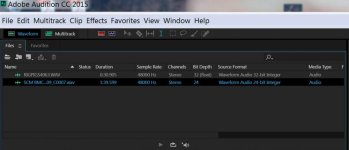
The only difference between the files is CD creates 32bit files. Which I REALLY wish they wouldn't because many 3rd party programs don't support 32bit audio and besides, none of the audio engineers I've worked with have ever wanted more than a 24bit files. Anyway, I digress...
If you bring both cDNGs into Premiere Pro, guess what, the audio is perfectly synced. You don't have to do anything.

So really, it's a Davinci issue. They have coded Resolve to recognise BM camera cDNGs and it does so right from the import view. I imagine it would be a tweak to one line of code for Davinci to recognise other camera/recorder's cDNG output.
Unless it's the 32bit thing. Better be safe Mitch, change it to 24bit!
I have both the BMCC and the FS700 w/7Q. Taking cDNG files from both cameras gives two different workflows in Davinci. However, looking at the audio files themselves, both have no timecode. They both start at 00:00:00:00.
The only difference between the files is CD creates 32bit files. Which I REALLY wish they wouldn't because many 3rd party programs don't support 32bit audio and besides, none of the audio engineers I've worked with have ever wanted more than a 24bit files. Anyway, I digress...
If you bring both cDNGs into Premiere Pro, guess what, the audio is perfectly synced. You don't have to do anything.
So really, it's a Davinci issue. They have coded Resolve to recognise BM camera cDNGs and it does so right from the import view. I imagine it would be a tweak to one line of code for Davinci to recognise other camera/recorder's cDNG output.
Unless it's the 32bit thing. Better be safe Mitch, change it to 24bit!
Mitch Gross
Veteran
FYI guys, we are listening and looking into the matter.