Mitch Gross
Veteran
NEW ODYSSEY FIRMWARE 2015.7
Released Wednesday, July 8
NEW FEATURES (ODYSSEY7 / ODYSSEY7Q / ODYSSEY7Q+)
Third-Party SSD Support
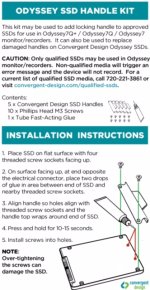
Use qualified third-party SSDs in Odyssey monitor/recorders. (SSD Handle kits required to mount.)
Qualified third-party SSDs:
Samsung 850 PRO in 128GB, 256GB, 512GB & 1TB (1024GB)
Samsung 850 EVO 1000GB
NOTE: Samsung SSDs draw more power than Odyssey SSDs.
Convergent Design highly recommends using an AC-powered USB3 adapter or a Thunderbolt adapter when connecting Samsung SSDs to a computer.
Additional Anamorphic De-Squeeze options - Center Extraction
Desqueezes and magnifies center portion of image for common anamorphic formats.
Adjusted image sent to video outputs; recording unaffected.
Center Extraction modes:
1.33x (1.78:1) Stretches center 4:3 image to cover 16:9 frame
2.0x (2.39:1) 2.0x stretch with image zoom & crop to 2.39:1
2.0x (2.67:1) 2.0x stretch with image zoom to 2.67:1
Hyper Zoom
Additional Pixel Zoom mode.
4,6,8,10, & 12X Hyper Zoom on a selected portion of image, displayed in the lower right corner of OLED display.
Selectable Color reference frame
Exposure Compensation LUTs
Combination S-Log to REC709 and exposure compensation for re-rating FS7 and FS700 cameras to 1000ISO (1 stop over) or 500ISO (2 stops over).
Reduces noise and increases apparent bit depth.
Additional Preset LUTs:
Sony FS700 (Exposure Compensation)
SONY_EE_SL2_L709A-1
SONY_EE_SL2_L709A-2
Sony FS7 (Exposure Compensation)
SONY_EE_SL3C_L709A-1
SONY_EE_SL3C_L709A-2
FIXES & IMPROVEMENTS
FIXED Histogram with 720p source
FIXED Image tearing on PSF inputs in HD Prores
FIXED DPX video outputs when PSF output turned on
FIXED Appearance of a single pixel in or near the audio meters
FIXED LUT Extended/Legal setting saved through a power cycle
FIXED Scene and Project setting saved through a power cycle
FIXED Audio corruption on DPX and DNG file spanning
FIXED Audio playback on Odyssey in all ProRes formats
FIXED Pixel Zoom reaches full image in 4K
FIXED GH4 Motion Picture Luminance Level under 0-255
FIXED FS7 Camera Trigger in HD Apple ProRes
FIXED FS7 Camera Trigger in 4K Raw->Apple ProRes
FIXED 4K RAW->2K/HD Apple ProRes 50p playback
FIXED 4K RAW->2K/HD Apple ProRes 100/120p live image
FIXED Stuttering video in FS700 4K RAW->HD/2K 100/120p burst mode
IMPROVED On screen counter during LUT import
IMPROVED Upper Toolbar Setup Menu
SOFTWARE UPDATES
CD Apple ProRes Transfer Utility 1.8 (PC / Mac)
Fixes for installation Issues
Fixes for transfer issues
CD LUT Utility 1.8 (PC / Mac)
Fixes for installation Issues
Fixes with issues due to region settings
Fixes for inverted LUTs
NOTE: Updating firmware on an Odyssey monitor/recorder requires the use of an SSD. If an Odyssey monitor/recorder is currently running firmware version 5.10.100 (March 2015) or 2015.5 (May 2015) then a qualified Samsung SSD (see list above) as well as an Odyssey SSD can be used to perform the update. Samsung SSDs require the Convergent Design SSD Handle kit to mount in an Odyssey monitor/recorder. Odyssey monitor/recorders running earlier firmware versions must use an Odyssey SSD to perform the update.
Released Wednesday, July 8
NEW FEATURES (ODYSSEY7 / ODYSSEY7Q / ODYSSEY7Q+)
Third-Party SSD Support
Use qualified third-party SSDs in Odyssey monitor/recorders. (SSD Handle kits required to mount.)
Qualified third-party SSDs:
Samsung 850 PRO in 128GB, 256GB, 512GB & 1TB (1024GB)
Samsung 850 EVO 1000GB
NOTE: Samsung SSDs draw more power than Odyssey SSDs.
Convergent Design highly recommends using an AC-powered USB3 adapter or a Thunderbolt adapter when connecting Samsung SSDs to a computer.
Additional Anamorphic De-Squeeze options - Center Extraction
Desqueezes and magnifies center portion of image for common anamorphic formats.
Adjusted image sent to video outputs; recording unaffected.
Center Extraction modes:
1.33x (1.78:1) Stretches center 4:3 image to cover 16:9 frame
2.0x (2.39:1) 2.0x stretch with image zoom & crop to 2.39:1
2.0x (2.67:1) 2.0x stretch with image zoom to 2.67:1
Hyper Zoom
Additional Pixel Zoom mode.
4,6,8,10, & 12X Hyper Zoom on a selected portion of image, displayed in the lower right corner of OLED display.
Selectable Color reference frame
Exposure Compensation LUTs
Combination S-Log to REC709 and exposure compensation for re-rating FS7 and FS700 cameras to 1000ISO (1 stop over) or 500ISO (2 stops over).
Reduces noise and increases apparent bit depth.
Additional Preset LUTs:
Sony FS700 (Exposure Compensation)
SONY_EE_SL2_L709A-1
SONY_EE_SL2_L709A-2
Sony FS7 (Exposure Compensation)
SONY_EE_SL3C_L709A-1
SONY_EE_SL3C_L709A-2
FIXES & IMPROVEMENTS
FIXED Histogram with 720p source
FIXED Image tearing on PSF inputs in HD Prores
FIXED DPX video outputs when PSF output turned on
FIXED Appearance of a single pixel in or near the audio meters
FIXED LUT Extended/Legal setting saved through a power cycle
FIXED Scene and Project setting saved through a power cycle
FIXED Audio corruption on DPX and DNG file spanning
FIXED Audio playback on Odyssey in all ProRes formats
FIXED Pixel Zoom reaches full image in 4K
FIXED GH4 Motion Picture Luminance Level under 0-255
FIXED FS7 Camera Trigger in HD Apple ProRes
FIXED FS7 Camera Trigger in 4K Raw->Apple ProRes
FIXED 4K RAW->2K/HD Apple ProRes 50p playback
FIXED 4K RAW->2K/HD Apple ProRes 100/120p live image
FIXED Stuttering video in FS700 4K RAW->HD/2K 100/120p burst mode
IMPROVED On screen counter during LUT import
IMPROVED Upper Toolbar Setup Menu
SOFTWARE UPDATES
CD Apple ProRes Transfer Utility 1.8 (PC / Mac)
Fixes for installation Issues
Fixes for transfer issues
CD LUT Utility 1.8 (PC / Mac)
Fixes for installation Issues
Fixes with issues due to region settings
Fixes for inverted LUTs
NOTE: Updating firmware on an Odyssey monitor/recorder requires the use of an SSD. If an Odyssey monitor/recorder is currently running firmware version 5.10.100 (March 2015) or 2015.5 (May 2015) then a qualified Samsung SSD (see list above) as well as an Odyssey SSD can be used to perform the update. Samsung SSDs require the Convergent Design SSD Handle kit to mount in an Odyssey monitor/recorder. Odyssey monitor/recorders running earlier firmware versions must use an Odyssey SSD to perform the update.