Hi Olof, did you record this scene to H264 slog2 internal at the same time? It would be very helpful if you could share a frame of this as a jpeg or tiff so that we can directly compare internal 1080p with a 2K raw frame, even better if we could compare with an internal 24/25p frame and an internal 240fps frame. As raw I believe works similar to the 240fps mode in the way it downscales it will be interesting to see how the 8 bit 24mbit slog2 with a reasonable debayer compares to a 12 bit raw image that's debayered more crudely.

Navigation
Install the app
How to install the app on iOS
Follow along with the video below to see how to install our site as a web app on your home screen.
Note: This feature may not be available in some browsers.
More options
You are using an out of date browser. It may not display this or other websites correctly.
You should upgrade or use an alternative browser.
You should upgrade or use an alternative browser.
Odyssey 7Q is shipping- example videos?
- Thread starter jcs
- Start date
Hi Olof, did you record this scene to H264 slog2 internal at the same time? It would be very helpful if you could share a frame of this as a jpeg or tiff so that we can directly compare internal 1080p with a 2K raw frame, even better if we could compare with an internal 24/25p frame and an internal 240fps frame. As raw I believe works similar to the 240fps mode in the way it downscales it will be interesting to see how the 8 bit 24mbit slog2 with a reasonable debayer compares to a 12 bit raw image that's debayered more crudely.
I would also love to see this test from Olof or anyone else who has the time with their new 7Q. Thanks so much.

olof
DVXuser Sponsor
Hi Olof, did you record this scene to H264 slog2 internal at the same time? It would be very helpful if you could share a frame of this as a jpeg or tiff so that we can directly compare internal 1080p with a 2K raw frame, even better if we could compare with an internal 24/25p frame and an internal 240fps frame. As raw I believe works similar to the 240fps mode in the way it downscales it will be interesting to see how the 8 bit 24mbit slog2 with a reasonable debayer compares to a 12 bit raw image that's debayered more crudely.
Yes I did, and I will post more here soon. Busy lots todo.
I will try to get to it later today...
olof
DVXuser Sponsor
Here is a sample, you can download a better copy than the one playing.
https://vimeo.com/79125916
I will post more soon.
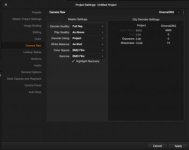
Here is a screen shot of the best settings for projects in Resolve using the RAW footage.
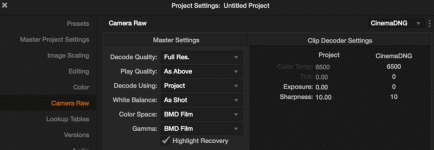
And expose much brighter than you normally would. It is actually OK to clip the highlights a bit RAW will still retain them. This may change in future firmware. I find with these settings all you need to do is hit auto color in Resolve (option-A on the mac) and you are very close to where you want to be. No need for a LUT, just expose on the light side.
This is what the WF on the 7Q looked like when I shot this:
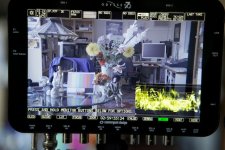
https://vimeo.com/79125916
I will post more soon.
Here is a screen shot of the best settings for projects in Resolve using the RAW footage.
And expose much brighter than you normally would. It is actually OK to clip the highlights a bit RAW will still retain them. This may change in future firmware. I find with these settings all you need to do is hit auto color in Resolve (option-A on the mac) and you are very close to where you want to be. No need for a LUT, just expose on the light side.
This is what the WF on the 7Q looked like when I shot this:
Attachments
Last edited:
Here's Olof's footage showing the difference in quality:
https://vimeo.com/79145781
https://vimeo.com/79145781
olof
DVXuser Sponsor
thanks for posting the test footage Olof. it looks like you were more exposed when using the internal codec. the slog picture looked brighter overall.
Both were recorded at the same time. Same settings. The internal is recorded much lighter.
It is really nice that you can trigger both Internal and 7Q with the FS700 rec trigger. I like using the internal as proxy footage as the files are so small, and it takes a while to process the RAW. The timecode is recorded the same as well, I have to test if this is true in 240 fps as well, this was shot 30p.
Dan Keaton and I discussed how nice it would be if the file names could be copied to the 7Q as well, possible in a future FW upgrade.
Last edited:
olof
DVXuser Sponsor
Here's Olof's footage showing the difference in quality:
https://vimeo.com/79145781
Thanks for posting this edit.
Yes there is a huge difference in quality.
It can be seen on an Evaluation monitor much easier, than a computer screen.
i dont see much of a difference in resolution on my laptop. i thought it would be alot sharper. I see a difference in color but nothing that stands out. noise in the shadows seem very similar aswell. since the internal card captured a lighter picture, the graded picture will be lighter aswell. if you used the same settings for both in resolve than the 7Q will look alittle darker giving it more pop.
Last edited:

cuervo
Veteran
I really wouldn't expect to see much difference between HD(1920x1080) and 2k(2048x1080). It's conceivable that 2k might be worse, depending on how it's been downscaled from the 4K sensor. The one advantage one gains by recording to 2K is the increase in bit depth from 8 bit at HD to 12 bit in 2K, not really visible on a computer screen. In fact not really visible until performing a color grade.i dont see much of a difference in resolution on my laptop. i thought it would be alot sharper. I see a difference in color but nothing that stands out. noise in the shadows seem very similar aswell. since the internal card captured lighter the graded picture will be lighter aswell if you used the same settings for both in resolve aswell.
olof
DVXuser Sponsor
i dont see much of a difference in resolution on my laptop. i thought it would be alot sharper. I see a difference in color but nothing that stands out. noise in the shadows seem very similar aswell. since the internal card captured a lighter picture, the graded picture will be lighter aswell. if you used the same settings for both in resolve than the 7Q will look alittle darker giving it more pop.
You really have to use an evaluation monitor to grade, and you are now looking at a compressed file from Vimeo. But even looking at the 1080 from Vimeo, look at the detail in the flowers and in the shadows. The RAW is also much less noisy in the shadows. You can also push the grade much further in the RAW without having it fall apart.
If all you want to do is view video on the web then you probably don't need the 7Q unless you want to do some heavy grading. Then the RAW will hold much better even for the WEB.
The RAW is not for every one it depends on your clients.