
AndrewTaran
Active member
I got GH4 couple weeks ago and so far I'm very pleased with the image I could get from it. I've read a lot of negative comments regarding noise on GH4 and decided to do my own small absolutely non-scientific test.
I used Sigma 50mm f/1.4(old version, Canon mount) and Metabones Speedbooster Canon EF to m43. I don't have any m43 lenses, and I'm not planning to get any soon. Nailed exposure just right using Sekonic Light Meter. I doubled shutter speed for each shot while doubling ISO. Constant aperture at f/2.8.
Profiles used : Cinelike D -5, -5, -5, -5, 0 ; Cinelike V -5, -5, -5, -5, 0.
i.Dynamic & i.Resolution OFF, Master Pedestal at 0, Luminance 0-255, no Highlight/Shadow tweaking. All shot at 4K Cinema with manual white balance at 5200. After a ton of research, I found those to be the most clean settings with some room for color correction and grading.
[UPDATE] Because of bad YouTube compression I've uploaded both pics and video here : https://drive.google.com/folderview?id=0B4aB6wybnhB2cWZmcTRlTFlJUFk
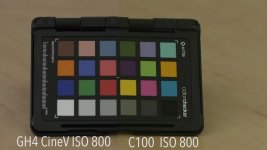
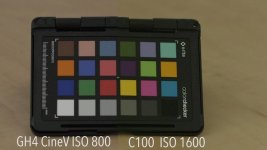
Well, test surprised me. I was expecting horrible unusable footage, but it turned out GH4 is a clean camera with right profile settings. Noise is controllable, film-like grain, color purple noise starts to show up only at 6400 ISO. It absolutely usable up to 3200 ISO at Cine V for my taste. Some folks definitely will find it noisy, but I find this noise quite pleasing. A little bit of Neat Video + some film grain on top and you're golden. Then I decided to compare it with "low light king" aka Canon C100. While I used exactly the same WB setting, C100 definitely messed it up. It happens ALL THE TIME! No ND, the exact same lens and it's definitely warmer. Anyway, as you might notice, it has a very different noise pattern. Even though it's hard to see on compressed footage, I started seeing purple color noise at ISO 1600. I confomed GH4 footage to 100%(full HD) and compared it to C100 200%(to match). Yes, GH4 is more noisy, but it's not color noise that is present at C100 as well as artifact. I didn't include it into test, but I attached side by side comparison at ISO 800 and 1600. I just filmed 40-minute long documentary with C100 and I find it to be quite noisy at 1600 ISO. Don't worry, I did ABB! Yes, C100 clearly wins, but I find GH4 noise quite "filmic" - no color noise up to 6400, barley noticeable artifacts at 3200. I don't like C100's(and frankly any other Canon DSLRL fixed color noise pattern. Yes, GH4 is not night-vision camera like A7S, but I folks, night should look like night sometimes Another observation that I didn't include in the test - it's better to have proper exposure at higher ISO, than underexpose! This is critical, as well as proper WB.
I used Sigma 50mm f/1.4(old version, Canon mount) and Metabones Speedbooster Canon EF to m43. I don't have any m43 lenses, and I'm not planning to get any soon. Nailed exposure just right using Sekonic Light Meter. I doubled shutter speed for each shot while doubling ISO. Constant aperture at f/2.8.
Profiles used : Cinelike D -5, -5, -5, -5, 0 ; Cinelike V -5, -5, -5, -5, 0.
i.Dynamic & i.Resolution OFF, Master Pedestal at 0, Luminance 0-255, no Highlight/Shadow tweaking. All shot at 4K Cinema with manual white balance at 5200. After a ton of research, I found those to be the most clean settings with some room for color correction and grading.
[UPDATE] Because of bad YouTube compression I've uploaded both pics and video here : https://drive.google.com/folderview?id=0B4aB6wybnhB2cWZmcTRlTFlJUFk
Well, test surprised me. I was expecting horrible unusable footage, but it turned out GH4 is a clean camera with right profile settings. Noise is controllable, film-like grain, color purple noise starts to show up only at 6400 ISO. It absolutely usable up to 3200 ISO at Cine V for my taste. Some folks definitely will find it noisy, but I find this noise quite pleasing. A little bit of Neat Video + some film grain on top and you're golden. Then I decided to compare it with "low light king" aka Canon C100. While I used exactly the same WB setting, C100 definitely messed it up. It happens ALL THE TIME! No ND, the exact same lens and it's definitely warmer. Anyway, as you might notice, it has a very different noise pattern. Even though it's hard to see on compressed footage, I started seeing purple color noise at ISO 1600. I confomed GH4 footage to 100%(full HD) and compared it to C100 200%(to match). Yes, GH4 is more noisy, but it's not color noise that is present at C100 as well as artifact. I didn't include it into test, but I attached side by side comparison at ISO 800 and 1600. I just filmed 40-minute long documentary with C100 and I find it to be quite noisy at 1600 ISO. Don't worry, I did ABB! Yes, C100 clearly wins, but I find GH4 noise quite "filmic" - no color noise up to 6400, barley noticeable artifacts at 3200. I don't like C100's(and frankly any other Canon DSLRL fixed color noise pattern. Yes, GH4 is not night-vision camera like A7S, but I folks, night should look like night sometimes
Another observation that I didn't include in the test - it's better to have proper exposure at higher ISO, than underexpose! This is critical, as well as proper WB.Attachments
Last edited:

