

Tim Nitsch
Well-known member
So tonight is a full moon, so I went out and filmed a little bit of it just for fun.
I brought it into 5D to RGB and converted it to ProRes HQ (I normally do LT) 23.98.
And while playing it I noticed a lot of noise (which I guess is understandable being that I'm filming a black sky) but when I went frame by frame I noticed this blocky-ness:
(NOTE: I cropped the image quite a bit)
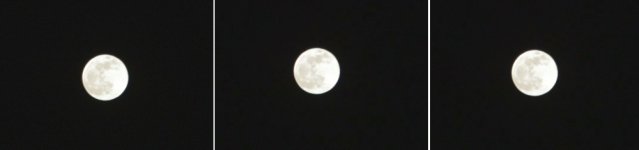
The strange thing is, out of three frames, one frame doesn't have the blocky-ness while the other two do.
What's causing this? The AVCHD Codec, transcoding, or just the lack of light?
If I play the unconverted .MTS file in VLC:
1. I can bearily see any noise at all
2. I don't really see the blocking
I also noticed that if I transcode using Toast, the edge of the moon will get really bad aliasing, Even if I use the exact same settings I do in 5D to RGB.
I know 5D to RBG is supposed to help bring out the "Full Range" of the image, but would that introduce all this noise and blocky-ness?
I brought it into 5D to RGB and converted it to ProRes HQ (I normally do LT) 23.98.
And while playing it I noticed a lot of noise (which I guess is understandable being that I'm filming a black sky) but when I went frame by frame I noticed this blocky-ness:
(NOTE: I cropped the image quite a bit)
The strange thing is, out of three frames, one frame doesn't have the blocky-ness while the other two do.
What's causing this? The AVCHD Codec, transcoding, or just the lack of light?
If I play the unconverted .MTS file in VLC:
1. I can bearily see any noise at all
2. I don't really see the blocking
I also noticed that if I transcode using Toast, the edge of the moon will get really bad aliasing, Even if I use the exact same settings I do in 5D to RGB.
I know 5D to RBG is supposed to help bring out the "Full Range" of the image, but would that introduce all this noise and blocky-ness?
Last edited:


