
Navigation
Install the app
How to install the app on iOS
Follow along with the video below to see how to install our site as a web app on your home screen.
Note: This feature may not be available in some browsers.
More options
You are using an out of date browser. It may not display this or other websites correctly.
You should upgrade or use an alternative browser.
You should upgrade or use an alternative browser.
C100: Ninja Blade and Premiere Pro in windows
- Thread starter mtnski
- Start date

marvinhello
Well-known member
No problem.
However I still recommend Avid DNxHD codec as it offers slightly better compression quality than ProRes.
However I still recommend Avid DNxHD codec as it offers slightly better compression quality than ProRes.
However I still recommend Avid DNxHD codec as it offers slightly better compression quality than ProRes.
According to these guys, it's the other way around:
http://www.fallenempiredigital.com/...gopro-cineform-recompression-generation-loss/
marvinhello
Well-known member
According to these guys, it's the other way around:
http://www.fallenempiredigital.com/...gopro-cineform-recompression-generation-loss/
That test was not done properly in my opinion (also pointed out by David Newman in the comments).
http://www.studiodaily.com/2007/05/the-great-codec-bake-off/
When going from uncompressed source, this test shows that DNxHD has an edge.
I thought ProRes forces the Windows version of Premiere Pro into a 32bit environment?
Anyone?
marvinhello
Well-known member
Anyone?
Premiere version 7.1.0.141 and up handles most codec in native 64bit environment, including ProRes.
Premiere version 7.1.0.141 and up handles most codec in native 64bit environment, including ProRes.
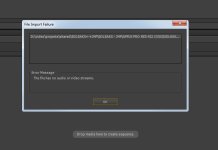
I believe this is incorrect. I've just uninstalled Quicktime from my Windows 7 64-bit machine, and I'm now unable to import ProRes files into Premiere (see screen grab).
As Quicktime on Windows is a 32-bit application, it would seem to logically follow that importing ProRes files forces Premiere Pro to revert to a 32-bit application (limited to 4GB of ram, limited to one Processor core, etc).
Can you comment, marvinhello?
marvinhello
Well-known member
I believe this is incorrect. I've just uninstalled Quicktime from my Windows 7 64-bit machine, and I'm now unable to import ProRes files into Premiere (see screen grab).
As Quicktime on Windows is a 32-bit application, it would seem to logically follow that importing ProRes files forces Premiere Pro to revert to a 32-bit application (limited to 4GB of ram, limited to one Processor core, etc).
Can you comment, marvinhello?
View attachment 87683
http://ppbm7.com/index.php/tweakers-page
see blue box
http://helpx.adobe.com/premiere-pro/using/whats-new-7-1.html
64bit ProRes is listed, for 64bit export it's Mac only.
Cool, thanks! ProRes files in Premiere 7.2.2 DO seem to be working well. Very fast to skip around a timeline and windows task manger shows Premiere is using more than 4GB of RAM. But I'm still confused why I need to have the 32-bit Quicktime player installed. And If I kill the "Adobe QT32 Server.exe *32" process, it does render Premiere projects using ProRes files unusable.