New Short Film - shot at night with available light on Nex5n

I specifically purchased the Nex5n for the low light ability to use on this short. I used a small LED occasionally for a fill light.
Canon FD SSC lenses 50mm 1.4, 100mm 2.8, 24mm 2.4 and 70-200 F4. Edited in CS5.5 with Neat Video for noise removal.


https://vimeo.com/56217892
 
Last edited:
Looks really great. How hard was it to remove noise with Neat Video? I have the 5R and it's been so nice i'm thinking of using it a lot more, but would definitely need to use something like Neat Video. Been on the fence about the purchase.

Again great video, amazing what can be done now with a camera so small!
 
Thanks Chad!

Neat Video is really amazing. I corrected every night shot with it. The results were so astounding that I found myself just clicking the before and after repeatedly every time. I was also on the edge about purchasing it initially, but i don't see how this film could of happened without it. Several of the shots would have been virtually unusable without it.

If you're doing night stuff.. go for it. If you're shooting well exposed images, you can do without it. (I don't mind the fine camera noise in well exposed shots - even to 1600 ISO.)

I did find that it worked much better on original AVCHD clips rather then the same clips converted to Prores. I also found that as soon as I needed to render out to Prores, it re-introduced some noise on the more heavily processed clips. But the end results were still night and day difference.

As far as ease of use goes - most times it's nearly push button simple. There's a tutorial on Vimeo by the people at R-Grain, that walks through the process of de-nosing and converting to prores in order to add grain. I pretty much followed this process minus the adding grain step - and using AE's native tools for color correction. Here's the link to it - https://vimeo.com/39979623

Lane
 
Last edited:
This was amazing! I'm curious though, which picture profile and which settings within that picture profile did you use here? I tend to use Portrait at -3, -2, -3, though I end up getting some pretty heavy noise.
 
I use standard and only -1 on the contrast adjustment. Going further increases blobby shadow noise, especially after iso 800. At ISO 100 it has more "apparent DR" but I feel it's just grey shadows instead of real DR. So -1 for me.
 
Last edited:
I shot this on Portrait -3 0 -3. I did have some heavy blocky noise in a lot of the shots. I relied on Neat Video to remove it. Even after using Neat Video on some shots, I would crush the blacks some to get rid of additional noise. I may have had less blocky footage had I shot on standard - and possibly would have ended up with a cleaner image overall.. can't be sure at this point. I can say that any gains that were achieved through shooting on a low contrast setting - were probably neutralized due to blockiness in the dark areas.

When this camera is exposed properly the noise is pretty acceptable. But, when you get into a setting - like shooting at night - Neat Video is the way to go. I shot everything at ISO 800 and 1600 (except maybe the moon shot at the end was at ISO 3200 - that did have a lot of noise, and a lot of cloud detail surrounding the moon was lost due to the amount I had to compress the dark areas, although I did like how it came out.)

To contrast this - my next project was shot at ISO 800 and 1600 in a much better lit environment (anything is better than unlit night exteriors I guess) I shot on Standard 0 0 0. Everything looked good, just did some basic color correction and I didn't do any processing with Neat Video. (I did have some concern with aliasing on initial playback due to the sharpness set to 0 - but the final Prores render looked fine. But next time, I'll definitely move to -3.)

One last thing to note on noise - it seems as soon as you go to Prores, you introduce significant noise in shadow gradient areas. In my trial of final cut X (my Nex5n was new also) I shot some test footage and was noticing some heavy noise in those areas. But, when I switched to Premiere CS5.5 - it was gone. The difference being the ability to work with the native AVCHD file in Premiere.
 
I know it's been mentioned before a number of times in this forum, but I'd have to add Neat video is good at what it does. It doesn't seem to lose too much detail either, some denoisers take too much detail out along with the noise.

For example I tried to remove some noise in CS6 Speed Grade and it's absolute pants in comparison to Neat, it loses a lot of detail to clean the noise.
 
lane-

nicely done.

the nex 5n did you right.

was overheating an issue?

had did the 5n's white balance and focus tools perform?

again, congrats.

be well.

rob
smalltalk productions
nyc
 
Thanks for the kind words.
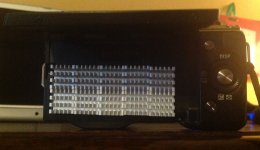
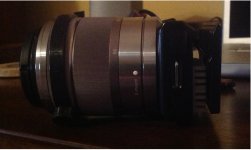
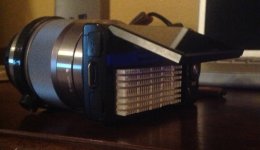
At the beginning of the shoot we were outside in 50 degree weather, so I didn't have any issues with overheating. I did cover 2/3 of the back of the camera (behind the display) with ram heat sinks. This helped to dissipate the heat and did extend record times significantly in testing.
On the sunset scene I did get the warning signal (even with heat sinks) but I did shoot continuously for the entire sunset.
White balance was fine (set to auto for most of the film)
Focus tools are very helpful. I had a magnetic loupe, but it was quicker to go without it - and the focus assist nailed most shots.

Lane
 
Thanks for the kind words.
At the beginning of the shoot we were outside in 50 degree weather, so I didn't have any issues with overheating. I did cover 2/3 of the back of the camera (behind the display) with ram heat sinks. This helped to dissipate the heat and did extend record times significantly in testing.
On the sunset scene I did get the warning signal (even with heat sinks) but I did shoot continuously for the entire sunset.
White balance was fine (set to auto for most of the film)
Focus tools are very helpful. I had a magnetic loupe, but it was quicker to go without it - and the focus assist nailed most shots.

Lane

lane-

thanks for the quick reply.

care to share more about the ram heat sinks and how you used them/attached them?

pix maybe?

thanks in advance.

be well.

rob
smalltalk productions
nyc
 
Sure Rob,
I had seen this done in the forums some time ago...
I bought two packs of these heat sinks: http://koolance.com/video-ram-heat-sinks
And just placed two rows of them along the lower 2/3 of the back of the camera. They definitely work well for increased record times. I'm 10x more comfortable using the camera in a professional environment now. I just shot a mini doc- with only this camera for interviews and b-roll. No issues. I'll post a few pictures tomorrow.

Lane
 
Back
Top